
Setting up an ergonomic workspace is harder than it should be. Most people suffer through neck pain and cluttered desks simply because their monitors sit too low. The stock stands that come in the box take up massive amounts of room and offer almost zero movement. Upgrading to a proper monitor arm solves both problems instantly.
Many buyers make the mistake of picking the first arm they see. They end up with weak springs that slowly sag under the weight of their screens, or stiff joints that require serious effort to move. The real differences only show up when you clamp the arm to a desk and try to adjust your screen with one hand.
We went through the top options and read thousands of real buyer reviews to find out which arms actually hold heavy screens, which ones move smoothly, and which ones stay firmly attached to your desk. Here is everything you need to know to pick the right mount for your setup.
Quick Comparison
| # | Product | Rating | Reviews | Best For | Action |
|---|---|---|---|---|---|
| #1 | HUANUO FlowLift Dual | 4.6 | 33,576 | Overall Setup | View on Amazon |
| #2 | WALI Dual Stand | 4.4 | 5,815 | Everyday Use | View on Amazon |
| #3 | FlexiSpot Heavy Duty | 4.4 | 265 | Ultrawide Screens | View on Amazon |
| #4 | HUANUO White Dual | 4.6 | 33,576 | White Setups | View on Amazon |
| #5 | ErGear Dual Arm | 4.5 | 8,211 | Fast Installation | View on Amazon |
| #6 | HUANUO FlowLift Single | 4.6 | 15,707 | Single Monitors | View on Amazon |
| #7 | MOUNTUP Dual Stand | 4.4 | 6,526 | Small Desks | View on Amazon |
| #8 | WALI Single Arm | 4.4 | 5,815 | Heavy Screens | View on Amazon |
| #9 | HUANUO Triple Mount | 4.4 | 7,091 | Three Screens | View on Amazon |
| #10 | VIVO Dual Desk Mount | 4.5 | 60,377 | Center Pole Style | View on Amazon |
#1 Best Overall — HUANUO FlowLift Dual Mount

This dual monitor arm suits people with two standard screens who want a clean, organized desk. It replaces two bulky monitor stands with one central base.
The dual C-clamp structure makes the biggest difference here. Many dual arms shake when you type fast or bump the desk. This base locks firmly to the wood and keeps your screens totally still while you work.
Most buyers agree that the stability is excellent. People love how much desk space they get back after installing it. A few users note that the tension bolts arrive very tight from the factory, which requires strong hands to loosen during setup.
This arm shines in a home office where you type heavily and hate screen wobble. You can push the screens back for reading or pull them close for detailed work.
Honestly, the firm clamp base stands out most. A wobbly screen ruins your focus, and this arm prevents that completely. I would not suggest it if you have super light monitors under four pounds, as the gas spring might constantly push them upward.
Compared to basic center-pole mounts, this gas spring model lets you move each screen independently with just one hand.
✅ Pros
- Keeps screens totally still while typing
- Clears up a lot of desk space
- Moves smoothly after initial setup
- Handles curved monitors easily
❌ Cons
- Tension bolts are very hard to turn initially
- Included mounting screws might be too long for thin monitors
💬 What Customers Say
Across thousands of reviews, the thing people mention most is the build quality. Buyers who switched to this arm say it feels like a massive upgrade over standard stands. They love how easily they can adjust the viewing angles. The most common complaint involves the included screws, which often run too long for certain monitor brands. Overall, users feel highly satisfied with the stability and the clean look it brings to their desks.
#2 Best Everyday Pick — WALI Dual Monitor Stand

This stand works perfectly for anyone upgrading from stock monitor bases who wants more desk space. It holds two screens up to 32 inches each.
The gas spring adjustments matter most. Instead of loosening a knob to change the height, you simply push or pull the monitor. The internal spring does the heavy lifting for you.
Buyers report that it performs just as well as big name brands. They like the smooth movement and easy installation. Some users note that the metal feels a bit lighter than they expected.
It works best for a shared family computer where different people need to change the screen height quickly. Anyone can grab the monitor and move it to their eye level.
I really like how easy it is to tune the gas spring tension. You just turn the hex key until the screen floats perfectly. I would pick this for a basic home setup. Heavy users might want something with thicker metal components.
✅ Pros
- Adjusts up and down with very little effort
- Holds up to 22 pounds per arm
- Hides messy cables inside the arms
❌ Cons
- Materials feel less dense than higher-end models
- Requires a solid wood desk for safe mounting
💬 What Customers Say
Most buyers agree that this arm delivers excellent performance for regular daily use. People love how simple it is to dial in the gas spring tension. They frequently mention that it clears up their workspace beautifully. A few users point out that the materials feel a bit light, but they confirm the arm still holds their monitors securely. Overall, customers view this as a highly practical upgrade.
#3 Best for Ultrawide — FlexiSpot Heavy Duty Arm

This heavy-duty arm targets gamers and video editors who use massive ultrawide screens. It handles monitors up to 49 inches wide.
The massive 44-pound weight capacity makes the real difference. Large curved monitors pull forward heavily, which causes standard arms to droop. This arm holds the screen exactly where you leave it.
Customers with huge 34-inch and 49-inch screens praise the stability. They love trusting the arm with their heavy displays. A few buyers mention the mount sticks out far in the back, pushing the desk away from the wall.
This shines in a high-end gaming setup where you need a large screen floating exactly at eye level. You can lift it for standing desk use or lower it for seated gaming.
Finding an arm that actually holds a 40-plus inch monitor without sagging is tough. This one does the job incredibly well. I would not recommend it if your desk sits flush against a wall, because the thick arms need room to bend backward.
✅ Pros
- Supports massive monitors up to 49 inches
- Holds heavy screens without tilting forward
- Gas spring makes lifting massive displays easy
❌ Cons
- Takes up space behind the desk
- Clamp screws can strip if tightened too hard
💬 What Customers Say
Gamers who use this daily report that it holds massive screens without breaking a sweat. They love how sturdy the main joint feels, especially with heavy curved monitors. The main complaint that comes up often is the bulky design behind the monitor, which prevents users from pushing their desk completely flat against a wall. Overall, buyers feel very confident trusting their large screens to this mount.
#4 Best White Setup — HUANUO White Dual Mount

This white dual arm suits desk setup fans who want a bright, clean look. It holds two screens while matching light-colored office decor.
The full motion pneumatic springs give you total control. They let you pull the screen close for reading or push it away for watching videos without touching any screws.
Buyers share the same praise as the black version of this arm. They love the sturdy hold and the clean white finish. Some mention the tension bolts require strong hands to adjust out of the box.
This fits perfectly in a modern home office with a white desk and light-colored accessories. It hides the cables and keeps the visual style completely uniform.
White monitor arms are hard to find, and this one looks great. It gives a very clean look to your workspace. Just like the black version, watch out for the included screws. You might need shorter ones for your specific monitor back.
✅ Pros
- Matches white desk setups perfectly
- Keeps screens from shaking during heavy typing
- Built-in covers hide messy wires easily
❌ Cons
- Tension bolts arrive very tight from the factory
- Included mounting hardware might not fit thin monitors
💬 What Customers Say
Most buyers agree that the white finish looks fantastic in person. They love how it blends into lighter room designs while clearing off their desk. Customers frequently mention the impressive stability and smooth movement. Similar to the black model, users often state that the initial setup requires some muscle to loosen the tension bolts. Overall, buyers are thrilled with the clean aesthetic.
#5 Fast Installation — ErGear Dual Monitor Arm

This arm is for people who hate putting furniture together and want a quick setup. It supports two monitors up to 19.8 pounds each.
The tool-free VESA mounting plate changes the entire setup process. Instead of holding a heavy monitor while turning screws, you simply clip the monitor right onto the arm.
Customers love how fast it goes together. They say the base feels like a tank once clamped down. A common complaint is that the large VESA plate sticks out if your monitor only needs the smaller 75×75 size.
This works best when you need to set up a new home office quickly without digging through a toolbox. You can clamp it down, clip the screens on, and start working.
The clip-on VESA plate is a massive relief. Trying to hold a heavy monitor in the air is usually awful. This arm solves that problem completely. I would check your monitor back first, as the large plate might block your cable ports.
✅ Pros
- Tool-free monitor attachment saves serious time
- Holds screens firmly with zero sag
- Cable clips open easily without tools
❌ Cons
- Large mounting plate might block ports on some monitors
- Upward bounce is strong until you adjust the tension
💬 What Customers Say
Buyers constantly mention how fast they got this arm set up. They love the tool-free clips and the sturdy feeling of the main clamp. Many users point out that the arm springs up forcefully out of the box, so you have to adjust the tension right away. A few people note that the large mounting plate covers up their plug inputs. Overall, the quick assembly wins major points.
#6 Best Single Arm — HUANUO FlowLift Single

This single arm works for anyone who uses one main monitor and wants to clear the space underneath it. It holds screens from 13 to 32 inches.
The automotive-grade gas spring gives you completely smooth height control. You can lift or lower the screen with one hand, and it stays exactly where you stop.
Buyers use this for heavy ultrawide monitors and report zero wobble. They appreciate the strong desk clamp. Some note that the tilt adjustment gets very stiff once you lock it down.
This arm is great for a compact desk where you need room for a large keyboard and mouse pad. It lets you slide your gear right under the floating screen.
Honestly, this is one of the most reliable single arms available. Once you set the tension, it just works without any fuss. I would not suggest it if you need to tilt your screen up and down constantly, as the tilt hinge requires effort to move.
✅ Pros
- Frees up the entire space under your monitor
- Holds heavy screens easily without dropping
- Setup takes only a few minutes
❌ Cons
- Tilt function is stiff and hard to change often
- Not safe for glass or honeycomb desks
💬 What Customers Say
Across thousands of reviews, people mention how well this holds heavy single monitors. Buyers who own 34-inch screens say it stays completely solid. Customers love the easy setup process and the clean look. The most common complaint is about the tilt joint, which users say is hard to adjust finely. Overall, buyers feel it delivers incredible stability for a single screen.
#7 Best for Small Desks — MOUNTUP Dual Stand

This dual arm suits people working in tight spaces who need two screens to float. It handles monitors up to 17.6 pounds each.
The 135-degree tilt and 360-degree rotation offer extreme flexibility. You can push the screens back, pull them close, or turn one completely vertical for reading long documents.
Users praise the space-saving design and the height range. They like how easily the arms bend. Several buyers mention the plastic cable management clips break easily if you remove them too often.
This is ideal for a bedroom corner desk where you need to fit two monitors without crowding your workspace. You can fold the arms tight against the wall.
I like how flexible the joints are on this model. You can really push the monitors out of the way when you need desk space. I highly recommend buying a metal reinforcement plate if your desk is made of thin particle board, as the clamp base is quite small.
✅ Pros
- Reclaims a lot of space on small desks
- Makes turning a monitor vertical very easy
- Gas springs move smoothly
❌ Cons
- Plastic cable clips break easily
- Small clamp base can dig into soft wood desks
💬 What Customers Say
Buyers who switched to this say it completely transformed their small desks. They love the range of motion and how easily they can flip a monitor vertically. The main complaint that comes up often involves the cable management covers breaking during installation. Despite the fragile clips, users feel very happy with the overall flexibility and strength of the actual arms.
#8 Heavy Single Screens — WALI Single Monitor Arm
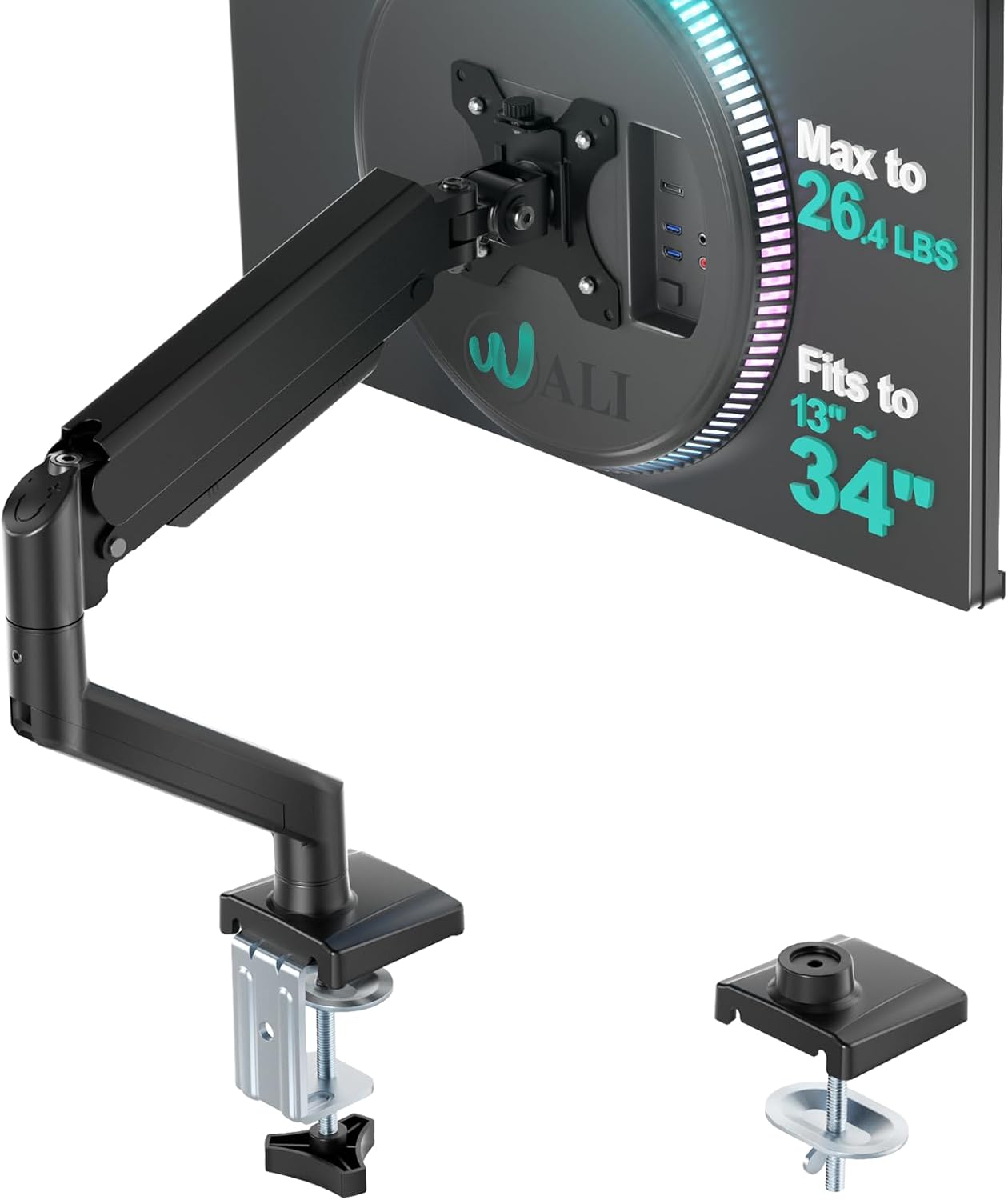
This heavy-duty single arm is for users with one large monitor up to 34 inches. It focuses entirely on holding massive weight securely.
The high load capacity changes everything. It safely holds flat screens up to 26.4 pounds without drooping, which is rare for a standard gas spring arm.
Customers appreciate the sturdy build for large screens. They say it performs like premium gear. A few mention the plastic covers feel a bit thin.
This fits perfectly for a creative professional using a single large color-accurate display. You can pull the screen close for detailed editing and push it back when you finish.
Holding heavy monitors is difficult, but this arm does it well. The gas spring handles the weight easily once you dial it in. I would not worry about the thinner plastic covers, as they just hide cables and do not affect the arm strength.
✅ Pros
- Easily supports heavy monitors up to 26.4 pounds
- Extends far forward for close-up work
- Simple to adjust tension with the included tool
❌ Cons
- Plastic cable covers feel slightly thin
- Takes time to balance the spring for heavy screens
💬 What Customers Say
Most buyers agree that this arm handles weight brilliantly. People with large 32-inch and 34-inch screens praise how well it prevents screen droop. They love the smooth gas spring action once properly adjusted. Some users note that the plastic parts feel a little flimsy compared to the metal arms. Overall, buyers feel it is a very secure mount for heavy screens.
#9 Best for Three Screens — HUANUO Triple Mount

This triple mount targets power users, day traders, or streamers running three monitors. It holds screens up to 32 inches on each arm.
The three independent arms let you build a custom layout. You can align three screens horizontally or turn the side ones vertical to read chat and code.
Buyers love having three screens off the desk. They mention it supports heavy older monitors well. Some users over six feet tall wish the center pole was higher.
This shines in a flight simulator or racing game setup where you want screens wrapping around you. It creates a seamless curve of monitors.
Managing three monitors is usually a nightmare. This stand makes it surprisingly manageable. I would warn tall users that the center screen maxes out at a normal height. If you need your screens very high up, this might not reach your eye level.
✅ Pros
- Holds three large monitors securely
- Side arms allow a nice curved layout
- Clears massive amounts of desk space
❌ Cons
- Center pole is too short for very tall users
- Aligning all three screens perfectly takes patience
💬 What Customers Say
Users who run three monitors report that this stand reclaims half their desk space. They love the sturdy side arms and the cable management options. The most common complaint comes from taller users who feel the center pole restricts the maximum height. Buyers also mention that getting all three screens perfectly level takes some tweaking, but the final result looks great.
#10 Best Center Pole — VIVO Dual Desk Mount

This mount is for people who want their dual monitors to stay at the exact same height permanently. It uses a fixed center pole instead of gas springs.
The shared center bracket keeps both arms perfectly level. You slide the bracket up or down the pole once, and both monitors move together.
Buyers praise the rock-solid steel build. They like the clean look. Many point out that aligning two different brands of monitors is hard because the arms do not move up and down independently.
This is great for a standard office setup using two identical monitors side by side. It creates a perfectly flat wall of screens.
Center pole mounts are incredibly sturdy because they have fewer moving parts. This one is built like a tank. I would only buy this if you have two of the exact same monitor. If your screens are different sizes, they will not line up perfectly.
✅ Pros
- Solid steel construction lasts for years
- Keeps identical monitors perfectly level
- Very secure desk clamp prevents wobbling
❌ Cons
- Arms cannot move up and down independently
- Hard to use with two different monitor models
💬 What Customers Say
Across tens of thousands of reviews, buyers praise the heavy-duty steel construction. They love how solid it feels once clamped to the desk. The main complaint is the lack of independent height adjustment. Users with mismatched monitors say it is frustrating trying to get them to line up. For users with matching screens, they report it works flawlessly.
Frequently Asked Questions
What is a VESA mount?
Will a monitor arm damage my desk?
Can I use a monitor arm for a curved screen?
Why does my new gas spring arm keep popping up?
Are grommet mounts better than C-clamps?
Conclusion
The HUANUO FlowLift Dual Mount stands out as the best overall choice. It provides incredible stability, smooth gas spring movements, and a clamp that stays firmly locked to your desk. It solves the wobbly screen problem that ruins so many dual setups.
If you use a massive curved monitor, the FlexiSpot Heavy Duty Arm is the right alternative. It handles extreme weight without drooping, keeping your giant screen exactly where you want it. Take your time setting the tension during installation, and enjoy your new clean workspace.