
Working at a computer all day often leads to wrist pain. Many people try to fix this by changing their chair or keyboard. But the standard flat mouse is usually the real problem. It forces your arm into an unnatural twist for hours at a time.
Finding the right vertical mouse takes some work. Brands make many claims about comfort and health. Most of those claims mean nothing if the mouse does not fit your hand properly. A mouse that feels great for a large hand might cause cramps for a smaller one.
We looked at the top options and read thousands of real buyer reviews. This guide shows you which ones track smoothly, which ones fit different hand sizes, and which ones actually help your wrists feel better at the end of the day.
Quick Comparison
| # | Product | Rating | Reviews | Best For | Action |
|---|---|---|---|---|---|
| #1 | Logitech Lift Mouse | 4.5 | 13794 | Small Hands | View on Amazon |
| #2 | ProtoArc EM11 Wireless | 4.4 | 4369 | Multi-Device Use | View on Amazon |
| #3 | Perixx Left-Handed Mouse | 4.8 | 13 | Left-Handed Users | View on Amazon |
| #4 | Anker 2.4G Vertical | 4.2 | 52917 | Large Hands | View on Amazon |
| #5 | TECKNET Vertical Mouse | 4.4 | 12301 | Quiet Workspaces | View on Amazon |
| #6 | Anker USB Wired Mouse | 4.4 | 8948 | Wired Desktop Use | View on Amazon |
| #7 | JYKEYMOUT Wireless | 4.2 | 1874 | Laptop Travel | View on Amazon |
| #8 | UGREEN Vertical Mouse | 4.5 | 912 | Large Hands | View on Amazon |
| #9 | Acer Wireless Vertical | 4.4 | 2351 | Slim Workspaces | View on Amazon |
| #10 | Neises Rechargeable | 4.5 | 2920 | Mixed Devices | View on Amazon |
#1 Best Overall — Logitech Lift Vertical Mouse

This mouse suits office workers with small to medium hands. It comes in both right and left-handed versions to fit your exact needs.
The 57-degree vertical angle makes the biggest difference here. This tilt stops your forearm from twisting inward. Your arm rests in a natural handshake position, which stops pain before it starts.
Buyers consistently praise how fast their arm pain goes away. Many mention that the main buttons click very quietly. A few users note that it takes a few days to get used to the side button placement.
This model shines in quiet office spaces. The silent clicks keep you from bothering the people working near you.
Honestly, the shape feels incredibly natural. I recommend this to anyone who works long hours at a desk. I would skip it if you have very large hands, as your fingers will hang off the edge.
✅ Pros
- Keeps your forearm in a natural posture
- Main buttons click quietly
- Battery lasts up to two years
❌ Cons
- Does not fit large hands well
- Side buttons take time to learn
💬 What Customers Say
Most buyers agree that this mouse provides immediate relief for wrist pain. Customers love the quiet clicks and the smooth scroll wheel. A few people mention that learning to use the side buttons takes some practice, but the overall feeling is highly positive.
#2 Best Multi-Device — ProtoArc EM11 Wireless

This mouse works well for people who use multiple computers at once. It connects to three different devices using Bluetooth and a USB receiver.
The fast switching feature stands out the most. You can jump from a desktop computer to a laptop by pressing one button. This saves you from unplugging receivers or pairing Bluetooth over and over.
Customers love how comfortable the grip feels during long shifts. Many mention that it connects easily to different operating systems. Some buyers note that the matte surface shows finger oils quickly.
This mouse works best for workers who keep a laptop and a desktop on the same desk.
I like how easily it handles multiple connections. I recommend it to anyone with a busy mixed-device setup. I would not pick this if you use a Mac, as the side buttons will not work for you.
✅ Pros
- Connects to three computers at once
- Built-in battery charges with a Type-C cable
- Keeps your wrist straight
❌ Cons
- Forward and back buttons fail on Mac systems
- Surface shows skin oils quickly
💬 What Customers Say
Buyers praise how easily this mouse connects to different computers. People with wrist issues say the shape brings great relief. A common complaint is that the matte finish attracts skin oils, requiring frequent cleaning. Overall, users feel it performs very well for daily tasks.
#3 Best for Lefties — Perixx Left-Handed Mouse

This model serves left-handed users who struggle to find comfortable desk gear. It features a true left-handed shape rather than a flat, awkward compromise.
The dual charging system makes this mouse highly practical. You can plug it in with a cable or set it on a wireless charging pad. You never have to stop working just because the battery runs low.
Left-handed buyers feel thrilled to finally have a shape that fits them. They like the soft rubber coating and the secure grip. Some users mention that the mouse feels very light, which takes time to get used to.
This works best for long days of remote work where you cannot afford dead batteries.
Finding a true left-handed vertical mouse is difficult. I recommend this one because the shape feels right and the wireless charging adds great convenience. The very light weight might bother people who prefer a heavy, solid feel.
✅ Pros
- Fits left hands perfectly
- Works on wireless charging pads
- Soft rubber coating gives a secure grip
❌ Cons
- Feels very light in the hand
- Steep angle takes days to learn
💬 What Customers Say
Left-handed buyers love finally having a vertical mouse designed just for them. Customers appreciate the dual charging options and the comfortable rubber grip. Some users point out that the steep handshake angle feels clumsy for the first few days. Most agree it is worth the short learning curve.
#4 Best Basic Wireless — Anker 2.4G Vertical Mouse
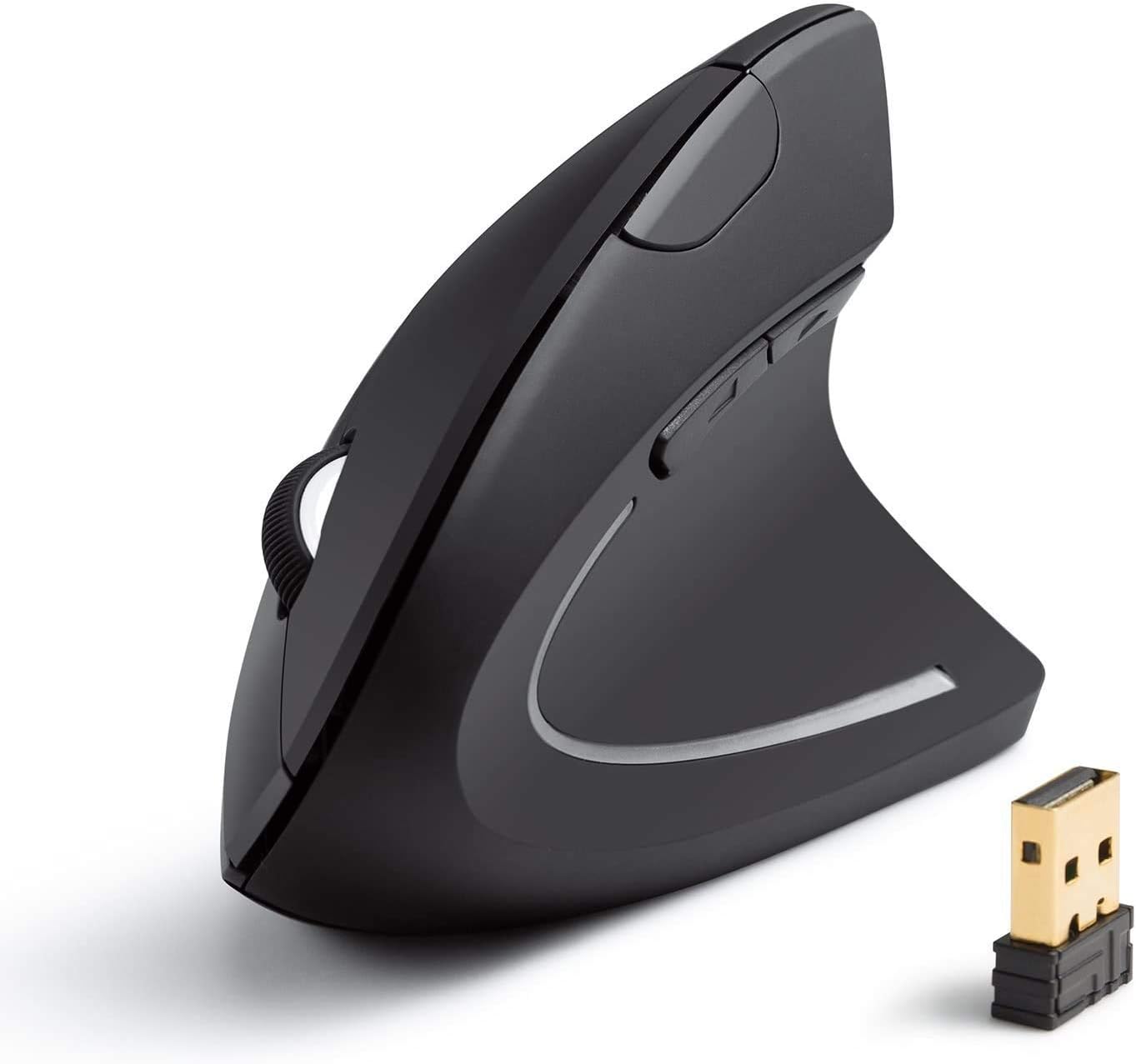
This mouse suits people who want a simple wireless setup without complex software. It connects quickly using a standard USB receiver.
The automatic power-saving mode helps the batteries last longer. The mouse turns itself off after eight minutes of sitting still. You just click a button to wake it up again.
Buyers with large hands appreciate the taller size. Many mention that it relieves their wrist pain almost instantly. However, several users report that the scroll wheel starts jumping or glitching after a few months of daily use.
This mouse fits perfectly into a basic home office where you just need to point, click, and read.
I think this is a good starter option if you want to test a vertical shape. I recommend it to people with larger hands. I would look elsewhere if your job requires constant, heavy scrolling, given the wheel issues.
✅ Pros
- Fits large hands easily
- Turns off automatically to save power
- Sets up in seconds
❌ Cons
- Scroll wheel often jumps after heavy use
- Requires two AAA batteries
💬 What Customers Say
Customers love how this tall mouse supports larger hands. Many buyers report that their wrist pain vanished after switching to this model. A frequent complaint involves the scroll wheel, which tends to glitch or jump randomly after several months of use. Despite this, many still buy it again for the comfort.
#5 Best Battery Life — TECKNET Vertical Mouse

This mouse works well for people who hate dealing with charging cables. It runs on two AAA batteries and lasts up to a year before needing replacements.
The six adjustable tracking speeds give you excellent control. You can slow the cursor down for careful editing or speed it up for fast web browsing. The light flashes to show you which speed you selected.
Customers praise the quiet clicks and the immediate relief from hand cramps. Many users love how easily it connects to different laptops. A few buyers complain that the scroll wheel sits at an awkward angle.
This model shines in shared workspaces where loud clicking might annoy your coworkers.
I appreciate the long battery life and the silent operation. I recommend this to anyone working in a quiet room. I would not pick this if you have very long fingers, as the main buttons sit a bit too far back.
✅ Pros
- Runs for a year on two batteries
- Main buttons click quietly
- Connects to three devices
❌ Cons
- Scroll wheel sits at a weird angle
- Wireless connection drops at short distances
💬 What Customers Say
Most buyers say this mouse stops their hand cramps quickly. They really like the silent clicks and the fast Bluetooth connection. Some users with large hands complain that their fingers have to stretch awkwardly to reach the buttons. Overall, people appreciate the simple setup and long battery life.
#6 Best Wired Pick — Anker USB Wired Mouse

This corded mouse suits users who want zero lag and no battery worries. It connects directly to your computer with a long USB cable.
The wired connection guarantees a smooth, steady signal. You never have to deal with Bluetooth drops or dead batteries in the middle of a project. It is always ready to work.
Buyers love how dependable this mouse is over many years. They mention that the blue accent light looks nice without being too bright. Some users note that their wrist bone rubs against the desk because of the tall shape.
This works perfectly for a permanent desktop setup where you never move your computer.
I like the simple reliability of a wired mouse. I recommend this to anyone who hates charging their computer gear. I suggest buying a soft wrist pad to go with it, so your hand does not rub the hard desk.
✅ Pros
- Never needs charging
- Tracks smoothly with no lag
- Blue light looks nice in the dark
❌ Cons
- Cord can get in the way
- Wrist bone rubs the desk without a pad
💬 What Customers Say
Buyers praise this mouse for lasting years without breaking. People love that they never have to worry about charging it. A common issue is that resting your hand sideways causes your wrist bone to rub against the desk. Most users fix this easily by adding a soft gel mouse pad.
#7 Best for MacBooks — JYKEYMOUT Wireless Mouse

This mouse fits modern laptop users who lack standard USB ports. It connects easily through Bluetooth and charges with a standard Type-C cable.
The dual connection mode makes it highly adaptable. You can use Bluetooth for your MacBook and the USB receiver for an older desktop. You switch between them by pressing one button underneath.
Customers like the smooth feel and the nearly silent clicks. Many mention that it fits medium hands perfectly. However, several buyers complain that the battery dies suddenly without giving any low-power warning.
This mouse works best for traveling workers who use modern, slim laptops in cafes or airports.
I like how easily it pairs with modern laptops. I recommend it for travel because it is very light. The lack of a battery warning frustrates me, so you have to remember to charge it regularly.
✅ Pros
- Connects easily to modern laptops
- Charges with a standard Type-C cable
- Clicks make almost no noise
❌ Cons
- Battery dies without warning
- Feels almost too light to control well
💬 What Customers Say
Many buyers report that this mouse stops their joint pain completely. They enjoy the quiet clicks and the easy Bluetooth pairing. The biggest complaint across reviews is the battery dying without any warning lights. Despite that, users find it very comfortable for long hours of computer work.
#8 Best for Big Hands — UGREEN Vertical Mouse

This mouse serves users with larger hands who find most office gear too small. It features a tall, wide design that supports your whole hand.
The Teflon glide pads on the bottom make a huge difference. They reduce friction against your desk. This allows the large mouse to move smoothly and quietly without dragging.
Buyers with large hands feel relieved to finally find a mouse that fits. They praise the smooth tracking and the comfortable grip. Users with smaller hands report that they cannot reach the buttons easily.
This model shines during long editing sessions where you need a large, supportive grip.
Most vertical mice run small, so this large shape is a welcome change. I recommend it for tall users. I would skip this entirely if your hands are small, as you will strain your fingers trying to click.
✅ Pros
- Fits large hands comfortably
- Glides smoothly on Teflon pads
- Allows quick cursor speed changes
❌ Cons
- Too bulky for small hands
- Uses disposable batteries instead of charging
💬 What Customers Say
People with large hands frequently call this mouse a game changer for their comfort. Buyers love how smoothly it glides across a desk. The main complaint comes from users with small hands who find it impossible to use comfortably. For the right hand size, it gets very high praise.
#9 Best Sleek Design — Acer Wireless Vertical

This mouse suits office workers who want a clean, minimal look on their desk. It features a slim profile that takes up less space than traditional bulky models.
The 58-degree tilt angle provides excellent relief for your wrist. It forces your arm into a healthy posture, which reduces muscle strain by up to ten percent during long shifts.
Customers appreciate the slim shape and the built-in rechargeable battery. Many mention that it connects instantly with no setup required. Unfortunately, multiple buyers report that the scroll wheel breaks easily after a few months.
This mouse works well in tight workspaces where a bulky mouse would get in the way.
The slim design and the comfortable tilt angle feel great. I recommend it for basic daily tasks. However, the fragile scroll wheel makes me hesitate to recommend it for heavy, fast-paced work.
✅ Pros
- Slim shape saves desk space
- Built-in battery charges easily
- Connects instantly with no setup
❌ Cons
- Scroll wheel breaks easily
- Requires a USB port to work
💬 What Customers Say
Buyers love the slim design and find it very comfortable for long work days. People appreciate that it works well for both left and right-handed users. The most common complaint is about durability, with several users stating the scroll wheel snapped off inside the mouse after a few months.
#10 Best Dual Port Receiver — Neises Rechargeable

This mouse works well for people who switch between older PCs and new MacBooks. It features a unique receiver that plugs into different types of ports.
The dual-plug receiver solves a major connection problem. It has both a standard USB plug and a modern Type-C plug. You can connect it to almost any computer without needing extra adapters.
Buyers find the shape very comfortable and helpful for hand cramps. They like that it connects quickly. However, many users complain that the battery only lasts a few hours before needing a charge.
This model fits perfectly into a mixed-device setup, like moving between a school computer lab and a personal laptop.
I think the dual-plug receiver is a brilliant idea. I recommend it if you constantly switch between old and new computers. The very short battery life is a major flaw, so keep the charging cable close.
✅ Pros
- Receiver fits both old and new USB ports
- Shape prevents hand cramps
- Tracks smoothly
❌ Cons
- Battery dies very fast
- Metal USB adapter bends easily
💬 What Customers Say
Customers agree that this mouse feels great in the hand and reduces wrist strain well. Students find it very useful for school computer labs. The biggest issue mentioned across reviews is the terrible battery life, with many users reporting it only lasts an hour or two on a full charge.
Frequently Asked Questions
Does a vertical mouse really help with wrist pain?
How long does it take to get used to a vertical mouse?
Can I use a vertical mouse for gaming?
Do I need a special mouse pad for a vertical mouse?
Conclusion
The Logitech Lift Vertical Mouse stands out as the best overall choice. It offers a perfect 57-degree angle, quiet clicks, and incredible battery life. It simply gets everything right for users with small to medium hands.
If you have larger hands, the UGREEN Vertical Mouse is a fantastic alternative. It gives you the space you need to rest your hand fully, and the smooth glide pads make it a joy to use all day. Both options will help you work in comfort and leave wrist pain behind.