
Setting up a home studio brings up a confusing question. Which box do you actually need to plug your microphone or guitar into your computer? Brands throw around big numbers and complex terms that make it hard to choose.
Many people buy a massive interface with ten inputs when they only record one voice. Others buy the simplest option and soon realize they need a second plug for a guest or a guitar. The wrong choice leaves you with messy cables or poor sound.
We looked at 10 popular audio interfaces and read thousands of real buyer reviews. This guide explains what each interface actually does, who it fits best, and what real users experience when they set them up at home.
Quick Comparison
| # | Product | Rating | Reviews | Best For | Action |
|---|---|---|---|---|---|
| #1 | Scarlett Solo 3rd Gen | 4.6 | 34,170 | Solo Beginners | View on Amazon |
| #2 | Scarlett Solo 4th Gen | 4.6 | 34,170 | Solo Artists | View on Amazon |
| #3 | Scarlett 2i2 4th Gen | 4.6 | 34,170 | Two People | View on Amazon |
| #4 | M-Track Duo | 4.4 | 6,322 | Basic Setups | View on Amazon |
| #5 | M-Track Solo | 4.2 | 7,289 | Travel Use | View on Amazon |
| #6 | Behringer UMC1820 | 4.6 | 457 | Full Bands | View on Amazon |
| #7 | Quantum ES 2 | 4.2 | 194 | Guitar Players | View on Amazon |
| #8 | FIFINE Gaming SC3 | 4.4 | 4,203 | Live Streamers | View on Amazon |
| #9 | Mackie Onyx Artist | 4.4 | 367 | Heavy Travel | View on Amazon |
| #10 | Arturia MiniFuse 2 | 4.7 | 1,074 | Software Bundle | View on Amazon |
#1 Best for Beginners — Scarlett Solo 3rd Gen
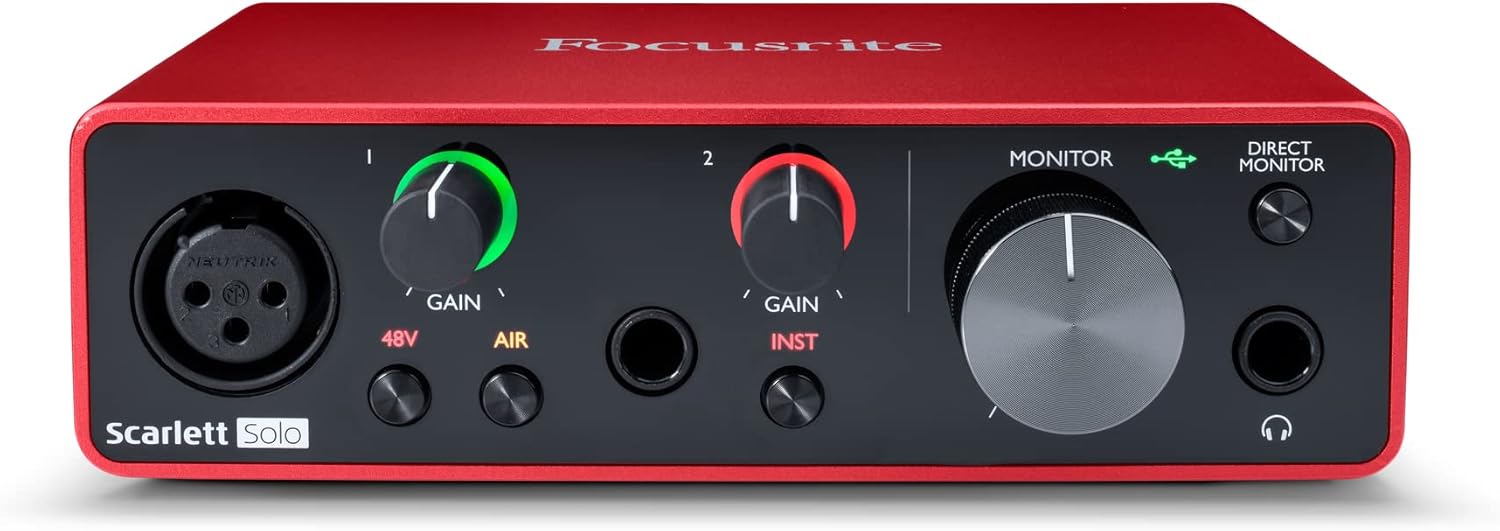
This simple red box fits perfectly on a small desk. It gives singer-songwriters and solo podcasters an easy way to connect one microphone and one guitar at the same time.
The Air mode button makes the biggest difference here. When you press it, the interface adds a bright, clear tone to your voice or acoustic guitar. This means your recordings sound more open and professional before you even start editing.
Buyers praise the low noise and clear sound. Many people say it works exactly as promised for years. However, several users complain about the packaging and say the setup instructions feel confusing for first-time users.
This interface works best when you record alone in a quiet room. It handles a single vocal track and an acoustic guitar beautifully.
Honestly, the simple light rings around the volume knobs make this a great choice. They flash green when your sound is good and red when it is too loud. I would suggest this to anyone starting out, but experienced producers might outgrow the single microphone input fast.
✅ Pros
- Makes vocals sound bright and clear easily
- Shows you when your volume is too loud
- Takes up very little space on a desk
❌ Cons
- Only accepts one microphone at a time
- Setup instructions lack clear first steps
💬 What Customers Say
Most buyers agree that this interface delivers clear, quiet sound with no annoying background hiss. People love how solid the metal box feels. However, multiple users point out that the setup software and manual confuse them, and they wish the box included a simple quick-start card.
#2 Best for Solo Artists — Scarlett Solo 4th Gen

This updated version of the Solo keeps the same small size but adds parts from much larger studio consoles. It suits solo musicians who want cleaner sound without buying a bigger unit.
The massive 120-decibel dynamic range matters most. This means the interface picks up very quiet whispers and very loud guitar strums clearly, without adding fuzzy background noise to your tracks.
Reviewers love the clean sound and low distortion. Many buyers note how quiet the background stays during recording. Just like the older version, some users feel frustrated by the lack of clear printed instructions in the box.
It shines when you record dynamic instruments or vocals that go from quiet to loud quickly. The hardware catches every detail without ruining the take.
I like how Focusrite improved the headphone output on this model. You can hear your mix much louder and clearer than before. I would recommend this to a solo artist who wants better sound quality but still only needs to plug in one microphone.
✅ Pros
- Captures loud and soft sounds with great detail
- Drives studio headphones clearly with a strong amp
- Includes a large bundle of recording software
❌ Cons
- Missing printed setup instructions
- Only handles one microphone
💬 What Customers Say
Buyers consistently praise the extremely low noise floor, noting it beats older models easily. Users appreciate that it works well without needing a wall plug. Some buyers express frustration with the digital manual and software installation process, wishing for a simpler plug-and-play start.
#3 Best for Two People — Scarlett 2i2 4th Gen

This interface offers two microphone inputs instead of one. It fits podcasters with a guest or musicians who want to record vocals and an acoustic guitar with two microphones.
The Auto Gain feature changes everything for home recording. You just press a button, play your instrument or sing for a few seconds, and the interface sets the perfect volume level for you automatically.
Customers report excellent sound quality and very low distortion. Many buyers mention they upgraded from older models and notice the cleaner audio. A few users still find the software installation step annoying.
This unit works best for a two-person podcast or a live acoustic jam. You can set up two microphones, hit Auto Gain, and start recording without worrying about the technical details.
The Clip Safe feature really stands out to me. If you suddenly yell or play too loud, the interface turns the volume down instantly so your recording does not distort. I highly suggest this for anyone who records exciting, loud conversations or dynamic music.
✅ Pros
- Sets your recording volume automatically
- Prevents loud noises from ruining your audio
- Allows two microphones to record at once
❌ Cons
- Requires a computer to update settings
- Setup software can confuse new users
💬 What Customers Say
Most buyers agree that the sound quality is a major step up from older USB interfaces. People love the low noise and clean preamps. The main complaint centers on the lack of physical instructions and the required software download just to get the drivers working.
#4 Best Basic Option — M-Track Duo
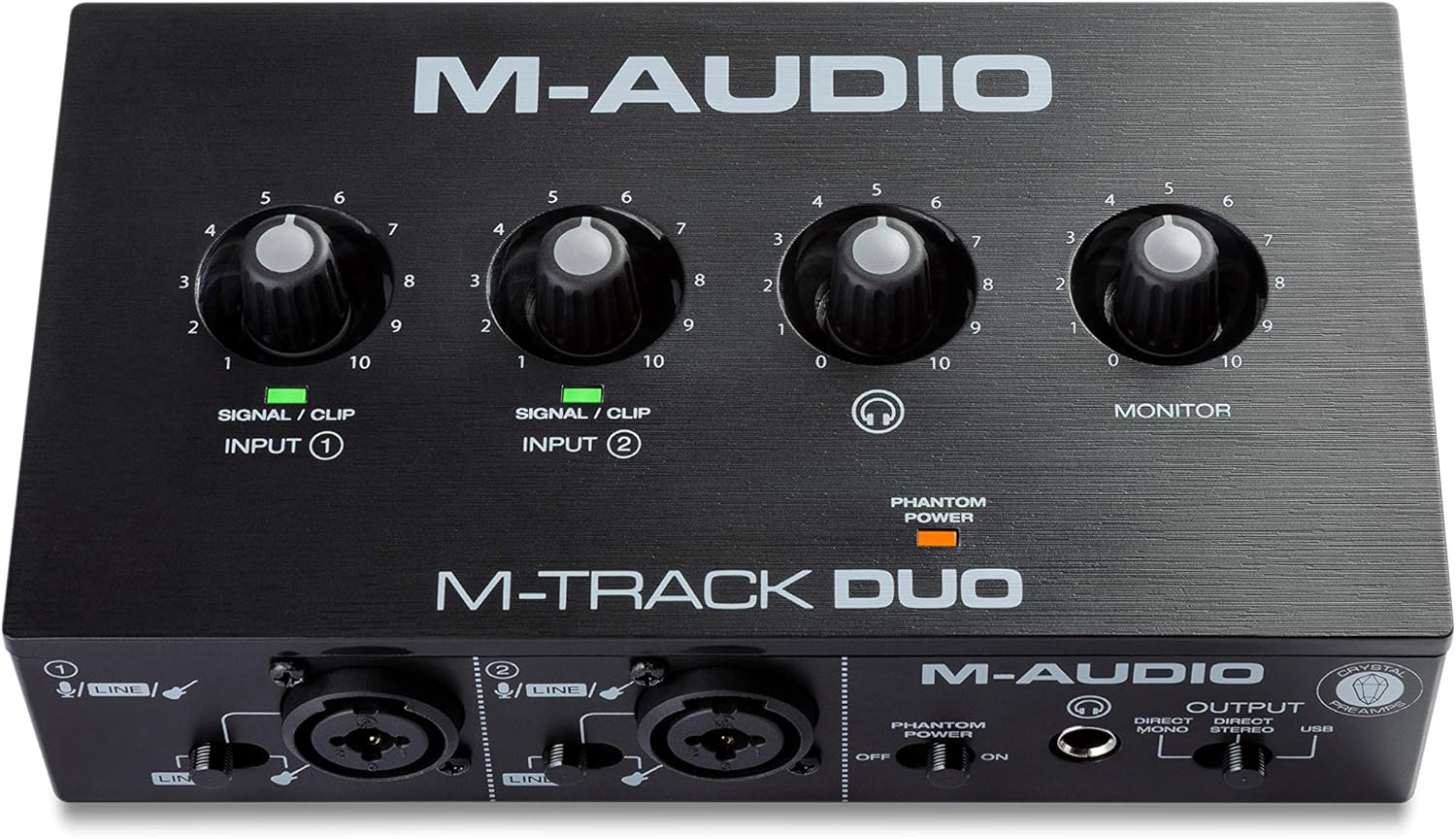
This compact interface gives you two inputs in a simple plastic case. It serves beginners who need to plug in two microphones or instruments but want to keep things very basic.
The direct monitoring switch helps you record better. It lets you hear your voice through your headphones instantly, before the sound goes into the computer. This stops that confusing delay that makes it hard to speak or sing.
Buyers say it gets the job done well for simple setups. Many users like how easily it connects to Windows and Mac. However, several people complain that the volume knobs turn up too fast at the very end, making it hard to get the level just right.
It works best when you want to record a quick demo or a basic two-person chat on a laptop. You just plug it into the USB port and go.
Honestly, the simple design is its biggest strength and weakness. It lacks fancy features, but it works reliably. I would suggest this to someone setting up their first home studio. I would not pick it for someone who needs very fine control over their recording volume.
✅ Pros
- Lets you hear yourself with zero delay
- Powers two microphones at the same time
- Connects easily without needing a wall plug
❌ Cons
- Volume knobs jump up too fast near the end
- Plastic case feels less durable than metal options
💬 What Customers Say
Buyers appreciate how simple this interface is to use right out of the box. Users report it works great with common free recording software. The most common complaint is about the input knobs, which people say make the volume jump suddenly from quiet to loud.
#5 Best Compact Pick — M-Track Solo

This tiny interface provides one microphone input and one instrument input. It targets traveling musicians or podcasters who need a small, light box to throw in a backpack.
The USB power design makes it highly portable. You do not need an extra power cable or a wall outlet. Your laptop battery runs the whole interface, so you can record anywhere.
Customers like the small size and the solid metal feel. Many buyers find it works well for quick vocal ideas. However, multiple users warn that the second input only records in mono, which causes problems if you try to plug in a stereo device like a phone.
This interface shines when you sit in a coffee shop or a hotel room and need to record a quick guitar riff or vocal track directly into your laptop.
I like that the headphone plug sits right on the front. Many small interfaces put it on the back, which gets annoying. I would recommend this for travel, but the mono-only second input makes it a poor choice for recording backing tracks from a phone or tablet.
✅ Pros
- Fits easily into a small laptop bag
- Runs entirely off your computer battery
- Headphone plug sits conveniently on the front panel
❌ Cons
- Second input does not record stereo sound
- Requires special adapter cables for some setups
💬 What Customers Say
Most buyers agree this interface offers great value for a small travel setup. People like the strong build and clear sound for vocals. A frequent complaint comes from users who try to record stereo music from a phone, only to find the line input only accepts a mono signal.
#6 Best for Bands — Behringer UMC1820

This large, rack-mounted interface handles up to 18 inputs and 20 outputs. It fits full bands, drum recording setups, and producers who need to leave many instruments plugged in all the time.
The eight built-in microphone preamps let you record a whole group at once. Instead of recording one person at a time, you can put microphones on a drum kit, a bass, a guitar, and a singer, and capture the whole song live.
Buyers praise the massive amount of connections. Many users say it works flawlessly and replaces older, troublesome gear easily. A few people mention they love that it works well with older software that does not require strict ASIO drivers.
It works best in a permanent home studio space. You mount it in a rack, plug all your gear into the back, and never have to unplug cables to switch instruments again.
Honestly, the ability to add even more inputs later using an optical cable makes this a smart long-term choice. I would highly suggest this for anyone recording live drums. I would not recommend it for someone who just records podcasts at their desk, as it takes up too much room.
✅ Pros
- Records eight microphones at the exact same time
- Allows you to add more inputs later with one cable
- Includes two separate headphone outputs
❌ Cons
- Takes up a lot of physical space
- Requires a wall power plug to operate
💬 What Customers Say
Customers love the sheer number of inputs and outputs they get. Many buyers report it runs very stable on Windows and Mac without complex driver issues. Users frequently mention they use it to connect all their synthesizers or drum microphones at once.
#7 Best for Guitarists — Quantum ES 2

This sleek desktop interface brings high-end preamps and a special instrument input. It targets guitar players and producers who want premium sound and modern digital controls.
The custom guitar input, built with Fender engineers, makes a real difference. It handles the signal from your guitar pickups perfectly, so your digital amp simulators sound and feel exactly like playing through a real amplifier.
Buyers enjoy the bright LED lights and the clear sound quality. People like how easy it is to read the meters while playing. However, some users report that the standalone mode fails to work properly and complain about poor customer support.
It shines when you sit at your desk with an electric guitar, playing through software amps. The low delay means you hear your notes the exact millisecond you pick the string.
I really like the top-facing controls and the bright LED meter. It stops you from having to lean over to see if your volume is clipping. I would pick this for heavy guitar users, but the weird mini-plug for MIDI connections might frustrate synth players.
✅ Pros
- Makes electric guitars sound clear and natural
- Bright lights show your volume levels clearly from a distance
- Sets microphone volume automatically with one button
❌ Cons
- MIDI connection requires an unusual mini-plug adapter
- Standalone mode proves difficult to set up
💬 What Customers Say
Most buyers agree the interface sounds fantastic and the top-panel layout makes it easy to use while playing an instrument. Guitarists note the low latency helps them play better. A few users complain that getting help from customer service takes too long when software issues happen.
#8 Best for Streamers — FIFINE Gaming SC3

This desktop mixer combines an audio interface with physical volume sliders and colorful lights. It suits live streamers, gamers, and podcasters who want to control their sound without opening computer menus.
The four separate volume sliders give you total physical control. If your game gets too loud or your chat gets too quiet, you just reach out and move a slider. You never have to pause your stream to fix your audio.
Customers love the physical sliders and the easy setup. Many buyers say it makes their microphone sound much better than a standard USB connection. A few users mention the voice changing effects feel a bit silly and the custom sound buttons lack high audio quality.
This works best during a busy live stream. When the action gets loud, you can instantly hit the physical mute button or slide the game volume down while keeping your eyes on the screen.
Honestly, the physical mute buttons are exactly what streamers need. They sit right on the front and work instantly. I would recommend this to any gamer moving to an XLR microphone. I would not pick it for serious music production, as the sound effects are clearly made for fun.
✅ Pros
- Lets you change volumes instantly with physical sliders
- Mutes your microphone quickly with a dedicated button
- Adds colorful lighting to your desk setup
❌ Cons
- Voice changing effects sound unnatural
- Custom sound pads play back audio in lower quality
💬 What Customers Say
Streamers love how this mixer lets them balance their game, chat, and microphone volumes easily. Buyers praise the solid feel of the sliders and buttons. Some users note that the voice changers and sound pads are fun but feel a bit cheap compared to the main microphone sound.
#9 Best Heavy Duty — Mackie Onyx Artist

This heavy metal interface offers one microphone input and one instrument input. It serves musicians and creators who need a tough, reliable box that can survive travel and rough handling.
The heavy metal casing provides serious protection. You can drop it into a backpack, take it to a gig, or accidentally knock it off a desk, and the internal parts stay safe and working.
Buyers praise the strong build and the clean sound quality. Many users say it works flawlessly on Windows, Mac, and even Linux computers. However, some people complain about the gain knob, saying the volume jumps up too fast at the very end of the dial.
It works best for a mobile recording setup. You can take it to a friend’s house or a rehearsal space without worrying about breaking fragile plastic parts.
I like that Mackie kept the design simple and focused on durability. The knobs feel heavy and smooth. I would suggest this to anyone who travels with their gear. I would look elsewhere if you want combo jacks, as the inputs are strictly separated into one microphone and one instrument port.
✅ Pros
- Survives drops and bumps easily with a thick metal case
- Works reliably across many different computer systems
- Knobs feel heavy and smooth to turn
❌ Cons
- Volume dial makes sudden jumps near the end
- Does not use combo jacks for inputs
💬 What Customers Say
Customers constantly mention the built like a tank metal body. Buyers appreciate the clear, noise-free sound and easy driver installation. The main complaint involves the input volume knobs, which users say offer very little change until the very end, where they suddenly get very loud.
#10 Best Software Bundle — Arturia MiniFuse 2
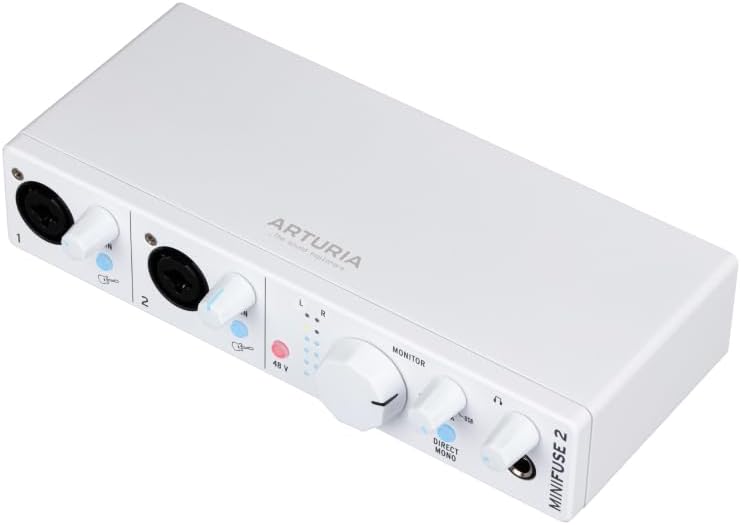
This white desktop interface offers two combo inputs and a built-in USB hub. It targets home producers who want a stylish box and a massive collection of digital instruments to start making music.
The included software bundle stands out immediately. It gives you recording programs, classic synthesizer sounds, guitar effects, and vocal tuning tools. You get everything you need to write and mix a full song right out of the box.
Buyers love the look of the unit and the smooth feel of the dials. Many people praise the sound quality and the bonus USB port on the back. A few users warn that the MIDI ports do not work until you connect to a computer and update the internal software.
This shines when you set up a home studio for the first time. You plug it in, download the included software, and instantly have hundreds of professional sounds to play with.
Honestly, the extra USB port on the back is incredibly helpful. It lets you plug in a MIDI keyboard without taking up another slot on your computer. I highly recommend this for synth players and beat makers. Just remember you might need to turn the volume up high if you use a quiet dynamic microphone.
✅ Pros
- Includes a massive collection of music making software
- Provides an extra USB port for connecting keyboards
- Lights up clearly to show your volume levels
❌ Cons
- Requires a software update before the MIDI ports work
- Dynamic microphones require turning the volume dial very high
💬 What Customers Say
Buyers agree this unit looks great on a desk and feels very premium. People love the extra USB hub on the back for connecting other gear. Some users mention they had to spend time updating the firmware to get all the features working, and a few note that dynamic microphones run a bit quiet.
Frequently Asked Questions
Do I need to buy a separate power cable for my audio interface?
Will any microphone work with these interfaces?
Why do my recordings sound delayed when I listen through headphones?
Does a more expensive interface make my voice sound better?
What is a combo jack?
Conclusion
Finding the right audio interface makes setting up your home studio much less stressful. The Focusrite Scarlett 2i2 4th Gen stands out as the best overall choice. The Auto Gain and Clip Safe features take the guesswork out of setting your volume, preventing ruined takes and saving you time.
If you stream games or record live podcasts, the FIFINE Gaming SC3 offers a great alternative. The physical sliders let you control your sound instantly without clicking through computer menus. Whichever you choose, getting a dedicated interface will instantly improve how your projects sound.