
Picking the right memory for your computer often feels like reading a secret code. You see endless numbers, letters, and marketing claims that promise to make your computer lightning fast. But most of those claims mean very little in the real world.
Many people buy the fastest memory they can find, only to realize their computer cannot even run it at that speed. Others buy extra glowing lights when a plain, low-profile kit would fit their build much better. The wrong choice leads to wasted effort or a computer that crashes during your favorite game.
We looked at the best gaming RAM kits for speed, performance, and RGB builds. We checked the real speeds, how well they handle heat, and what thousands of real buyers actually experience. This guide will help you find the exact memory your system needs to run smooth and fast.
Quick Comparison
| # | Product | Rating | Reviews | Best For | Action |
|---|---|---|---|---|---|
| #1 | Corsair Vengeance LPX | 4.8 | 19,202 | Best Overall DDR4 | View on Amazon |
| #2 | Corsair Vengeance RGB | 4.8 | 3,620 | Best RGB DDR5 | View on Amazon |
| #3 | Netac Shadow III | N/A | N/A | Budget Upgrade | View on Amazon |
| #4 | Crucial Pro DDR5 | 4.7 | 1,846 | Fast DDR5 | View on Amazon |
| #5 | G.Skill Trident Z5 Neo | 4.8 | 1,492 | AMD Builds | View on Amazon |
| #6 | G.Skill Royal Neo | 4.8 | 337 | Premium Look | View on Amazon |
| #7 | Corsair Vengeance 6400 | 4.7 | 2,133 | High Speed | View on Amazon |
| #8 | OLOy Black Owl | 4.2 | 33 | Basic Replacement | View on Amazon |
| #9 | T-Force Vulcan Z | 4.8 | 6,088 | Value DDR4 | View on Amazon |
| #10 | G.Skill Trident Z RGB | 4.8 | 4,374 | Best RGB DDR4 | View on Amazon |
#1 Best Overall DDR4 — Corsair Vengeance LPX

This memory kit suits people who want a fast, stable computer without any glowing lights. It works great for older systems that still use DDR4 memory.
The low-profile design matters most here. The sticks measure just 34 millimeters tall. This means you can install a massive air cooler on your processor without the memory getting in the way.
Buyers consistently praise how easy it is to set up. Most people just plug it in, turn on the XMP setting, and it runs at full speed. A few users mention they could not push the speed past the rated 3200MHz.
This kit shines in small computer cases where space is tight and airflow is hard to manage. The solid aluminum cover pulls heat away from the chips effectively.
Honestly, this is the safest choice for a DDR4 build. It rarely causes trouble and fits almost anywhere. I would not pick it if you want a flashy setup, but it does its job perfectly.
✅ Pros
- Fits easily under large CPU coolers
- Stays cool under heavy gaming loads
- Works instantly with XMP settings
❌ Cons
- Lacks any lighting features
- Does not overclock well past rated speeds
💬 What Customers Say
Most buyers agree that this memory works exactly as promised right out of the box. Gamers love that it handles heavy multitasking without crashing. Many people appreciate the plain black design because it blends into any build. A few users note that the memory does not overclock well, but almost everyone feels it offers great value.
#2 Best RGB DDR5 — Corsair Vengeance RGB

This DDR5 kit targets builders who want the newest technology and a bright, colorful computer. It fits perfectly in modern gaming systems.
The ten-zone lighting makes the biggest difference. Each memory stick has ten separate lights inside a top bar. This creates smooth, bright colors that look great from any angle in your case.
Customers love how stable this memory runs. Many buyers report that it hits the fast 6000MHz speed easily, even on AMD systems. Some users note that you need the Corsair software to control the lights properly.
This memory works best in cases with large glass side panels. The bright lights fill the case, and the fast speeds keep games running smooth.
I think the lighting on this kit looks cleaner than almost anything else available. The colors blend smoothly without harsh bright spots. I would skip this if you have a tight case, as the light bar makes the sticks quite tall.
✅ Pros
- Delivers very bright and smooth lighting
- Runs stable at high speeds
- Syncs easily with other Corsair parts
❌ Cons
- The tall design might block large air coolers
- Requires background software for custom lights
💬 What Customers Say
Gamers who use this daily report that it makes their system feel much faster. Buyers love the clean light bar and say the colors look amazing. Many people mention it works perfectly on both Intel and AMD setups. A few users mention that high-end memory requires an investment, but they feel the stability makes it worth it.
#3 Best Budget Upgrade — Netac Shadow III

This simple memory kit helps people who need to speed up an older computer. It works well for basic gaming and daily office tasks.
The upgraded aluminum heat sink stands out as the main feature. It wraps around the memory chips to pull heat away quickly. This keeps the memory running stable when you play games for hours.
This kit performs best when you need to replace slow memory in a basic build. The 3200MHz speed gives older processors a nice boost.
Honestly, this is a very basic kit that just gets the job done. I would recommend it to someone fixing up an old family computer. I would look elsewhere if you plan to build a high-end gaming machine.
Compared to the Corsair Vengeance LPX, this kit has a taller heat sink and less total memory, making it strictly a simple replacement pick.
✅ Pros
- Cools the chips quickly with a metal sink
- Speeds up older desktop computers
- Installs easily into standard slots
❌ Cons
- Only provides 16GB of total memory
- Features a very plain design
#4 Fast DDR5 — Crucial Pro Overclocking

This fast memory kit suits serious gamers who want top speeds without any flashy lights. It requires a very modern motherboard to work.
The incredibly low latency matters most here. With a CL32 rating at 6400MHz, this memory sends data to your processor extremely fast. This helps keep your game frame rates high and smooth.
Buyers frequently mention how reliable this memory feels. People love that it runs cool and stable right away. A few users point out that the brand is stopping consumer memory production soon.
This kit shines in high-end gaming computers built for competitive play. The fast response time helps when every millisecond counts in a match.
I really like the simple, tactical look of these sticks. They feel heavy and well-made. However, the fact that the company is leaving the consumer market might make warranty support tricky later on.
✅ Pros
- Sends data instantly with low latency
- Fits easily due to a short profile
- Runs very cool under heavy loads
❌ Cons
- May lack future brand support
- Requires very new computer parts to work
💬 What Customers Say
Across thousands of reviews, the thing people mention most is the rock-solid stability. Buyers love that they can just turn on the fast profile and it works perfectly. Many users appreciate the stealthy look without any lights. A common complaint involves the brand leaving the market, making future matching kits hard to find.
#5 Best for AMD — G.Skill Trident Z5 Neo

This memory kit targets builders using modern AMD processors. It comes tuned specifically to work smoothly with AMD systems.
The specific AMD EXPO profile makes a massive difference. You just click one button in your system settings, and the memory runs exactly how AMD intended. This prevents crashes and keeps your games running fast.
Customers constantly praise the beautiful design and fast speeds. Many buyers notice their computer feels much snappier. Several users warn that combining two kits together causes the system to crash.
This memory works perfectly in a high-end AMD gaming build. The brushed metal looks great, and the speeds match exactly what modern Ryzen processors need.
Honestly, the build quality on this memory feels fantastic. The metal cover looks premium and the lights shine smoothly. I would not buy this if you plan to use four sticks, as AMD systems struggle with that right now.
✅ Pros
- Tunes perfectly for AMD processors
- Shines with bright and smooth colors
- Responds very fast during heavy gaming
❌ Cons
- Crashes often if you use four sticks
- Sits very tall on the motherboard
💬 What Customers Say
Most buyers agree that this memory perfectly matches modern AMD builds. Gamers love how easily it hits the advertised speeds without any manual tuning. People frequently compliment the brushed metal design. The only major complaint comes from users who tried to install four sticks and experienced system crashes.
#6 Best Premium Look — G.Skill Royal Neo

This kit appeals to builders who want their computer to look like a display piece. It offers extreme speeds and a very unique design.
The crystal light bar is the defining feature. Instead of a plain plastic cover, the top looks like crushed glass. It scatters the light in a beautiful, sparkling pattern that stands out in any case.
Buyers rave about the stunning appearance and the extremely fast CL28 latency. People notice their games load faster and run smoother. Some users mention that the sticks are very tall and might hit their fans.
This memory looks incredible in an all-white or silver computer build. The chrome finish reflects the other parts inside your case.
I think this is the best-looking memory you can buy right now. The crystal effect catches the eye immediately. However, the shiny silver finish picks up fingerprints instantly, so you must install it carefully.
✅ Pros
- Looks stunning with a crystal light bar
- Delivers ultra-fast CL28 response times
- Works perfectly with AMD EXPO settings
❌ Cons
- Shows fingerprints easily on the silver finish
- Blocks large air coolers due to its height
💬 What Customers Say
Builders and gamers alike say this memory looks even better in person. Buyers love the shimmering light effect and the heavy, premium feel of the metal. Many users report that the low latency makes a real difference in fast games. A few people note you must check your cooler clearance before buying.
#7 Best High Speed — Corsair Vengeance 6400

This high-speed kit suits advanced gamers who want to push their Intel systems to the limit. It combines very fast data speeds with bright lights.
The 6400MHz speed rating offers a big advantage. It pushes data to your processor faster than standard DDR5 memory. This helps keep your game running smooth when the screen gets busy.
Customers enjoy the fast speeds and reliable performance. Many buyers say it handles heavy multitasking easily. Some users warn that the speed drops if you try to use four sticks instead of two.
This kit performs best in a high-end Intel gaming rig. The fast speeds help power through heavy video editing and demanding games.
I really like how easily this memory reaches its top speed. You just enable the profile and it works. I would avoid this if you want to fill all four memory slots, as the speeds will slow down.
✅ Pros
- Pushes data extremely fast at 6400MHz
- Shines brightly with ten light zones
- Stays stable during long gaming sessions
❌ Cons
- Slows down if you install four sticks
- Software sometimes fights with other programs
💬 What Customers Say
Most buyers agree that this memory delivers exactly the speed it promises. Gamers love how smooth their system feels when running multiple heavy programs. People appreciate the bright lights and the easy software controls. A common issue is that the computer forces the memory to run slower if four sticks are installed.
#8 Basic Replacement — OLOy Black Owl

This basic memory kit helps people who just need their computer to turn on and work. It targets budget builders and standard home computers.
The low 1.2-volt power draw is the main benefit here. It uses very little electricity and creates almost no heat. This keeps your computer running quietly without needing extra fans.
Buyers say this memory works well for basic tasks and light gaming. People like the easy setup. Several users complain that the memory arrived broken or caused their computer to fail to start.
This memory fits perfectly in a simple office computer or a basic media PC for the living room. It does not need any special settings to work.
Honestly, this is a very slow memory kit by modern standards. It lacks the fast profiles that gamers usually want. I would only recommend this if you have very basic needs and just need something simple.
✅ Pros
- Uses very little power to run
- Installs easily without complex settings
- Fits easily into tight computer cases
❌ Cons
- Runs at a much slower speed than most kits
- Lacks fast tuning profiles
💬 What Customers Say
Buyers who want a simple fix say this memory gets the job done. Many people appreciate that it installs easily and runs basic games without trouble. However, a noticeable number of users report receiving dead sticks that prevent their computer from turning on. Others wish it had a faster speed option.
#9 Best Value DDR4 — T-Force Vulcan Z
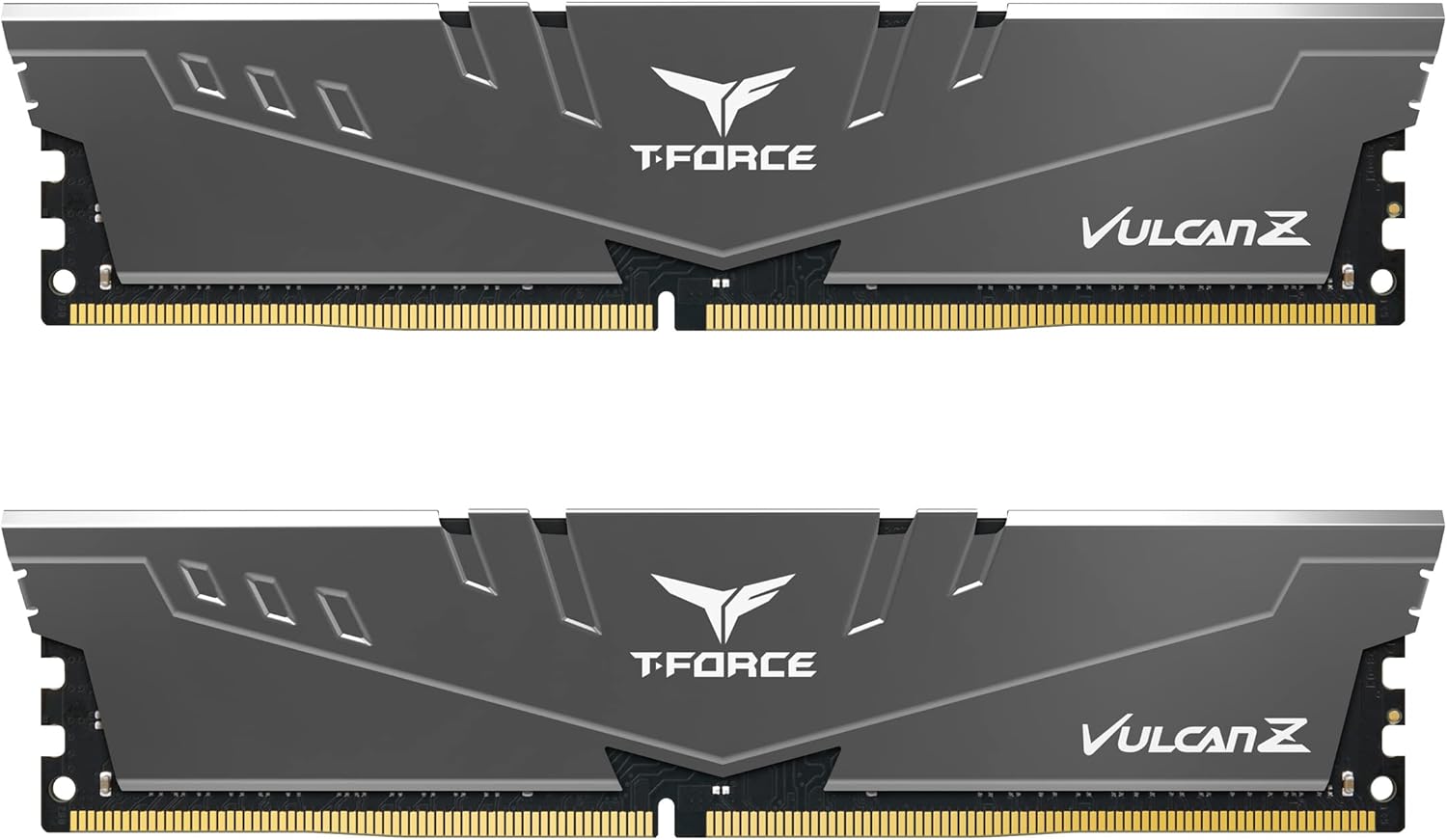
This kit suits gamers who want good performance without paying for extras. It offers a great balance of speed and reliability.
The simple aluminum cooling module does a great job. It wraps tightly around the memory chips to pull heat away. This keeps the memory safe and stable when your computer works hard.
Customers love the performance this memory provides. Many buyers say it drastically improves their loading times. People appreciate that it works perfectly without any complicated setup.
This kit shines in standard gaming builds. It gives you the fast 3200MHz speed you need for modern games while keeping things simple.
I think this is one of the smartest buys for an older DDR4 system. It looks clean, runs cool, and hits the right speeds. I would not pick it if you want to show off your build, as the gray design is very plain.
✅ Pros
- Keeps chips cool with a metal cover
- Runs fast enough for modern games
- Fits easily under large coolers
❌ Cons
- Features a very plain gray look
- Only provides 16GB of total memory
💬 What Customers Say
Across thousands of reviews, the thing people mention most is the excellent performance. Gamers report that their system loads much faster after installing this kit. Buyers love the simple metal design and the reliable performance. The only minor complaint is that some people wish they had bought a version with lights.
#10 Best RGB DDR4 — G.Skill Trident Z
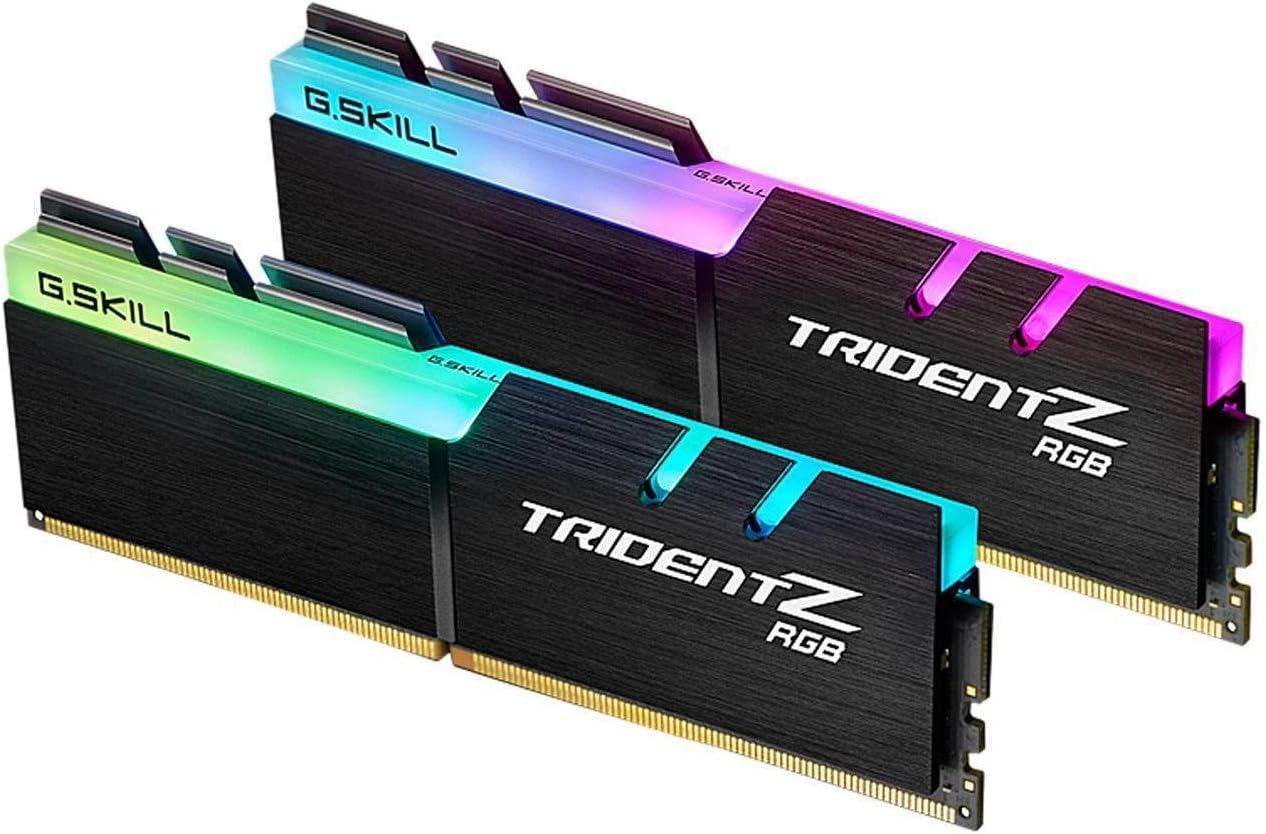
This memory kit targets gamers who want their older DDR4 system to look brand new. It combines fast speeds with a classic, beautiful design.
The exposed aluminum fins make a big difference. They look sharp and aggressive, but they also pull a lot of heat away from the memory chips. This helps the memory stay fast during long gaming sessions.
Buyers constantly praise the beautiful lights and strong build quality. People say it feels heavy and premium. Some users note that older AMD processors struggle to run this memory at its full speed.
This kit works perfectly when you want to make a DDR4 build look premium. The lights blend beautifully, and the metal finish catches the eye.
Honestly, this design still looks amazing years after it first came out. The metal feels incredibly solid. However, the top fins are actually quite sharp, so you have to be careful when pushing them into the motherboard.
✅ Pros
- Features a beautiful and classic metal design
- Shines with smooth and bright colors
- Feels very heavy and well-made
❌ Cons
- Sharp metal edges make installation slightly painful
- Older processors may struggle with the fast speed
💬 What Customers Say
Gamers who use this memory love the classic, aggressive look. Buyers frequently mention that the lights sync perfectly with their other parts. Many people appreciate the fast speeds and stable performance during heavy use. A few users mention that the sharp metal fins hurt their fingers during installation.
Frequently Asked Questions
Do I really need 32GB of memory for gaming?
Does faster memory give me more frames per second?
Can I mix two different brands of memory?
Why is my memory running slower than advertised?
Does memory need a heat sink?
Conclusion
The Corsair Vengeance LPX stands out as the best overall choice for older systems. It fits under any cooler, runs very stable, and skips the flashy lights to keep things simple and reliable.
If you are building a modern AMD system, the G.Skill Trident Z5 Neo is the way to go. It tunes perfectly to AMD processors and offers beautiful lighting. Take your time, check your motherboard manual, and pick the kit that fits your build best.