
Working at a cluttered desk makes it hard to focus. When your screen sits too low, you end up leaning forward to see it. This poor posture causes real neck and back pain over time. Finding the right stand solves both problems at once by raising your screen and giving you back your desk space.
Many brands promise strong materials and perfect heights. But a lot of cheap stands bend under heavy screens or take up too much room. The real test happens when you put a heavy monitor on top and try to work for eight hours straight.
We looked at the top options and read thousands of customer reviews to see how these stands actually perform. We found out which ones hold heavy dual screens safely, which ones fix messy cables, and which ones look best in a home office.
Quick Comparison
| # | Product | Rating | Reviews | Best For | Action |
|---|---|---|---|---|---|
| #1 | ELIVED 2-Pack Riser | 4.7 | 1239 | Dual Screens | View on Amazon |
| #2 | HUANUO Mesh Monitor Stand | 4.7 | 4324 | Cooling Laptops | View on Amazon |
| #3 | VIVO Dual Monitor Mount | 4.4 | 15970 | Heavy Duty | View on Amazon |
| #4 | Hemudu Single Monitor Mount | 4.6 | 8711 | Single Screens | View on Amazon |
| #5 | TAVR Dual Monitor Riser | 4.6 | 3664 | Corner Desks | View on Amazon |
| #6 | OPNICE 2-Tier Stand | 4.6 | 4109 | Desk Storage | View on Amazon |
| #7 | LOTEYIKE Metal Riser | 4.8 | 1753 | Small Spaces | View on Amazon |
| #8 | Hemudu Glass Riser | 4.8 | 8205 | Modern Desks | View on Amazon |
| #9 | BONTEC Metal Riser | 4.7 | 8776 | Cable Control | View on Amazon |
| #10 | WESTREE Dual Stand | 4.6 | 3506 | Heavy Setups | View on Amazon |
#1 Best for Dual Screens — ELIVED 2-Pack Riser

This two-pack of metal risers gives you a simple way to lift two screens off your desk. You get two separate platforms that you can place side by side or stack on top of each other. The stands hold up to 44 pounds each.
The adjustable legs make the biggest difference here. You press a small button on each leg to click it into one of three heights. This lets you match your exact eye level so you stop looking down all day.
Most buyers agree that these stands clear up desk clutter fast. People love how quickly they go together. A few reviewers mention that the thin metal top can bend slightly if you press down hard on it.
This set works perfectly on a standard office desk where you run a laptop and a separate monitor side by side. You can set the laptop slightly lower than the main screen.
I like the simple push-button legs because they make setup fast. I would not put a heavy older television on these, but they handle modern flat screens easily. The extra space underneath is perfect for sliding your keyboard out of the way.
✅ Pros
- Adjusts easily to three different heights
- Holds up to 44 pounds without breaking
- Mesh top keeps your laptop cool
- Sets up in less than one minute
❌ Cons
- Sheet metal top can bend under heavy pressure
- Pinned legs require careful placement to avoid shaking
💬 What Customers Say
Buyers appreciate how fast these stands go together right out of the box. Many people mention that the adjustable legs help them line up two different brands of monitors perfectly. A few customers noted that the legs can feel slightly loose if you do not push them out to the edges properly.
#2 Best for Cooling — HUANUO Mesh Monitor Stand

This set of two metal stands focuses on keeping your devices cool. The steel platforms feature hundreds of small holes stamped into the top. Each stand supports up to 44 pounds.
The mesh design matters most for people who use laptops as their main computer. Laptops get very hot when running heavy programs all day. The holes let fresh air reach the bottom of your laptop so it runs faster and lasts longer.
Buyers say these stands do exactly what they promise. People like the clean look and the extra storage space underneath. Some buyers point out that the legs feel a bit cheap, but they still hold heavy screens without a problem.
This stand shines when you use a hot gaming laptop next to a larger main screen. You can raise the laptop to match the big screen while keeping the fans completely clear.
The cooling aspect is the real winner here. Hot laptops slow down your work, and this simple stand stops that from happening. The plastic feel of the legs is a minor letdown, but once you set the stand on your desk, you never notice it.
✅ Pros
- Mesh holes stop laptops from getting too hot
- Leaves plenty of room underneath for notebooks
- Rubber feet stop the stand from sliding
- Requires no tools to build
❌ Cons
- Legs can be tricky to screw into the base
- Some users feel the leg materials look cheap
💬 What Customers Say
Customers love how much space these stands free up on a crowded desk. Many people use the space underneath for keyboards and paperwork. A common complaint is that the legs feel like light plastic, but buyers say the stand stays strong once you put weight on it.
#3 Best for Heavy Duty — VIVO Dual Monitor Mount

This heavy-duty desk mount takes a different approach. Instead of sitting your monitors on a shelf, you bolt them to two steel arms. A single heavy glass and metal base holds everything up.
The ability to move your screens in any direction changes how you work. You can tilt the screens up or down, spin them sideways, or turn them to show a screen to someone else in the room.
Reviewers constantly mention how solid the metal parts feel. People love getting their desk space back. A common warning from buyers is that the stand can tip forward if you pull the monitors too far out from the center pole.
This mount works best on a deep desk where you want your screens floating above your work area. It gives you room to spread out large paper plans or books.
Floating monitors make a desk feel twice as big. I love how much space this base frees up compared to standard monitor legs. Just remember to keep the screens balanced over the base so the heavy metal frame stays stable.
✅ Pros
- Frees up desk space by holding two screens on one base
- Lets you tilt and turn screens in any direction
- Includes clips to hide messy power cords
- Heavy base protects your desk from scratches
❌ Cons
- Can tip forward if you pull screens too far out
- Takes time to build with multiple screws and wrenches
💬 What Customers Say
Most buyers agree that the metal construction feels very strong and safe. People who set it up correctly love how clean their desk looks. Several reviewers warn that you need to balance the screens carefully during setup so the whole unit does not tip forward.
#4 Best for Single Screens — Hemudu Monitor Mount

This freestanding mount holds one large screen up to 32 inches wide. It features a heavy tempered glass base and a thick steel center pole. It holds heavy monitors up to 77 pounds safely.
The rotation feature makes the biggest difference in daily use. You can grab your screen and spin it from a normal wide view to a tall portrait view. This helps a lot when reading long documents or writing code.
Buyers praise how strong the glass base feels. People say it holds large screens without shaking when they type. Some customers mention that the shiny black glass shows dust and fingerprints very quickly.
This stand is perfect for a home office where you use one large, heavy monitor and need it to sit higher than the factory stand allows.
The glass base looks great when it is clean. I appreciate that it holds heavy screens without shaking. I do not like that you have to take the monitor off and unscrew the back plate to change the height. It takes extra work to get the level right.
✅ Pros
- Holds heavy screens up to 77 pounds safely
- Lets you easily spin your screen to a tall portrait mode
- Heavy glass base keeps everything stable
- Includes clips to keep your cords tidy
❌ Cons
- Shiny glass base shows dust and fingerprints quickly
- Changing the height takes time because you must unscrew the mount
💬 What Customers Say
Customers say this stand feels much stronger than the cheap plastic stands that come in the box with most monitors. Buyers love the smooth rotation feature. A few people note that adjusting the height is annoying because you cannot do it on the fly.
#5 Best for Corner Desks — TAVR Dual Monitor Riser

This extra-long stand uses three separate wooden shelves linked together. You can shrink it down to 30 inches or stretch it out to 43 inches wide. It holds up to 44 pounds across the three sections.
The flexible side pieces solve a huge problem for corner desks. You can swing the left and right shelves forward to create a curved shape. This lets you angle your screens perfectly toward your chair.
Buyers love how this stand handles two large monitors with ease. People say the wood finish looks great. Some reviewers mention that the side shelves can accidentally pull the center pegs out if you adjust them too quickly.
This stand works perfectly when you have an L-shaped desk and want to place your computer setup right in the corner curve.
Being able to bend the stand is a clever idea. It fits places a straight block cannot. The rustic wood finish also looks much better than plain black plastic. I just wish the three sections locked together a bit tighter so they would not slide when moved.
✅ Pros
- Bends at the sides to fit perfectly on curved or corner desks
- Stretches out long enough to hold two large screens
- Leaves three wide spaces underneath for storage
- Wood finish adds a nice look to your office
❌ Cons
- Side legs require some force to push into place
- Moving the side shelves can pull the center pole out
💬 What Customers Say
Buyers agree this stand makes a massive difference in how clean their desk looks. People with dual monitors love the wide layout. Some customers point out that you have to be careful when moving the side arms so you do not pull the whole stand apart.
#6 Best for Storage — OPNICE 2-Tier Stand

This metal stand acts as a complete desk organizer. It features two levels, a pull-out drawer, and two hanging baskets on the sides. It holds your monitor on top and your office supplies below.
The built-in drawer is the main reason to buy this stand. Most risers just leave an empty gap underneath. This one gives you a real place to hide ugly clutter like sticky notes, paper clips, and charging cables.
Customers say it clears up desk messes quickly. Buyers appreciate the sturdy metal build. A few people mention that small items tend to slide around freely inside the wide metal drawer when you open it.
This stand is ideal for a home desk that does double duty as a craft table or a place where you pay bills and sort mail.
If your desk is always covered in pens and notes, this helps a lot. The metal mesh looks a bit industrial, but it keeps everything where you can find it. I would skip the side baskets if you have a small desk, as they stick out quite a bit.
✅ Pros
- Includes a sliding drawer to hide messy office supplies
- Comes with two side baskets for pens and markers
- Raises your screen to a comfortable eye level
- Metal frame feels strong and safe
❌ Cons
- Small items slide around freely inside the metal drawer
- Takes up more desk space than a simple riser
💬 What Customers Say
Buyers consistently praise how much clutter this stand removes from their workspace. People really like the extra side baskets for holding scissors and pens. Some users note that the drawer lacks small dividers, so tiny items get mixed up inside.
#7 Best for Small Spaces — LOTEYIKE Metal Riser

This two-pack of metal risers features a small footprint. Each stand measures just 14.6 by 9.3 inches. They use simple screw-in legs that change between three different heights.
The compact size matters most for tight workspaces. Large stands hang over the edges of small tables. This stand fits perfectly in tight corners while still holding up to 44 pounds safely.
Buyers say these stands are great for small monitors and televisions. People love how fast they go together. Some reviewers warn that the platform is too small to hold screens with very wide or curved bases.
This riser works perfectly when you need to add a small second screen to a cramped dorm room desk or a kitchen counter.
This is a basic, honest product. It does exactly what it claims without taking up extra room. I would recommend this for anyone working on a tiny table. Just measure your monitor base first, because wide feet will hang off the edges of this stand.
✅ Pros
- Small footprint fits nicely on crowded desks
- Changes between three heights with a simple button press
- Holds heavy items without bending in the middle
- Sets up in seconds with no tools
❌ Cons
- Platform is too small for large television bases
- Only holds one average-sized screen per stand
💬 What Customers Say
Customers love how these small stands fit into tight spaces where other risers fail. Buyers say the metal feels strong and the legs do not slip. A few people mention that you must push the leg buttons hard to get them to snap into the next height slot.
#8 Best for Modern Desks — Hemudu Glass Riser

This two-pack of risers features thick tempered glass tops instead of metal or wood. The clear glass sits on four adjustable legs. The stands can support up to 88 pounds each.
The clear glass design changes how your desk feels. Solid black stands block light and make a small desk feel heavy and crowded. The glass lets light through, making your workspace look clean and open.
Reviewers love the modern look and heavy feel of the glass. People say the stands do not wobble at all. Some buyers point out that the legs look like shiny metal in photos but are actually made of plastic.
These stands look amazing on a white or glass desk where chunky black metal stands would look out of place.
Clear glass makes a small room feel bigger. I really like how these look on a desk. I wish the legs were actual metal instead of plastic, but they hold the weight just fine. The rubber feet do a great job stopping the glass from sliding away.
✅ Pros
- Clear glass top looks clean and modern on any desk
- Holds heavy equipment up to 88 pounds safely
- Feet adjust easily to fix uneven desk surfaces
- Glass wipes clean easily without staining
❌ Cons
- Legs look like metal but are actually made of plastic
- Maximum height is lower than many other risers
💬 What Customers Say
Buyers constantly praise the high-end look of the thick glass. People say the stands feel heavy and secure. Several reviewers mention they were disappointed to find out the shiny silver legs are plastic, though they admit the stands stay perfectly stable.
#9 Best for Cable Control — BONTEC Metal Riser
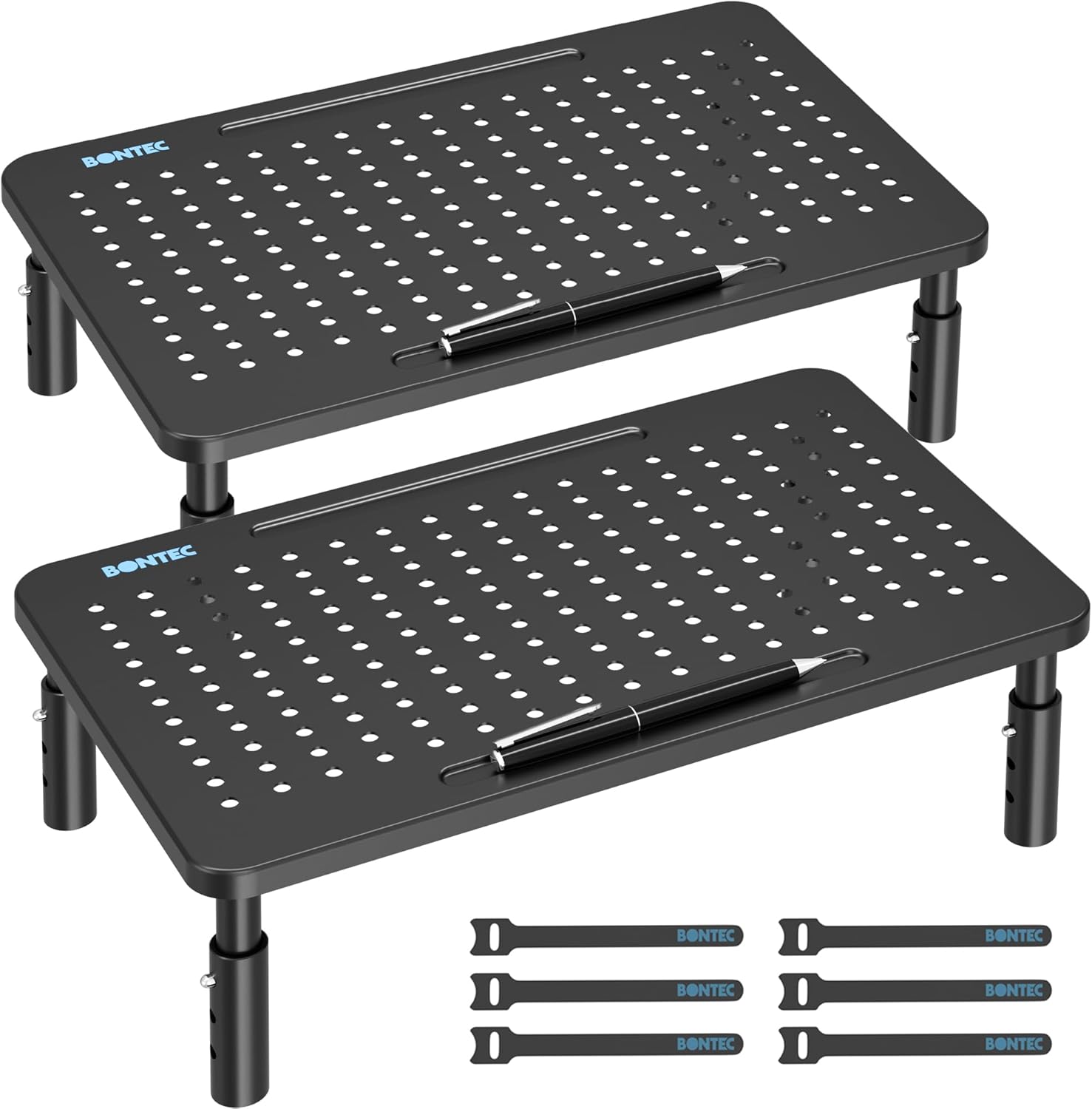
This set of two metal stands focuses on keeping your desk tidy. Each stand holds up to 44 pounds and adjusts to three heights. They also include a small pen slot and a cable management system.
The cable control clips fix a problem most stands ignore. When you raise a monitor, the ugly power and display cords hang down in plain sight. This stand gives you a way to pin those cords out of view.
Buyers say the stands feel very sturdy and do not slide around. People find the pen holder surprisingly useful. A few reviewers note that the lowest height setting might still be too tall for very short users.
This stand is perfect for a gaming setup or a home office that has too many mouse, keyboard, and speaker wires running everywhere.
Managing cables makes a huge difference in how a desk feels. The little clips on the back of this stand do a great job hiding the mess. The pen holder takes up a small bit of room on top, but it keeps your favorite pen right where you need it.
✅ Pros
- Built-in pen holder keeps your favorite tools close
- Includes simple cable ties to hide messy cords
- Rubber feet stop the stand from sliding around
- Metal frame supports heavy monitors easily
❌ Cons
- Pen holder takes up some space on the top surface
- Lowest height setting might still be too tall for some users
💬 What Customers Say
Customers appreciate the extra details like the cable ties and the pen slot. Buyers say the metal feels thick and durable. A few people mention that adjusting the legs takes a bit of wiggling to get the buttons to line up with the holes.
#10 Best for Heavy Setups — WESTREE Dual Stand

This extra-wide stand combines a rustic brown wood top with thick steel legs. It measures almost 36 inches long. The heavy-duty frame holds an impressive 149 pounds of equipment.
The massive weight capacity sets this stand apart. Most risers bend if you put two heavy monitors and a printer on them. This stand uses a thick steel frame that stays perfectly flat under extreme weight.
Reviewers love the warm wood look and the rock-solid feel. People say it easily holds two large monitors with room to spare. Some buyers note that the three wood panels sometimes have tiny gaps where they join together.
This stand looks and works best on a large executive desk holding two giant monitors and heavy desktop speakers.
This feels like real furniture rather than a cheap office accessory. The rustic wood adds warmth to a room full of cold plastic electronics. It sits at a fixed height, so make sure a five-inch lift is right for your eyes before you buy it.
✅ Pros
- Thick steel legs hold heavy dual-monitor setups easily
- Wide wooden top looks great in home offices
- Leaves a long open space underneath for large keyboards
- Does not bend or sag in the middle
❌ Cons
- Wood panels may have small gaps where they join together
- Height is fixed and cannot be adjusted up or down
💬 What Customers Say
Buyers are thrilled with how strong this stand is, often placing heavy televisions or dual screens on it without any sagging. People love the rustic wood finish. A few customers complain that the pre-drilled holes make the wood panels line up slightly unevenly.
Frequently Asked Questions
Do I need a freestanding riser or a clamp mount?
How high should my monitor stand be?
Will a glass monitor stand break easily?
Can I put a laptop on a monitor stand?
Conclusion
The ELIVED 2-Pack Riser stands out as the best overall choice. It gives you two separate platforms that hold heavy screens easily, and the push-button legs make it simple to find your perfect eye level.
If you want your desk to look like professional furniture, the WESTREE Dual Stand is a great alternative. The rustic wood and thick steel frame hold massive amounts of weight without bending, making it perfect for heavy dual-screen setups.