
Upgrading to a 4K monitor changes how you use your computer. But finding the right one takes time. Brands throw confusing letters and numbers at you, making it hard to know what actually matters for your desk.
Most buyers focus only on screen size and forget about things like eye strain, desk space, and how the monitor connects to their laptop. A cheap display might look fine on paper, but it can leave you with tired eyes and a mess of cables.
We checked the top options and read thousands of real buyer reviews to find out which monitors handle long workdays best. In this guide, we break down the 10 best 4K monitors for ultra-sharp displays and work so you can pick the right screen for your setup.
Quick Comparison
| # | Product | Rating | Reviews | Best For | Action |
|---|---|---|---|---|---|
| #1 | Dell S2725QS 27-Inch | 4.4 | 674 | Home Offices | View on Amazon |
| #2 | Dell S2725QC USB-C | 4.3 | 440 | Laptop Users | View on Amazon |
| #3 | Fyonix 32-Inch 4K | – | – | Creative Work | View on Amazon |
| #4 | Dell S3225QS 32-Inch | 4.4 | 314 | Large Screen | View on Amazon |
| #5 | LG 27UP650K-W | 4.4 | 324 | Ergonomic Setup | View on Amazon |
| #6 | LG 27US500-W 27-Inch | 4.4 | 3863 | Basic 4K | View on Amazon |
| #7 | LG 27UP850K-W | 4.4 | 324 | Single Cable Use | View on Amazon |
| #8 | LG 32UR550K-B | 4.4 | 347 | Media Viewing | View on Amazon |
| #9 | ASUS ROG Swift OLED | 4.5 | 453 | Premium Gaming | View on Amazon |
| #10 | ASUS TUF Gaming 27 | 4.5 | 3057 | Console Gaming | View on Amazon |
#1 Best for Home Offices — Dell S2725QS 27-Inch

This 27-inch Dell monitor fits perfectly on standard desks for people who stare at spreadsheets and documents all day.
The 120Hz refresh rate makes a big difference here. It keeps scrolling smooth and reduces eye strain when you read long web pages or large documents.
Buyers consistently praise the sharp text and bright colors. Many note how sturdy the base feels, though a few mention the screen can show a slight yellow tint out of the box.
It works best as a main display for a home office where you need clear text and built-in speakers for casual video calls.
I really like the ash white finish and thin bezels on this model. It looks much better than the standard black plastic monitors most offices use. The lack of a USB-C port is a small letdown, but the overall picture quality makes up for it.
✅ Pros
- Keeps scrolling smooth with a fast refresh rate
- Reduces blue light for eye comfort
- Stands firmly on your desk without wobbling
- Features clean white styling
❌ Cons
- Lacks a USB-C connection for modern laptops
- Factory color settings may need adjusting
💬 What Customers Say
Most buyers agree that this monitor makes reading text and working on spreadsheets much easier. Office workers who spend hours at their desks say the display reduces eye fatigue. A few users point out that you might need to adjust the color settings to get the best white balance, but they love the overall design.
#2 Best for Laptop Users — Dell S2725QC USB-C

This display suits laptop owners who want a clean, simple desk setup with minimal cables.
The USB-C connection handles video, data, and laptop charging all through one cord. This feature keeps your desk free of bulky power adapters.
Mac users strongly prefer this model for its easy connectivity and crisp text. Some users report issues with the USB-C port failing after a few months, but most praise the overall value.
It shines when you use a modern MacBook or PC laptop and want to dock it quickly at your desk.
Honestly, the single-cable setup is a massive benefit if you move your laptop around often. You get the same great 120Hz panel as the standard Dell version, but with much better connectivity. I would pick this over the standard version just for the USB-C power delivery.
✅ Pros
- Charges your laptop while displaying video
- Delivers sharp 4K text for easy reading
- Includes an adjustable stand for better posture
- Reduces blue light emissions
❌ Cons
- The USB-C port can be fragile over time
- Built-in speakers sound basic
💬 What Customers Say
People who use MacBooks and modern laptops rave about the single-cable setup. They mention the screen provides clear, crisp text that rivals much more expensive displays. A small number of buyers experienced connection drops with the USB-C port, but most say the monitor completely transformed their workspace.
#3 Best for Creative Work — Fyonix 32-Inch 4K

This large 32-inch monitor targets designers, video editors, and people who need high color accuracy for their work.
The IPS Black panel delivers deeper dark tones than standard screens. This helps you see fine details in shadows when editing photos or watching movies.
It works best in a creative studio or home office where you need plenty of screen space to view multiple windows at once.
The combination of a 32-inch size and 90W USB-C charging makes this a very capable workstation hub. I appreciate that it includes modern HDMI 2.1 ports, which gives you room to connect newer gaming consoles too. If you need maximum screen real estate for creative apps, this model offers a lot of useful tech.
✅ Pros
- Shows deep blacks and accurate colors
- Powers laptops with a 90W USB-C connection
- Provides a large 32-inch workspace
- Includes fast 1ms response time
❌ Cons
- Takes up a significant amount of desk space
- Requires a deep desk for comfortable viewing
#4 Best Large Display — Dell S3225QS 32-Inch

This 31.5-inch monitor fits people who want a massive screen for multitasking, watching media, and casual gaming.
The VA panel provides high contrast, making colors pop and dark scenes look deep and rich. This makes movies and games look fantastic.
Buyers love the sheer size and brightness of this display. Many mention how much easier it is to work without squinting. However, several users warn that the stand feels a bit loose and does not lock the heavy screen securely in place.
It excels in a home office where you split your screen into multiple windows instead of using two separate monitors.
A 32-inch 4K screen gives you an incredible amount of room to work. I like the separate power and menu buttons, which stops you from turning it off by mistake. The weak stand is a real drawback, so I strongly suggest mounting this monitor on a dedicated desk arm.
✅ Pros
- Offers a massive workspace for multiple windows
- Displays rich colors and deep contrast
- Features a high 120Hz refresh rate
- Includes separate power and menu buttons
❌ Cons
- The included stand feels unstable
- Takes up a lot of physical room on a desk
💬 What Customers Say
Customers frequently mention how the large screen size reduces eye strain during long workdays. They love the bright, vivid colors and the fast refresh rate. The most common complaint involves the stand, which many buyers say feels too weak for such a large and heavy display.
#5 Best Ergonomic Setup — LG 27UP650K-W

This 27-inch LG monitor works well for office workers who need to adjust their screen height frequently throughout the day.
The highly adjustable stand lets you raise, lower, tilt, and even pivot the screen sideways. This helps you find the perfect viewing angle to stop neck pain.
Users praise the sharp picture and easy setup process. They like the single joystick control for navigating menus. Some buyers note that the white plastic stand can show its age over time, and the 60Hz refresh rate feels basic compared to newer models.
It fits perfectly in a shared home office where different people need to adjust the screen height to match their chair.
I am a big fan of monitors that include proper ergonomic stands right out of the box. You do not get USB-C connectivity here, which means more cables on your desk. Still, the color accuracy and adjustability make it a very practical choice for daily computer work.
✅ Pros
- Allows full height and tilt adjustments
- Shows accurate colors for photo work
- Uses a simple joystick for menu settings
- Features an anti-glare matte screen
❌ Cons
- Does not include a USB-C port
- The 60Hz refresh rate falls behind faster models
💬 What Customers Say
Buyers consistently praise how easy it is to set up and adjust the stand. They appreciate the sharp text and the matte screen that blocks room reflections. A few users wish it had USB-C connectivity, but most agree it delivers excellent picture quality for daily office tasks.
#6 Best Basic 4K — LG 27US500-W 27-Inch
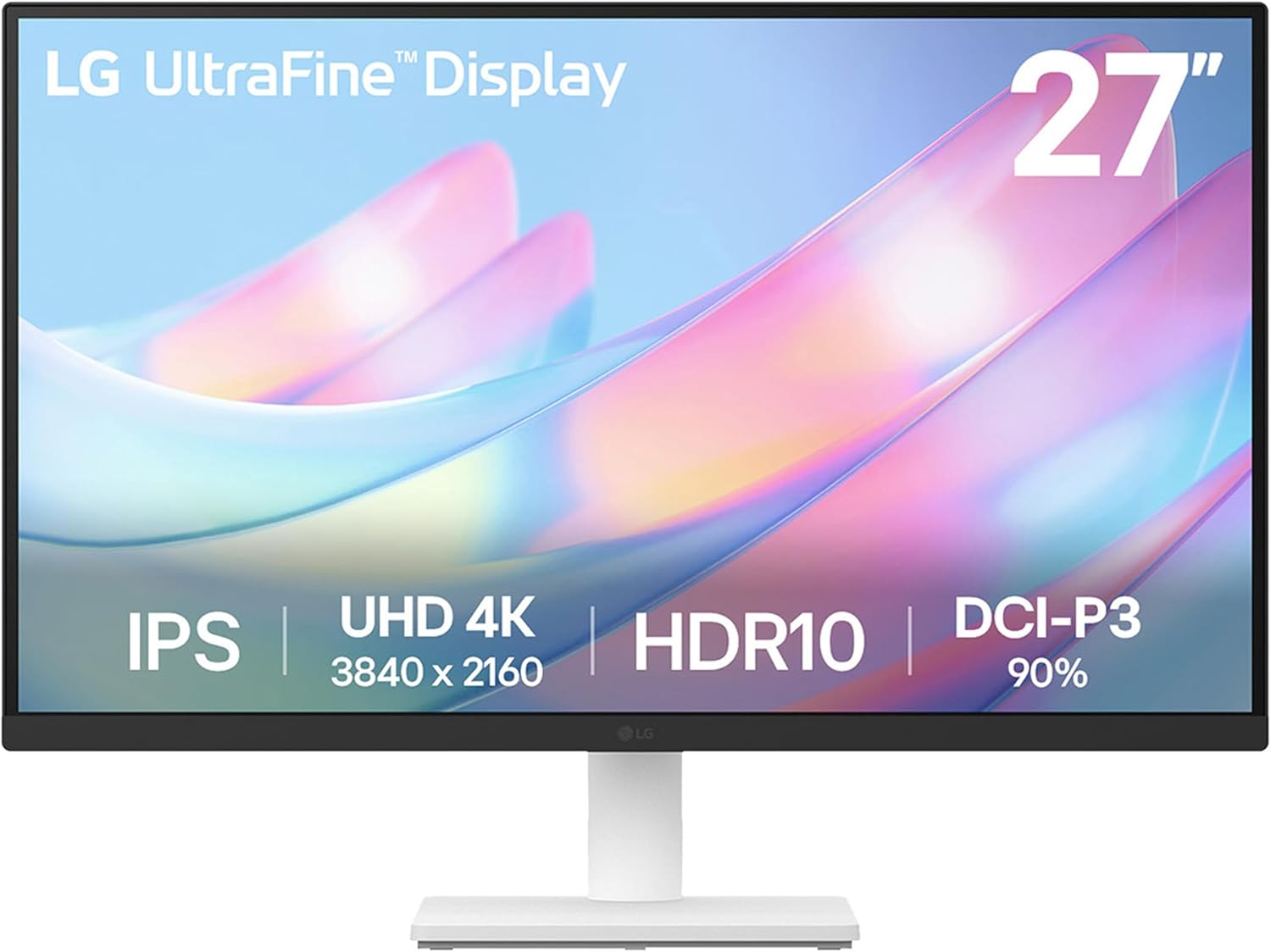
This display targets buyers who want clear 4K resolution for everyday tasks without paying for extra premium features.
The IPS panel keeps colors accurate and bright even when you look at the screen from an angle. This matters if you often show your screen to someone sitting next to you.
Customers appreciate the sharp image and reliable performance over long periods. Many use two of these side by side. Some reviewers point out that the stand only tilts and does not adjust for height.
It works great as part of a dual-monitor setup where you plan to use your own desk mount arms anyway.
If you just need a dependable 4K screen and nothing else, this LG gets the job done. The lack of height adjustment is annoying, but it keeps the overall cost down. I would recommend buying a separate monitor arm to get the most out of this display.
✅ Pros
- Delivers sharp 4K resolution for daily tasks
- Keeps colors accurate from wide angles
- Works great in a dual-monitor setup
- Features simple on-screen controls
❌ Cons
- The stand only tilts and cannot raise or lower
- Lacks built-in speakers
💬 What Customers Say
Most buyers agree this monitor provides a crisp, clear picture that makes reading and browsing enjoyable. People who use two of them together love the thin borders. The main complaint is the basic stand, which forces many users to buy a separate desk mount to get the right height.
#7 Best Single Cable Use — LG 27UP850K-W

This LG monitor is built for professionals who want a complete docking station built right into their screen.
The 90W USB-C port provides enough power to charge even large laptops while sending video and data. You can leave your laptop charger in your bag.
Reviewers love how this monitor handles multiple devices and clears cable clutter. They praise the vibrant colors and the built-in speakers. A few users mention the standard 60Hz refresh rate feels a bit slow for fast-paced gaming.
It shines on a minimalist desk where you want to plug in one cable and start working immediately.
This is the monitor I would pick for a modern MacBook Pro. The 90W power delivery is fantastic, and the built-in speakers save you from buying external ones. It hits the perfect balance of screen size, color quality, and workspace organization.
✅ Pros
- Charges powerful laptops with a 90W connection
- Includes decent built-in stereo speakers
- Features a fully adjustable ergonomic stand
- Displays vibrant and accurate colors
❌ Cons
- The 60Hz refresh rate is not ideal for fast gaming
- The white cables can look messy on a dark desk
💬 What Customers Say
Customers who use MacBooks love the single-cable USB-C connection that charges their laptop and handles video. They frequently mention the excellent color accuracy for photo editing. Some gamers note that the refresh rate is a bit slow, but office workers find it perfectly smooth for daily tasks.
#8 Best for Media Viewing — LG 32UR550K-B

This 32-inch black monitor suits people who want a large screen for watching movies, streaming shows, and doing light work.
The HDR10 support boosts the brightness and contrast of supported videos. This makes movies and high-quality YouTube videos look much more lifelike.
Buyers love using this large screen as a small TV replacement. They praise the sharp image and the decent built-in speakers. Some users warn that the input ports on the back can get blocked if you use certain wall mounts.
It works brilliantly in a small room or kitchen where you want to connect a streaming box like an Apple TV.
A 32-inch screen is right on the border between a monitor and a small television. I like that LG included an adjustable stand, which is rare for monitors this large. Just be careful if you plan to wall-mount it, as you might need special right-angle cables to make everything fit.
✅ Pros
- Provides a large viewing area for movies and shows
- Supports HDR for better video contrast
- Includes an adjustable stand for comfortable viewing
- Features built-in speakers
❌ Cons
- The rear ports can clash with standard wall mounts
- Takes up a lot of room on a standard desk
💬 What Customers Say
Most buyers agree this monitor works wonderfully for streaming video and replacing a small television. They appreciate the sharp picture and the decent sound from the speakers. A few users found the rear port placement frustrating when trying to mount the screen flush against a wall.
#9 Best Premium Gaming — ASUS ROG Swift OLED

This high-end display is built for serious gamers and media lovers who want the absolute best picture quality available.
The QD-OLED panel delivers perfect, inky black tones and incredibly vibrant colors. Because each pixel lights up on its own, games and movies look breathtakingly realistic.
Customers are blown away by the visual clarity and the ultra-fast 240Hz speed. They love the glossy screen finish. Some buyers note that you have to run regular pixel refresh cycles to protect the screen from burn-in over time.
It belongs in a high-end gaming setup or a dark room where you can truly appreciate the perfect contrast.
This is an incredible piece of technology. The glossy finish makes colors pop in a way that matte screens simply cannot match. Yes, you have to baby the OLED panel a bit to prevent burn-in, but the visual experience is so far ahead of standard monitors that it feels completely worth the extra care.
✅ Pros
- Displays perfect black tones and stunning colors
- Features a lightning-fast 240Hz refresh rate
- Uses a glossy finish for maximum image clarity
- Includes custom cooling to protect the panel
❌ Cons
- Requires regular maintenance to prevent screen burn-in
- Text can look slightly fuzzy from very close up
💬 What Customers Say
Gamers who buy this monitor say it completely changes how their favorite games look. They praise the glossy screen for making colors pop and the 240Hz speed for keeping fast action perfectly smooth. A few users mention the need to hide their taskbar and run screen savers to protect the OLED panel.
#10 Best for Console Gaming — ASUS TUF Gaming 27

This 27-inch monitor fits competitive gamers who play on a PC, PlayStation 5, or Xbox Series X.
It supports 4K gaming at 120Hz directly through the HDMI 2.1 ports. This lets modern consoles run games at their maximum possible speed and sharpness.
Buyers love how smooth their console games feel on this screen. They praise the fast response time and clear picture. Some users report that the monitor occasionally blinks on and off, and many dislike that the stand cannot move up or down.
It works perfectly on a dedicated gaming desk where you switch between a PC and a modern gaming console.
If you own a PS5 or Xbox Series X, you need HDMI 2.1 to get the most out of them. This monitor delivers that beautifully. I am disappointed by the rigid stand, which forces you to use books or a riser to get the screen to eye level. However, the actual gaming performance is top tier.
✅ Pros
- Runs console games at maximum speed via HDMI 2.1
- Keeps fast motion clear without blurring
- Displays rich colors for immersive gaming
- Features a fast 160Hz refresh rate for PC use
❌ Cons
- The stand cannot adjust for height
- Some units may experience screen blinking issues
💬 What Customers Say
Console gamers frequently mention how much this monitor improves their performance in fast-paced games. They love the sharp 4K resolution and the smooth motion. The most common complaints are about the lack of height adjustment on the stand and occasional signal dropouts on some units.
Frequently Asked Questions
Do I need a special cable for a 4K monitor?
Is a 32-inch monitor too big for a normal desk?
Does a higher refresh rate matter for office work?
What does USB-C power delivery mean?
Will a 4K monitor make my computer run slower?
Conclusion
The Dell S2725QC stands out as the best overall choice for most people. It combines a sharp 27-inch screen, a fast refresh rate, and excellent USB-C connectivity that keeps your desk organized.
If you want a larger screen for multitasking or watching media, the Dell S3225QS gives you a massive 32-inch workspace with rich colors. Picking the right monitor just comes down to measuring your desk and deciding how many cables you want to deal with.