
Finding the right gaming mouse is harder than it looks. Every brand promises the fastest sensor, the lightest weight, and the best switches. But most of those claims are just marketing. The real test happens when you actually hold the mouse for hours, click it thousands of times, and see how it tracks on your desk.
We looked past the hype to find out which mice actually perform. We checked the sensors, weighed the bodies, and read thousands of real buyer reviews. This guide will help you find a mouse that fits your hand size, matches your grip style, and tracks your movements perfectly.
Quick Comparison
| # | Product | Rating | Reviews | Best For | Action |
|---|---|---|---|---|---|
| #1 | Logitech G305 Lightspeed | 4.6 | 37,517 | Budget Wireless | View on Amazon |
| #2 | Logitech G502 Hero | 4.6 | 57,508 | Custom Weight | View on Amazon |
| #3 | RK Royal Kludge MG5 | 4.1 | 12 | Fast Polling | View on Amazon |
| #4 | Logitech G PRO X 2 | 4.5 | 2,003 | Esports Pros | View on Amazon |
| #5 | Redragon M612 Predator | 4.6 | 9,933 | Budget Wired | View on Amazon |
| #6 | Razer Basilisk V3 | 4.6 | 9,701 | Ergonomic Comfort | View on Amazon |
| #7 | Razer DeathAdder Essential | 4.5 | 15,529 | Simple Setup | View on Amazon |
| #8 | Logitech G PRO X | 4.5 | 11,321 | Lightweight Wireless | View on Amazon |
| #9 | Razer Viper V3 Pro | 4.6 | 1,945 | Competitive Play | View on Amazon |
| #10 | Redragon M908 Impact | 4.4 | 11,345 | MMO Gaming | View on Amazon |
#1 Best Budget Wireless — Logitech G305 Lightspeed

This mouse is for gamers who want a fast wireless connection without spending a lot. It has a classic shape that fits most hand sizes easily.
The HERO sensor is the most important part here. It tracks fast hand movements up to 12,000 DPI with zero lag. This means your cursor goes exactly where you want it to go, right when you move your hand.
Buyers mention how long the battery lasts. Many say they go months without changing the single AA battery. A few users note that the side buttons are easy to press by accident.
This mouse shines as a travel companion. The small size and built-in receiver storage make it easy to throw in a laptop bag for gaming on the go.
Honestly, the battery life is what stands out most. Getting up to 250 hours of play from one standard battery is rare. I would recommend this to anyone who hates charging cables. I would skip it if you prefer a very light mouse, since the battery adds extra weight.
✅ Pros
- Wireless connection has no lag
- Battery lasts up to 250 hours
- Stores the USB receiver inside
- Fits nicely in small laptop bags
❌ Cons
- Runs on a disposable AA battery
- Heavier than modern ultra-light mice
💬 What Customers Say
Most buyers agree that the battery life is outstanding. Gamers love how fast and reliable the wireless connection feels during matches. Some users mention the smooth glide across different mouse pads. A few people note that the smooth plastic can feel a bit slippery if your hands sweat.
#2 Best Custom Weight — Logitech G502 Hero

This wired mouse suits players who like to customize exactly how their gear feels. It has a larger, shaped design that works best for right-handed users.
The adjustable weight system makes the biggest difference. You get five small metal weights that you can place inside the bottom of the mouse. This lets you make the mouse heavier on one side or heavier overall to match how you play.
People who buy this love the shape and the scroll wheel. Many reviewers praise how comfortable it stays during long sessions. However, some buyers report that the Logitech software is confusing to set up at first.
It works best for games where you need many quick actions. The 11 programmable buttons give you fast access to items, spells, or building tools right under your thumb.
I really like the free-spinning scroll wheel. It makes reading long web pages outside of games much faster. I would recommend this to players with larger hands who like a heavy, planted feel. I would not pick this if you play fast-paced shooters where a light mouse helps you aim quicker.
✅ Pros
- Tracks movements up to 25,600 DPI
- Includes five removable tuning weights
- Scroll wheel can spin freely or click
- Has 11 buttons you can program
❌ Cons
- The setup software takes time to learn
- Might feel too heavy for some players
💬 What Customers Say
Buyers consistently praise how comfortable this mouse feels for larger hands. Many gamers love the extra buttons and the heavy, solid build quality. The free-spinning scroll wheel gets a lot of positive comments for daily computer use. On the downside, several users mention that the customization software is frustrating to learn.
#3 Best Ultra-Fast Polling — RK Royal Kludge MG5

This lightweight wireless mouse is for competitive players who want the fastest possible response times. It features a unique shape that sits lower on the left side.
The true 8000Hz polling rate is the main draw here. It reports your hand movements to the computer eight times faster than a standard gaming mouse. This makes tracking look and feel incredibly smooth on fast monitors.
This mouse works best in high-speed shooting games. The 56-gram weight makes it easy to stop and start your aim instantly without tiring your wrist.
The web-based setup is a huge plus. Most mice force you to download heavy background software, but this one lets you change settings right in your browser. I would recommend this to players with fast monitors who play fast games. I would pass on it if you only play slow strategy games, where the high polling rate does not matter much.
✅ Pros
- Extremely light at just 56 grams
- Reports movements 8 times faster than normal
- Connects via wireless, Bluetooth, or cable
- Changes settings through a web browser
❌ Cons
- High polling rate drains the battery faster
- Shape takes time to get used to
#4 Best for Esports — Logitech G PRO X Superlight 2

This premium wireless mouse is for serious competitive players. It has a simple, safe shape that works well with almost any grip style.
The combination of the 60-gram weight and the HERO 2 sensor changes how you play. The sensor tracks up to 44,000 DPI, and the light body lets you flick your wrist quickly with almost no effort.
Gamers who use this praise the battery life and the smooth glide. Many buyers say the click feel is a big upgrade from older models. A common complaint is that the background software can be hard to use.
This mouse shines in competitive matches where every millisecond counts. The smooth feet and light weight help you track moving targets accurately.
The battery life really impresses me here. Getting 95 hours from a mouse this light, while running at a high polling rate, is excellent. I would recommend this to anyone who plays shooters seriously. I would look elsewhere if you want extra buttons, since this only has the basic five.
✅ Pros
- Weighs only 60 grams for fast movement
- Battery lasts up to 95 hours
- Glides smoothly on zero-additive feet
- Charges quickly with a USB-C cable
❌ Cons
- Setup software can cause headaches
- Very few extra buttons
💬 What Customers Say
Most buyers agree that the low weight makes a massive difference in fast games. Gamers love how long the battery lasts and how crisp the clicks feel. Many reviewers mention that it glides perfectly across their mouse pads. A few users point out that the setup software is annoying to deal with, but they still love the mouse itself.
#5 Best Budget Wired — Redragon M612 Predator

This wired mouse is for players who want a lot of features without spending much money. It offers a comfortable grip and bright lights for your desk.
The 11 programmable buttons give you a lot of control. You can set the rapid-fire button or the side buttons to handle complex game actions, so your keyboard hand can do less work.
Buyers are very surprised by the build quality. Many say it feels like a much more expensive mouse. A few users mention that the main click buttons are highly sensitive and easy to press by accident.
It works best for players who enjoy different types of games. You can switch the tracking speed instantly using the top buttons when you move from a shooter to a strategy game.
The textured rubber grip on the side is a great touch. It keeps your thumb locked in place even if your hands get warm. I would recommend this to casual gamers building their first setup. I would skip it if you play games where an accidental click causes big problems.
✅ Pros
- Includes 11 buttons you can program
- Features a dedicated rapid-fire button
- Rubber side grip stops your thumb from slipping
- Changes tracking speed instantly
❌ Cons
- Main buttons are very sensitive
- Software looks a bit old-fashioned
💬 What Customers Say
Across thousands of reviews, the thing people mention most is the amazing value. Buyers love the textured side grips and the extra rapid-fire button. Many gamers report that it fits larger hands very comfortably. A few users note that the left and right click buttons are so sensitive that resting your fingers too heavily causes accidental clicks.
#6 Best Ergonomic Comfort — Razer Basilisk V3

This wired mouse is designed for people who play or work at their desk all day. It has a sculpted shape with a wide rest for your thumb.
The smart scroll wheel is the standout feature. You can set it to click firmly for changing weapons in a game, or let it spin freely to fly down long web pages instantly.
Customers love how comfortable the shape is. Many say the switches feel incredibly fast and satisfying to click. Some buyers mention that the Razer software takes up too much space on their computer.
This mouse is perfect for a mixed-use computer. It performs perfectly in games, but the comfortable shape and fast scroll wheel make it great for office work too.
The thumb rest makes a massive difference during long sessions. It stops your thumb from dragging on the mouse pad, which reduces wrist pain. I would recommend this to anyone who uses the same computer for work and gaming. I would not pick it if you want a wireless desk setup.
✅ Pros
- Thumb rest keeps your hand comfortable
- Scroll wheel can spin freely or click
- Tracks accurately up to 26,000 DPI
- Bright lighting syncs with many games
❌ Cons
- Requires a cable connection
- Background software feels bloated
💬 What Customers Say
Buyers consistently praise the thumb rest, saying it prevents hand pain during long gaming sessions. The free-spinning scroll wheel is a huge hit for scrolling through web pages. Gamers love the fast, crisp clicks from the main buttons. The main complaint that comes up often is that the required Razer software is annoying and takes up memory.
#7 Best Simple Setup — Razer DeathAdder Essential
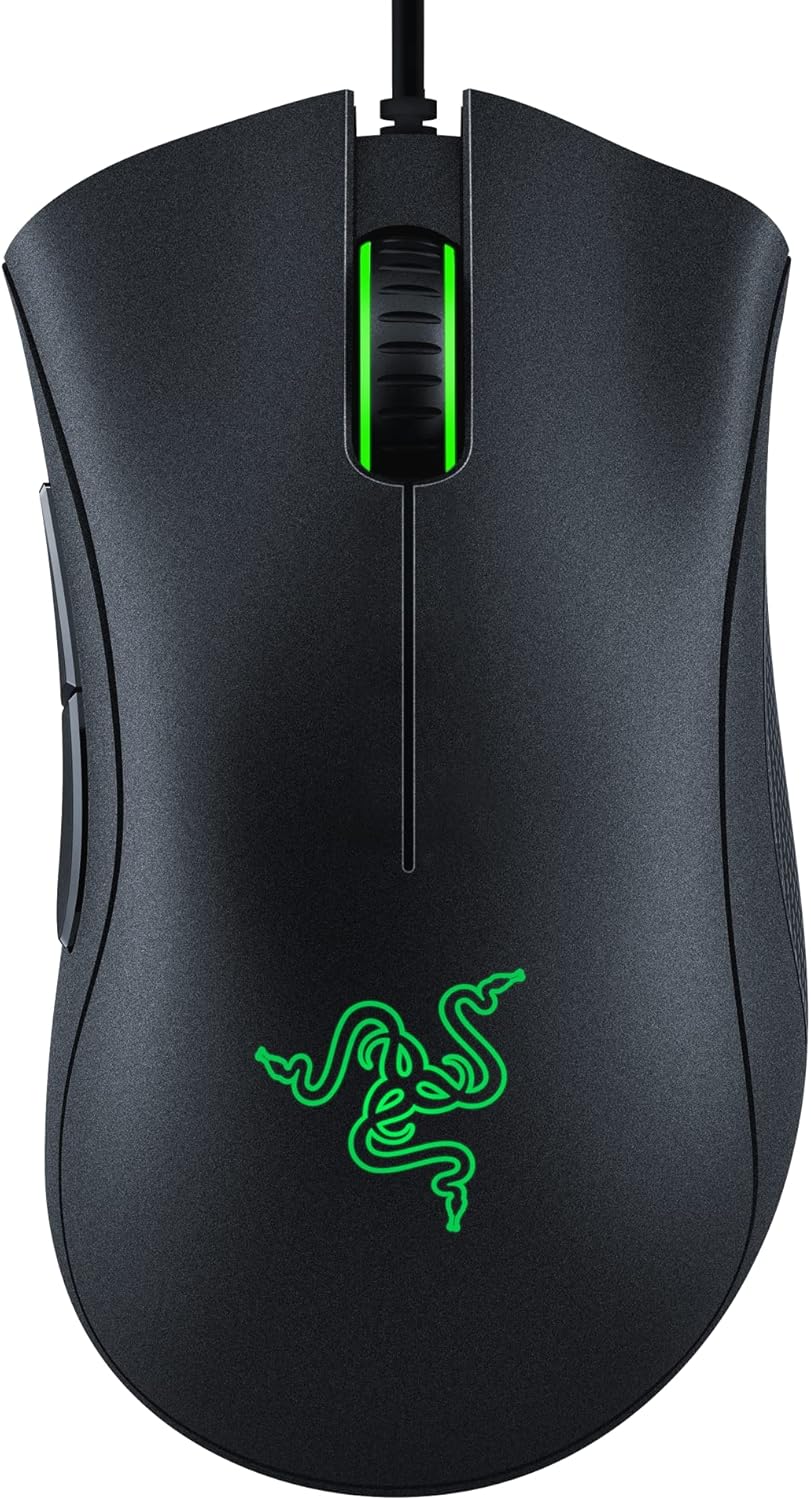
This wired mouse is for gamers who want classic performance without complicated extras. It keeps things simple with a proven, comfortable shape.
The high-precision 6,400 DPI sensor handles all the important work. It gives you smooth, reliable tracking for aiming without needing confusing software menus to get it right.
Buyers love the large, comfortable shape. Many people buy this mouse again when their old one finally wears out. A few users report that the scroll wheel can start acting up after a year of heavy use.
It shines in everyday gaming setups where reliability matters most. You just plug the cable into your computer and start playing right away.
I really appreciate how straightforward this mouse is. It does not try to do too much, which makes it very reliable. I would recommend this to players with larger hands who just want a mouse that works. I would pass on it if you want to match the colors of your other desk lights, since this only glows green.
✅ Pros
- Classic shape fits larger hands well
- Rubber grips keep your fingers steady
- Plugs in and works instantly
- Very easy to grip and lift
❌ Cons
- Only lights up in green
- Scroll wheel may wear out over time
💬 What Customers Say
Most buyers agree that the shape is incredibly comfortable, especially for larger hands. Gamers love how simple it is to plug in and start using right away. Many reviewers praise the solid click feel and the textured scroll wheel. A complaint that comes up a few times is that the scroll wheel can sometimes break or scroll backwards after heavy use.
#8 Best Lightweight Wireless — G PRO X Superlight

This wireless mouse is for players who want high-end performance in a very light package. It is the older version of the Superlight 2, offering great value for serious players.
The 63-gram weight makes the biggest difference in how you play. The light body lets you move the mouse faster and stop it exactly where you want, which helps you hit more targets.
Reviewers love how natural the mouse feels in the hand. Many gamers say it completely removed their wrist fatigue. However, some buyers note that the side buttons feel a bit soft compared to the main clicks.
This mouse works best in competitive shooting games. The lack of a cable and the smooth feet let you make large, fast arm movements without anything catching on your desk.
The battery life holds up really well, even compared to newer models. It wakes up from sleep instantly, so you never miss a moment. I would recommend this to players who want pro-level gear but do not need the absolute newest model. I would skip it if you rely heavily on crisp side buttons for your games.
✅ Pros
- Weighs under 63 grams for fast sweeps
- Wireless connection stays fast and stable
- Glides smoothly on large feet
- Battery lasts a long time
❌ Cons
- Side buttons feel a little soft
- Uses an older charging cable style
💬 What Customers Say
Gamers who use this daily report that the low weight completely changes how fast they can aim. Buyers love the smooth glide and the reliable wireless connection. Many people say the battery lasts much longer than they expected. The only common complaint is that the two side buttons feel a bit mushy when pressed.
#9 Best for Competitive Play — Razer Viper V3 Pro

This premium wireless mouse is for dedicated players who want top-tier tracking technology. It features a smooth, symmetrical shape that works well for claw and fingertip grips.
The Gen-2 optical sensor is incredibly advanced. It tracks your hand movements perfectly across almost any surface, including glass desks, so your aim never stutters during a match.
Buyers are amazed by how smooth the tracking feels. Many gamers say the low weight and fast polling rate make the mouse feel faster than a wired one. A few users mention that the fast polling setting drains the battery quickly.
This mouse is built for intense tournament play. The optical switches register your clicks instantly, making sure your shots fire exactly when you press the button.
The coating on this mouse is excellent. It feels soft but grips your hand well, even when things get tense. I would recommend this to highly competitive players looking for every possible advantage. I would not recommend it to players who rest their whole palm on the mouse, as the shape is a bit small for that.
✅ Pros
- Tracks perfectly even on glass surfaces
- Weighs only 54 grams
- Main buttons click instantly with no delay
- Coating feels great and grips well
❌ Cons
- High polling rate drains battery fast
- Shape does not suit palm grips well
💬 What Customers Say
Most buyers agree that the tracking speed and low weight make aiming feel effortless. Gamers love the smooth coating and the crisp, fast clicks. Many reviewers mention that the wireless connection is completely flawless. The main thing people warn about is that turning the polling rate up to the maximum setting will drain the battery very fast.
#10 Best for MMO Games — Redragon M908 Impact

This wired mouse is for players who need quick access to many different game commands. It features a wide body with a large grid of buttons on the side.
The 12 programmable side buttons change how you play complex games. Instead of stretching your fingers across a keyboard to cast spells or use items, you can do it all with your right thumb.
Customers love how much time the side buttons save them. Many buyers also use it for office work to trigger keyboard shortcuts. Some users mention that the right-click button can feel stiff or stick after a few months.
This mouse shines in large multiplayer games where you have dozens of skills to manage. You can program each button to a specific spell, making combat much faster.
I really like the included weight tuning set. Being able to make the mouse heavier or lighter helps you find the perfect balance. I would recommend this to MMO players and people who use heavy editing software. I would skip it if you play fast shooters, as the wide shape makes quick lifting difficult.
✅ Pros
- Features 12 buttons right under your thumb
- Includes small weights to change how it feels
- Saves five different button profiles
- Wide shape supports the whole hand
❌ Cons
- Right-click button can wear out early
- Wide shape is hard to lift quickly
💬 What Customers Say
Buyers who play complex games say the side buttons make a massive difference in their speed. Many people love how comfortable the wide shape feels for resting the whole hand. Users also praise the software for making it easy to set up shortcuts. A few buyers report that the right-click button started acting up after a few months of heavy use.
Frequently Asked Questions
Do I really need a wireless gaming mouse?
What does DPI mean for gaming?
Are ultra-light mice better for everyone?
Why do some mice have so many buttons on the side?
Conclusion
The Logitech G PRO X Superlight 2 stands out as the best overall pick. It combines an incredibly light body with a battery that lasts for weeks, making it perfect for players who want top-tier performance without a cable getting in the way.
If you want a comfortable shape with plenty of buttons, the Razer Basilisk V3 is a fantastic alternative. It offers a great thumb rest and a smart scroll wheel that makes both gaming and daily computer work feel much better. Whichever you choose, focus on the shape that fits your hand best.