
.msr-product-section{background:#ffffff;border:1px solid #e0e0e0;border-radius:8px;padding:24px;margin-bottom:30px;font-size:16px;font-family:inherit;}
.msr-product-heading{color:#1a1a2e;font-family:inherit;margin-top:0;font-size:1.4em;display:flex;align-items:center;gap:10px;}
.msr-rank{background:#e47911;color:#fff;border-radius:50%;width:32px;height:32px;display:inline-flex;align-items:center;justify-content:center;font-size:14px;font-weight:700;flex-shrink:0;}
.msr-product-inner{display:flex;gap:20px;align-items:flex-start;flex-wrap:wrap;margin-bottom:16px;}
.msr-product-img-wrap{flex-shrink:0;width:180px;}
.msr-product-img{width:100%;height:auto;border:1px solid #eee;border-radius:4px;}
.msr-product-content{flex:1;min-width:200px;}
.msr-rating{margin-bottom:10px;font-size:14px;}
.msr-stars{color:#e47911;font-size:18px;}
.msr-rating-num{font-weight:700;color:#1a1a2e;}
.msr-review-count{color:#888;font-size:13px;}
.msr-pros-cons{display:flex;gap:14px;margin:16px 0;flex-wrap:wrap;}
.msr-pros,.msr-cons{flex:1;min-width:160px;border-radius:5px;padding:14px;}
.msr-pros{background:#e8f8f0;}
.msr-cons{background:#fef0f0;}
.msr-pros h4,.msr-cons h4{margin:0 0 8px;font-size:14px;}
.msr-pros ul,.msr-cons ul{margin:0;padding-left:18px;}
.msr-pros li,.msr-cons li{margin-bottom:4px;font-size:13px;}
.msr-review-highlights{background:#f9f9f9;border-left:3px solid #e47911;padding:12px 16px;margin:14px 0;border-radius:0 4px 4px 0;font-size:14px;}
.msr-verdict{background:#fff8e1;border-radius:5px;padding:12px 16px;margin:14px 0;font-size:14px;}
.msr-cta{margin-top:16px;}
.msr-btn{display:inline-block;background:#e47911;color:#ffffff;padding:12px 28px;border-radius:6px;text-decoration:none;font-weight:700;font-size:15px;transition:opacity .2s;}
.msr-btn:hover{opacity:.88;color:#ffffff;}
.msr-table-wrap{margin:30px 0;}
.msr-section-title{color:#1a1a2e;font-family:inherit;}
.msr-table-scroll{overflow-x:auto;-webkit-overflow-scrolling:touch;}
.msr-table{width:100%;border-collapse:collapse;font-size:14px;}
.msr-table th{background:#1a1a2e;color:#ffffff;padding:11px 14px;text-align:left;white-space:nowrap;}
.msr-table td{padding:10px 14px;border-bottom:1px solid #dddddd;}
.msr-table tr:nth-child(even) td{background:#f8f9fa;}
.msr-table tr:hover td{background:#f0f4ff;}
.msr-faq-item{border-bottom:1px solid #eee;padding:14px 0;}
.msr-faq-q{margin:0 0 8px;font-size:15px;color:#1a1a2e;}
.msr-faq-a{font-size:14px;color:#333333;}
@media(max-width:600px){
.msr-product-inner{flex-direction:column;}
.msr-product-img-wrap{width:100%;max-width:200px;margin:0 auto;}
.msr-pros-cons{flex-direction:column;}
.msr-table th,.msr-table td{padding:8px 10px;font-size:13px;}
}
Finding the right gaming microphone is harder than it looks. Every brand promises studio-quality sound and perfect noise cancellation. But most of those claims fall apart the second you start typing on a mechanical keyboard or your computer fans spin up.
Most players buy a sensitive microphone, place it right next to their keyboard, and end up annoying their entire team with loud clicking sounds. The real differences between these microphones only show up when real people use them in messy, noisy bedrooms and living rooms.
We went through the top options and read thousands of real buyer reviews to find out the truth. In this guide, you will learn which microphones block out background noise, which ones survive daily use, and which ones give you the clearest voice chat for your setup.
Quick Comparison
| # | Product | Rating | Reviews | Best For | Action |
|---|---|---|---|---|---|
| #1 | COCONISE Gaming Mic | 4.3 | 5089 | Budget Starter | View on Amazon |
| #2 | FIFINE AmpliGame AM8 | 4.6 | 10341 | Dual Connection | View on Amazon |
| #3 | TONOR TC310+ Mic Kit | 4.5 | 1447 | Boom Arm Kit | View on Amazon |
| #4 | MAONO DGM20S Kit | 4.5 | 5276 | Noise Cancellation | View on Amazon |
| #5 | GUEVWES USB Mic | 4.3 | 810 | Retro Style | View on Amazon |
| #6 | FIFINE AM8T Kit | 4.6 | 4977 | Future Proof | View on Amazon |
| #7 | Logitech Blue Yeti | 4.6 | 60542 | Overall Quality | View on Amazon |
| #8 | MRSDY Gaming Mic | 4.5 | 890 | Compact Stand | View on Amazon |
| #9 | FIFINE AmpliGame A6V | 4.6 | 14022 | Lightweight Use | View on Amazon |
| #10 | ONIKUMA Mini Mic | 4.5 | 265 | Space Saver | View on Amazon |
#1 Best Starter Pick — COCONISE Gaming Mic

This microphone works well for anyone setting up their first streaming space. It gives you clear audio right out of the box without any confusing software.
The touch mute button makes the biggest difference during daily use. You just tap the top of the microphone to cut your audio, and the lights turn off so you know it worked.
Buyers mention how clear their voice sounds compared to old gaming headsets. However, a few people notice a quiet static sound developing after a few months of daily use.
It works best for players who need a quick upgrade for Discord calls. The heavy metal base stops the microphone from falling over when you bump your desk.
Honestly, the built-in pop filter is what stands out most. Many starter microphones skip this part, leaving your voice full of harsh air sounds. This one catches those sounds easily. I recommend this to new streamers, though heavy users might want something that lasts longer.
✅ Pros
- Clears up background noise easily
- Mutes your audio with a quick tap
- Stands firmly on your desk
❌ Cons
- You cannot turn the lights completely off
- Some units develop static after a few months
💬 What Customers Say
Most buyers agree that this microphone sounds surprisingly good right out of the box. Gamers who switched from standard headsets say their friends noticed the clear audio immediately. A few users complain that they cannot turn off the bright lights, and some report a faint static noise appearing after months of use.
#2 Best Dual Connection — FIFINE AmpliGame AM8

This microphone suits players who want to upgrade their audio over time. You can plug it directly into your computer today, or connect it to a professional mixer later.
The dynamic recording style matters most here. It naturally ignores background sounds and focuses only on the voice coming from directly in front of it.
Customers love how well it hides the sound of loud mechanical keyboards. A few buyers note that the USB connection sometimes drops and needs a quick replug to work again.
It shines in noisy rooms with fans running or people talking nearby. You can play late at night without annoying your team with background noise.
Honestly, the upgrade path makes this a great choice. You get simple USB power right now, and you can switch to an XLR cable when you want better quality. I pick this for anyone who plans to take streaming seriously.
✅ Pros
- Connects to both simple and advanced setups
- Blocks out loud keyboard clicks naturally
- Lets you hear yourself talk in real time
❌ Cons
- The USB cord occasionally needs to be plugged back in
- Picks up distant sounds if you turn the dial too high
💬 What Customers Say
Across thousands of reviews, the thing people mention most is how well it blocks out background noise. Gamers love that their friends no longer hear their keyboard clicks or computer fans. A few buyers experienced minor issues with the USB connection dropping, but overall, users feel the sound quality rivals much bigger brands.
#3 Best Boom Arm Kit — TONOR TC310+ Mic Kit
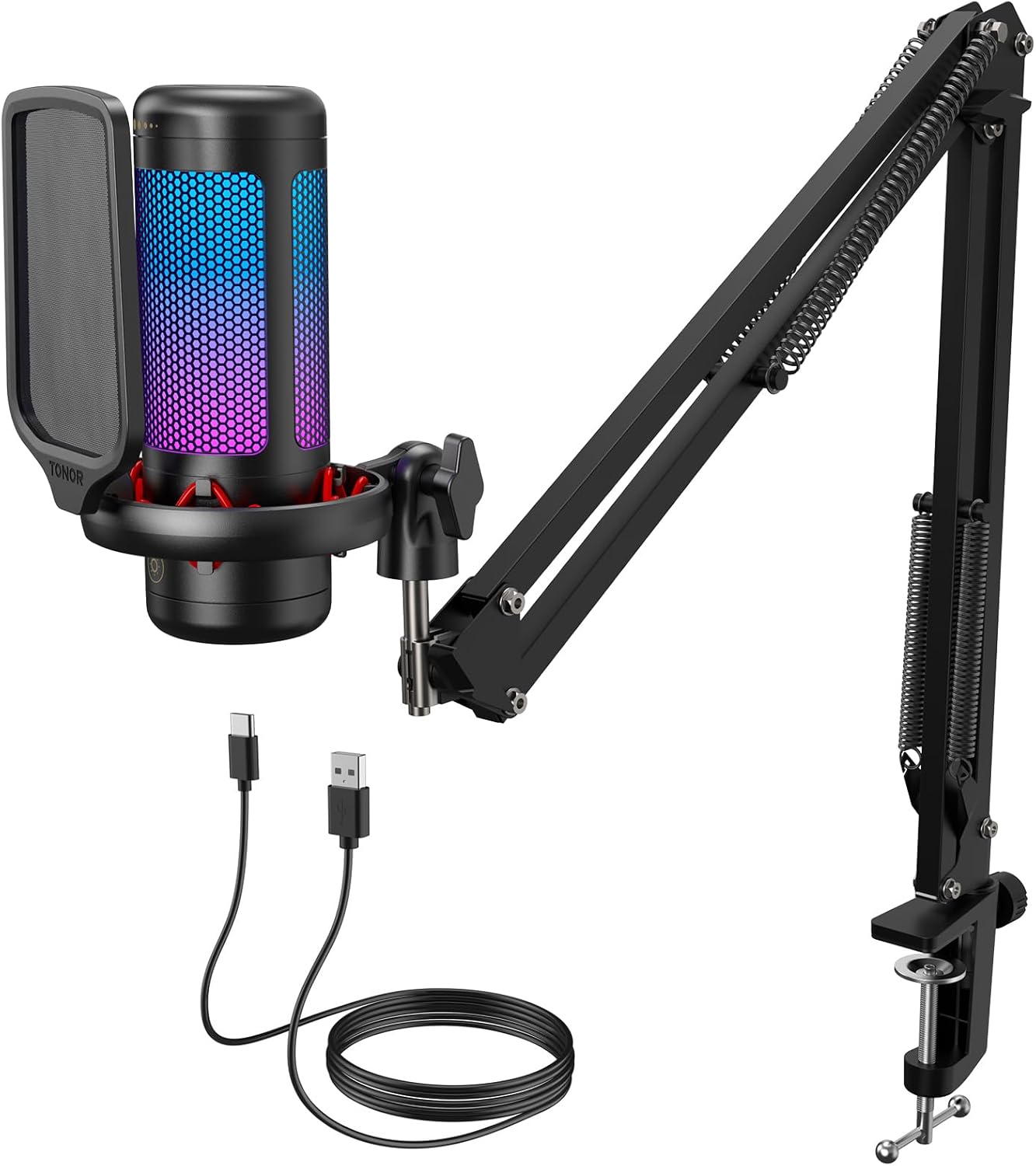
This kit works well for players who want their microphone off their desk. It includes an adjustable arm that clamps right to the edge of your table.
The adjustable metal arm makes the biggest daily difference. You can pull the microphone close to your mouth when you talk, and push it away when you finish.
Buyers often mention how fast their friends notice the audio upgrade. Some users report that the lights occasionally turn on by themselves after the computer goes to sleep.
This setup works best for players with limited desk space. The floating arm keeps your mouse area completely clear for big hand movements.
Honestly, getting a full arm setup in one box saves a lot of hassle. The arm holds steady and does not drift down while you play. I recommend this to players who want a clean, floating setup.
✅ Pros
- Clears up your voice chat instantly
- Saves valuable space on your desk
- Mutes quickly with a tap on top
❌ Cons
- The lights sometimes turn on by themselves
- The arm holds the microphone at a slight angle
💬 What Customers Say
Gamers who use this daily report that the arm stand saves a huge amount of desk space. Buyers love how clear their voice sounds in game chat. A common complaint is that the lighting can act up, sometimes turning on randomly, but most people feel the arm and sound quality make up for it.
#4 Best Noise Cancellation — MAONO DGM20S Kit

This microphone suits players who play in loud environments. It comes with a full arm stand and built-in technology to hide room noise.
The active noise cancellation feature changes everything. You just press one button, and the microphone digitally removes fan noise and typing sounds from your audio.
Customers praise how well it blocks out background chaos. A few buyers mention the audio records a bit quietly unless you turn the volume dial all the way up.
It works perfectly for players who share a room or play near a loud air conditioner. Your team only hears your voice, not the room.
Honestly, the included shock mount adds a lot of value. It stops the microphone from picking up loud thumps when you bump your desk. I recommend this to anyone tired of their friends complaining about background noise.
✅ Pros
- Blocks out loud computer fans and typing
- Comes with a sturdy metal boom arm
- Lets you check your own volume easily
❌ Cons
- Records a bit quietly compared to other models
- The power button instructions confuse some users
💬 What Customers Say
Parents and gamers alike love how well this microphone blocks out background noise. Buyers mention the arm is sturdy and easy to adjust. Some users warn that the microphone volume starts out a bit low, requiring you to turn the dial up to be heard clearly.
#5 Best Retro Style — GUEVWES USB Mic

This microphone appeals to players who want a unique look on their desk. It features a classic, old-school radio design mixed with modern lights.
The built-in echo and reverb modes stand out most. You can change how your voice sounds directly on the microphone without downloading any extra software.
Buyers love the crisp sound and the fun voice effects. However, some users note the physical unit takes up more desk space than they expected.
It works best for casual streamers who want to entertain their chat with different voice echoes and light colors.
Honestly, the physical volume knob makes quick adjustments very easy. Many modern microphones hide this in software, but having a real dial helps a lot mid-game. I pick this for someone who cares about how their setup looks on camera.
✅ Pros
- Looks great on a desk with its classic shape
- Picks up quiet voices easily
- Offers fun echo effects for streaming
❌ Cons
- Takes up more desk space than standard models
- Requires software tweaks to block room noise
💬 What Customers Say
Most buyers agree that the retro design looks fantastic on a desk. Streamers enjoy playing with the built-in echo effects during broadcasts. A few reviewers mention that the microphone is quite large and picks up background noise easily if you do not adjust your computer settings.
#6 Best Future Proof — FIFINE AM8T Kit

This complete kit fits players who want broadcast-quality sound. It includes a dynamic microphone and a metal arm stand to keep your desk clear.
The dynamic capsule does the heavy lifting here. It naturally rejects sounds coming from the sides and back, keeping your voice front and center.
Customers frequently mention how rich and professional their voice sounds. A few buyers feel the included arm moves a little stiffly compared to premium stands.
This setup shines during intense gaming moments. You can smash your keyboard and yell, and the microphone keeps the audio clear without hurting ears.
Honestly, the dual connection option makes this a smart buy. You can start with a simple USB cord and upgrade to an audio mixer later. I suggest this to anyone starting a YouTube channel.
✅ Pros
- Grows with you from simple USB to an advanced mixer
- Blocks out loud keyboards naturally
- Keeps cords tidy with the boom arm
❌ Cons
- The included arm feels slightly stiff when moving
- Picks up desk vibrations if you hit the table hard
💬 What Customers Say
Gamers who use this daily report that the audio quality sounds incredibly professional. Buyers love that it ignores background noise naturally without needing extra software. The main complaint is that the arm stand feels a bit stiff to move, but most agree it stays exactly where you put it.
#7 Best Overall — Logitech Blue Yeti

This classic microphone suits serious content creators and gamers. It remains one of the most popular choices for voice recording around the world.
The four different recording patterns make it incredibly useful. You can set it to record just you, or flip a switch to record the whole room for a group podcast.
Buyers consistently praise the rich, broadcast-quality tone it gives their voice. However, many users warn that it picks up every single bump and keyboard click if placed on the same desk.
It works best in a quiet room mounted on a separate arm. When set up right, it delivers studio-level voice recordings.
Honestly, the sound quality still holds up against newer models. The heavy metal stand feels great, but it does transfer desk noise straight into the audio. I recommend this to players willing to buy a separate arm and pop filter.
✅ Pros
- Captures rich and natural voice tones
- Offers four different recording directions
- Sits firmly on any desk
❌ Cons
- Picks up keyboard clicks and desk bumps very easily
- Takes up a lot of room on your desk
💬 What Customers Say
Across thousands of reviews, the thing people mention most is the rich, professional tone of the recordings. Buyers love how solid and heavy the microphone feels. The most common complaint is that it picks up absolutely everything in the room, especially keyboard clicks and mouse movements.
#8 Best Compact Stand — MRSDY Gaming Mic

This small microphone fits players who lack desk space. It packs standard gaming features into a very short, compact body.
The real-time monitoring jack helps you play better. You plug your headphones right into the microphone to hear exactly how you sound to your team.
Customers like how easy it is to plug in and use immediately. Some buyers complain that it struggles to block out loud pets and background noise in busy houses.
It works best for players using a laptop on a small desk. It tucks neatly out of the way while keeping the mute button close by.
Honestly, the size makes it very convenient. It does not block your monitor like taller microphones do. I pick this for a casual player, but competitive players might want better background noise blocking.
✅ Pros
- Fits easily on crowded gaming desks
- Lets you monitor your audio with headphones
- Mutes fast with a simple button
❌ Cons
- Struggles to block loud background sounds like pets
- Output volume can be too quiet for some users
💬 What Customers Say
Buyers appreciate how little space this microphone takes up on their desk. Many people say it is a great backup microphone that sets up in seconds. A few users complain that it picks up background noises easily, like birds or pets in other rooms.
#9 Best Lightweight — FIFINE AmpliGame A6V
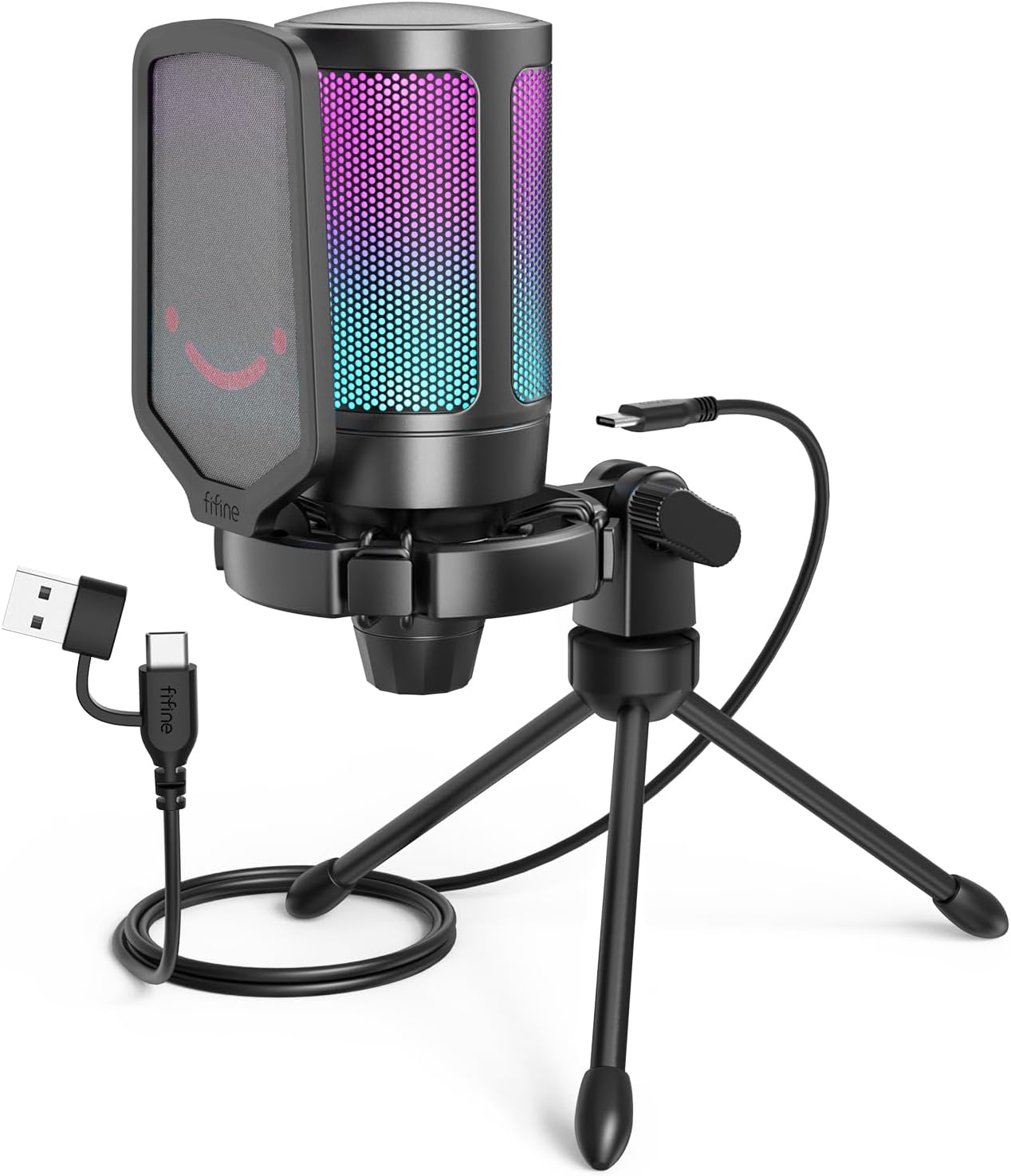
This microphone suits players who travel or move their setup often. It weighs very little and comes with a small tripod stand.
The included shock mount makes a big difference. It uses rubber bands to suspend the microphone, which stops desk vibrations from ruining your audio when you type.
Buyers love the clear sound and the included pop filter. A common complaint is that the bright colored lights stay on permanently and cannot be turned down.
It shines in casual gaming setups where you just want to plug something in and start talking. Windows recognizes it instantly without extra drivers.
Honestly, getting a shock mount and pop filter in the box is great. Most small microphones skip those parts. I recommend this to players who want an easy, colorful addition to their desk.
✅ Pros
- Stops hard breathing sounds with the included filter
- Sets up in seconds without software
- Absorbs desk vibrations well
❌ Cons
- The bright lights stay on and cannot be adjusted
- Captures background noise if you turn the dial too high
💬 What Customers Say
Most buyers agree that this microphone offers incredible sound for its size. Gamers love that it comes with a pop filter and shock mount right in the box. Some users wish they could turn off the bright RGB lights, as they stay illuminated the entire time the microphone is on.
#10 Best Space Saver — ONIKUMA Mini Mic

This ultra-compact microphone works well for players who hate cluttered desks. It takes up almost zero space while still offering a quick mute button.
The simple top-touch mute function matters most. You do not have to fumble with software or pick up the microphone to cut your audio when someone walks into your room.
Customers appreciate the tiny footprint and the solid metal stand. A few users mention their voice sounds slightly muffled compared to larger microphones.
It works best for single-player gamers who occasionally jump into Discord calls and want something better than a laptop microphone.
Honestly, the metal base gives it a surprising amount of stability for its size. You will not knock it over easily. I pick this for someone who wants their microphone to stay invisible on camera.
✅ Pros
- Takes up almost no space on a small desk
- Mutes instantly with a top touch button
- Stands securely on a metal base
❌ Cons
- Can make your voice sound slightly muffled
- Lighting colors change automatically with no manual control
💬 What Customers Say
Buyers love how easily this tiny microphone fits onto cramped desks. Parents mention it is a great, simple upgrade for their kids’ gaming setups. A few reviewers note that the audio quality is just okay, making voices sound a bit like they are inside a plastic container.
Frequently Asked Questions
Do I need a pop filter for my gaming microphone?
Does a more expensive microphone mean less background noise?
Why does my microphone pick up my keyboard clicks?
What is the difference between USB and XLR microphones?
Conclusion
The Logitech Blue Yeti stands out as the best overall choice for its proven reliability and incredibly rich sound quality. It gives you multiple recording options and lasts for years, provided you manage your background noise properly.
If you want to keep your desk clear, the FIFINE AM8T Kit is a fantastic alternative. It gives you a great dynamic microphone that ignores keyboard clicks, plus a boom arm to keep your setup tidy. Whatever you choose, moving your microphone closer to your mouth will instantly improve how you sound to your team.
{“@context”:”https://schema.org”,”@type”:”FAQPage”,”mainEntity”:[{“@type”:”Question”,”name”:”Do I need a pop filter for my gaming microphone?”,”acceptedAnswer”:{“@type”:”Answer”,”text”:”Yes. A pop filter stops the harsh bursts of air that happen when you say words with ‘P’ or ‘B’. Without one, those bursts of air hit the microphone capsule and create loud, annoying thumps in your friends’ ears.”}},{“@type”:”Question”,”name”:”Does a more expensive microphone mean less background noise?”,”acceptedAnswer”:{“@type”:”Answer”,”text”:”Not always. Many expensive condenser microphones are highly sensitive and will pick up even more background noise than cheaper models. If you have a noisy room, you need a dynamic microphone, not just an expensive one.”}},{“@type”:”Question”,”name”:”Why does my microphone pick up my keyboard clicks?”,”acceptedAnswer”:{“@type”:”Answer”,”text”:”Most desk microphones sit right next to the keyboard. They pick up the vibrations through the desk and the sound through the air. Moving the microphone onto a boom arm and closer to your mouth helps fix this.”}},{“@type”:”Question”,”name”:”What is the difference between USB and XLR microphones?”,”acceptedAnswer”:{“@type”:”Answer”,”text”:”USB microphones plug straight into your computer and work immediately. XLR microphones require a separate audio mixer box to connect to your PC. XLR setups offer better sound control, but USB is much easier for beginners.”}}]}
{“@context”:”https://schema.org”,”@type”:”ItemList”,”name”:”Best 10 Best Gaming Microphones for Clear Voice Chat and Streaming”,”itemListElement”:[{“@type”:”ListItem”,”position”:1,”item”:{“@type”:”Product”,”name”:”Gaming Microphone for PC: USB Mic for Podcasts Videos & Streaming – Condenser Mic with Quick Mute & Pop Filter – RGB Microphone Gift for Gamer boys – Compatible with PS4/5 & Computer & Laptop”,”image”:”https://m.media-amazon.com/images/I/71QclY4ig4L._AC_SL1500_.jpg”,”aggregateRating”:{“@type”:”AggregateRating”,”ratingValue”:4.3,”reviewCount”:5089}}},{“@type”:”ListItem”,”position”:2,”item”:{“@type”:”Product”,”name”:”FIFINE USB/XLR Dynamic Microphone for Podcast Recording, PC Computer Gaming Streaming Mic with RGB Light, Mute Button, Headphones Jack, Desktop Stand, Vocal Mic for Singing YouTube-AmpliGame AM8″,”image”:”https://m.media-amazon.com/images/I/71k6li+9vFL._AC_SL1500_.jpg”,”aggregateRating”:{“@type”:”AggregateRating”,”ratingValue”:4.6,”reviewCount”:10341}}},{“@type”:”ListItem”,”position”:3,”item”:{“@type”:”Product”,”name”:”TONOR Gaming Microphone Set with Boom Arm, Vocal Condenser Microphone for PC with Stand, USB Mic with controllable RGB Light, One Tap Mute, Volume Control, for Discord, Twitch Streaming, TC310+”,”image”:”https://m.media-amazon.com/images/I/71dYNkQDMOL._AC_SL1500_.jpg”,”aggregateRating”:{“@type”:”AggregateRating”,”ratingValue”:4.5,”reviewCount”:1447}}},{“@type”:”ListItem”,”position”:4,”item”:{“@type”:”Product”,”name”:”MAONO Gaming USB Microphone, Noise Cancellation Condenser Mic with Mute, Gain, Monitoring, Boom Arm Mic for Streaming, Podcast, Twitch, YouTube, Discord, PC, Computer, PS4, PS5, Mac, GamerWave DGM20S”,”image”:”https://m.media-amazon.com/images/I/71AjtTj4LUL._AC_SL1500_.jpg”,”aggregateRating”:{“@type”:”AggregateRating”,”ratingValue”:4.5,”reviewCount”:5276}}},{“@type”:”ListItem”,”position”:5,”item”:{“@type”:”Product”,”name”:”USB Microphone for PC Gaming: Condenser Microphone RGB for Gamer with Stand Mic – Recording Mic for Computer&Laptop with Qiuck Mute – Desk Podcast Mic for Podcast & Singing & Streaming & Youtube Black”,”image”:”https://m.media-amazon.com/images/I/71q6OMmkp-L._AC_SL1500_.jpg”,”aggregateRating”:{“@type”:”AggregateRating”,”ratingValue”:4.3,”reviewCount”:810}}},{“@type”:”ListItem”,”position”:6,”item”:{“@type”:”Product”,”name”:”FIFINE XLR/USB Gaming Microphone Set, Dynamic PC Mic for Streaming Podcasting, Computer RGB Mic Kit with Boom Arm Stand, Mute Button, Headphones Jack, for Recording Vocal Voice-Over-AmpliGame AM8T”,”image”:”https://m.media-amazon.com/images/I/61-0YoCB2LL._AC_SL1441_.jpg”,”aggregateRating”:{“@type”:”AggregateRating”,”ratingValue”:4.6,”reviewCount”:4977}}},{“@type”:”ListItem”,”position”:7,”item”:{“@type”:”Product”,”name”:”Logitech Creators Blue Yeti USB Microphone for Gaming, Streaming, Podcast, YouTube, Discord, PC, Studio Sound, Plug & Play-Blackout”,”image”:”https://m.media-amazon.com/images/I/61KTMvS5JBL._AC_SL1500_.jpg”,”aggregateRating”:{“@type”:”AggregateRating”,”ratingValue”:4.6,”reviewCount”:60542}}},{“@type”:”ListItem”,”position”:8,”item”:{“@type”:”Product”,”name”:”Gaming Microphone, USB Computer Microphone for PC, Mac, PS4/5, Condenser Podcast Mic for Studio Recording, YouTube, Streaming, with Headphone Jack, Led Light, Mute, Gain, Noise Cancellation”,”image”:”https://m.media-amazon.com/images/I/61zUSKiPcfL._AC_SL1500_.jpg”,”aggregateRating”:{“@type”:”AggregateRating”,”ratingValue”:4.5,”reviewCount”:890}}},{“@type”:”ListItem”,”position”:9,”item”:{“@type”:”Product”,”name”:”FIFINE Gaming USB Microphone for PC PS5, Condenser Mic with Quick Mute, RGB Indicator, Tripod Stand, Pop Filter, Shock Mount, Gain Control for Streaming Discord Twitch Podcasts Videos- AmpliGame”,”image”:”https://m.media-amazon.com/images/I/71lXdEfYDML._AC_SL1500_.jpg”,”aggregateRating”:{“@type”:”AggregateRating”,”ratingValue”:4.6,”reviewCount”:14022}}},{“@type”:”ListItem”,”position”:10,”item”:{“@type”:”Product”,”name”:”Gaming Microphone with Noise Cancellation & Mute Button, USB Condenser Mic for Streaming/Recording, Ultra-Compact Design, Compatible with PC/Mac/PS4/PS5, Podcast/YouTube/Twitch/Discord (Black)”,”image”:”https://m.media-amazon.com/images/I/61Xl0Hw+LGL._AC_SL1500_.jpg”,”aggregateRating”:{“@type”:”AggregateRating”,”ratingValue”:4.5,”reviewCount”:265}}}]}