
Finding the right gaming speakers is harder than it looks. Every brand promises massive bass and crystal clear audio. But most of those claims are just marketing. The real differences only show up when you actually plug them in and start playing.
Many buyers focus too much on high wattage numbers. In reality, the size of your room and how the speakers fit on your desk matter much more. A massive surround system does no good if you have no space for the rear speakers.
We looked at the top options and read thousands of real buyer reviews. This guide shows you which speakers actually sound good, which ones fit well under a monitor, and which ones handle game audio best.
Quick Comparison
| # | Product | Rating | Reviews | Best For | Action |
|---|---|---|---|---|---|
| #1 | LENRUE G11 | 4.3 | 4021 | Budget RGB | View on Amazon |
| #2 | Assistrust KY-8000 | 4.2 | 5895 | TV Soundbar | View on Amazon |
| #3 | Redragon GS520 | 4.2 | 12300 | Desk Setup | View on Amazon |
| #4 | LENRUE A38S | 4.4 | 2872 | Headset Use | View on Amazon |
| #5 | ULTIMEA Poseidon M60 | 4.5 | 2432 | Surround Sound | View on Amazon |
| #6 | KAPEYDESI Splitx | 4.4 | 186 | Portable Pick | View on Amazon |
| #7 | Amazon Basics 2.0 | 4.4 | 79658 | Basic Sound | View on Amazon |
| #8 | Razer Leviathan V2 X | 4.2 | 2113 | Premium Bar | View on Amazon |
| #9 | BUSP-HYY E-1062 | 4.4 | 659 | Compact Pair | View on Amazon |
| #10 | OFFSIR GS005 | 4.4 | 579 | Dual Design | View on Amazon |
#1 Best Budget RGB — LENRUE G11

This compact speaker set works well for gamers with very little desk space. It slides right under most monitors without getting in the way.
The single volume knob makes the biggest difference here. You can reach out and turn the game volume down instantly without messing with computer settings.
Most buyers agree that these speakers offer clear sound and a very easy setup. Gamers love how perfectly they fit under their screens and keep the desk clean. However, a common complaint is that the built-in lights sometimes fail. Several people mention the lights randomly turn off or stop working completely after a few months.
These shine best when you play casual games in a small bedroom. They give you clear sound without taking over your whole desk.
Honestly, the simple design is what stands out most to me. You just plug them in and play. I would recommend this to any casual gamer who hates messy cables. But I would skip these if you care deeply about long-lasting light effects.
✅ Pros
- Fits easily under small monitors
- Single knob controls volume fast
- Plugs in with no software needed
❌ Cons
- Light settings can stop working over time
- Does not get loud enough for large rooms
💬 What Customers Say
Most buyers agree that these speakers offer clear sound and a very easy setup. Gamers love how perfectly they fit under their screens and keep the desk clean. Many users praise the fast plug-and-play design. However, a common complaint is that the built-in lights sometimes fail. Several people mention the lights randomly turn off or stop working completely after a few months. Overall, buyers feel they get good sound for everyday use.
#2 Best TV Soundbar — Assistrust KY-8000

This soundbar works best for console gamers who play on a large television. You can keep it as one long bar or split it into two separate standing speakers.
The automatic voice boost feature really helps during games. It makes character dialogue loud and clear, even when loud explosions happen in the background.
Across thousands of reviews, the thing people mention most is the massive sound upgrade over standard TV speakers. Buyers love how clear voices sound. On the downside, many complain that the bar always defaults to Bluetooth mode when you turn it on.
This system works perfectly in a medium living room where you want better sound without setting up a huge home theater.
I really like the split design. Being able to stand the speakers up on each side of a TV gives you great stereo sound. I recommend this for console players. However, having to change the connection mode every single time you turn it on would annoy me quickly.
✅ Pros
- Splits into two separate speakers easily
- Connects fast through Bluetooth
- Makes game voices much easier to hear
❌ Cons
- Defaults to Bluetooth mode every time it turns on
- Does not come with remote batteries
💬 What Customers Say
Across thousands of reviews, the thing people mention most is the massive sound upgrade over standard TV speakers. Buyers love how clear voices sound and enjoy the easy setup process. Many users like the option to split the bar into two pieces. However, a frequent complaint is the connection memory. People find it annoying that the soundbar defaults to Bluetooth mode every time it turns on, forcing them to switch modes manually.
#3 Best Desk Setup — Redragon GS520

These tall speakers suit PC gamers who want a clean, modern look on their desk. The slim shape leaves plenty of room for your mouse pad and keyboard.
The front volume buttons make adjusting your sound very easy. You never have to click out of your game to turn the audio up or down.
Gamers who use this daily report that the sound gets surprisingly loud and stays clear. Buyers really like the tall, slim design. However, many users hate that you have to hold the power button down for a long time to turn the speakers on.
These work best on a crowded gaming desk. They sit nicely next to a large monitor without blocking your view.
Honestly, the small footprint is the best part. I would recommend these to anyone who needs more desk space. But I would look elsewhere if you use a very wide desk, because the cord connecting the two speakers is quite short.
✅ Pros
- Takes up very little space on a desk
- Front buttons let you change volume fast
- Touch controls swap light colors easily
❌ Cons
- You must hold the button down a long time to turn them on
- The cord between the two speakers is short
💬 What Customers Say
Gamers who use this daily report that the sound gets surprisingly loud and stays clear. Buyers really like the tall, slim design because it saves desk space. The touch controls for the lights also get a lot of praise. However, a few complaints come up often. Many users hate that you have to hold the power button down for a long time to turn the speakers on. Others mention the cord connecting the speakers is too short for wide desks.
#4 Best For Headsets — LENRUE A38S

These small stereo speakers fit well for gamers who live with other people. They offer decent sound for daytime play and a quick way to switch to quiet gaming at night.
The front headphone jack is incredibly useful. You can plug your gaming headset right into the speaker instead of reaching behind your heavy computer tower.
Parents and gamers who bought these say they look great and sound very clear. Buyers love the front headphone jack. On the negative side, several users point out that the volume knob stops working entirely when you plug headphones in.
These shine best in shared spaces like dorm rooms or apartments. You can swap from loud music to private gaming in one second.
I really appreciate the included USB-C adapter. It makes connecting to newer laptops very easy. I recommend this pair to anyone who switches between speakers and headphones often. I would not pick them if you want to set your lights to one solid color, as they only cycle through a rainbow pattern.
✅ Pros
- Front headphone jack makes private listening easy
- Comes with a handy USB-C adapter
- Simple knob controls power and volume
❌ Cons
- You cannot pick just one solid light color
- Volume knob stops working when you plug in headphones
💬 What Customers Say
Parents and gamers who bought these say they look great and sound very clear. Buyers love the front headphone jack, noting it makes switching to private gaming very fast. People also appreciate the included adapter. On the negative side, several users point out that the volume knob stops working entirely when you plug headphones in. Others mention that you cannot set the lights to stay on just one color, which frustrates some buyers.
#5 Best Surround Sound — ULTIMEA Poseidon M60

This full surround system targets gamers who want a movie theater experience. It includes a soundbar, surround speakers, and a dedicated subwoofer.
The real Dolby Atmos support makes a massive difference in games. You can actually hear enemy footsteps creeping up behind you or helicopters flying overhead.
Most buyers agree that this system delivers a massive upgrade over basic speakers. People love the deep bass and the clear dialogue during action scenes. However, some buyers note that the surround sound effect disappears if you do not sit directly in the middle of the room.
This setup works best in a dedicated gaming room or living room where you can arrange the speakers perfectly around your chair.
Honestly, the audio clarity stands out the most. The voice enhancement keeps dialogue clear even during loud explosions. I highly recommend this for story-driven games and movies. I would skip it if you hate running cables across your floor, since the subwoofer requires a wired connection.
✅ Pros
- Fills large rooms with deep surround sound
- Makes movie dialogue clear during loud action
- Connects to your TV fast using HDMI eARC
❌ Cons
- You lose the surround effect if you sit off to the side
- The wired subwoofer requires you to run cables across the floor
💬 What Customers Say
Most buyers agree that this system delivers a massive upgrade over basic speakers. People love the deep bass and the clear dialogue during action scenes. Setup gets high marks for being fast and simple. However, some buyers note that the surround sound effect disappears if you do not sit directly in the middle of the room. A few users also mention that the bass feels weak unless you turn it all the way up in the settings.
#6 Best Portable Pick — KAPEYDESI Splitx

These speakers suit laptop gamers who travel frequently. The clever design lets you pack them easily and set them up anywhere.
The two-in-one track system is very smart. You can slide the two speakers together to form one solid soundbar, or pull them apart to place on each side of your screen.
Buyers who travel often say these speakers are perfect for taking on the road. People love the clever design and the volume light bar. On the downside, console players report that the Bluetooth does not connect to the PlayStation 5.
These work best for gaming on a laptop in a hotel room or a small home office. They pack away quickly when you need to clear your desk.
I love how the light bar shows your exact volume level as you turn the dial. I recommend these to anyone who plays games on a laptop. I would not buy them if you play heavy action games, because the bass feels a bit weak during loud moments.
✅ Pros
- Snaps together into one bar or splits into two
- Shows your volume level on the light bar
- Travels easily inside a laptop bag
❌ Cons
- Bluetooth connection does not work with a PS5 console
- The bass feels a little weak on heavy action games
💬 What Customers Say
Buyers who travel often say these speakers are perfect for taking on the road. People love the clever design that lets them snap the speakers together or pull them apart. The volume light bar is another favorite feature. On the downside, console players report that the Bluetooth does not connect to the PS5. Some users also mention that while the sound is clear, it lacks the deep bass needed for intense gaming moments.
#7 Best Basic Sound — Amazon Basics 2.0

These basic stereo speakers work well for people who just want simple, reliable sound. They skip the fancy gaming lights and focus on doing one job well.
The heavy, padded base keeps these speakers firmly in place. They will not slide around your desk when you bump them or pull on the cord.
Across thousands of reviews, the thing people mention most is the solid build quality. Buyers are surprised by how heavy and well-made these feel. However, a complaint that comes up often is a faint pulsing static sound when the speakers sit idle.
These shine best in a simple home office where you play games casually and watch videos.
Honestly, the simple volume dial on the cord is a great touch. You can adjust the sound without reaching across your desk. I recommend these to anyone who wants a clean, adult-looking desk setup. I would pass on them if you play games with heavy soundtracks, as they lack real bass.
✅ Pros
- Heavy base keeps them from sliding on your desk
- Plugs in fast with no extra software needed
- Cord volume dial is easy to reach
❌ Cons
- Makes a quiet static noise when no sound plays
- Lacks deep bass for heavy music
💬 What Customers Say
Across thousands of reviews, the thing people mention most is the solid build quality. Buyers are surprised by how heavy and well-made these feel. Many users praise the simple setup and the easy-to-reach volume dial. However, a complaint that comes up often is the background noise. Several people report hearing a faint pulsing static sound when the speakers are plugged in but not playing any audio.
#8 Best Premium Bar — Razer Leviathan V2 X

This premium soundbar targets dedicated PC gamers who want a high-end setup. It sits perfectly beneath your monitor to push sound directly at you.
The single USB-C cable handles both power and audio at the same time. This keeps your desk incredibly neat and stops cable clutter from ruining your gaming space.
Gamers who use this daily report that the single-cable setup keeps their desk incredibly clean. Buyers love the bright lights and crisp sound. However, many users complain about having to download a large software program just to change basic sound settings.
This bar works best on a high-end gaming desk where you want all your computer lights to match perfectly.
I really like how loud and crisp this bar gets without needing a separate power brick. I recommend it to anyone already using other Razer gear. I would not pick this if you use wired headphones often, because it completely lacks a standard audio jack.
✅ Pros
- Uses one single cable for both power and sound
- Fits perfectly under almost any gaming monitor
- Syncs lights with other gaming gear through the app
❌ Cons
- You must download heavy software to change the settings
- Does not have a standard headphone jack
💬 What Customers Say
Gamers who use this daily report that the single-cable setup keeps their desk incredibly clean. Buyers love the bright lights and how well the soundbar fits under their monitors. The sound quality gets high praise for being crisp and clear. However, many users complain about the required software. People hate having to download a large program just to change basic sound settings. Others wish it included a standard audio jack.
#9 Best Compact Pair — BUSP-HYY E-1062

This small speaker set works well for gamers who want bright lights and easy controls. They take up very little room but deliver clear audio.
The front headphone port makes life very easy. You can plug your gaming headset in right on your desk without reaching behind your computer.
Most buyers agree that these speakers put out surprisingly loud sound for their small size. People really like the colorful lights and the simple volume knob. However, some buyers mention a quiet static noise in the background when no music plays.
These work best for kids or teenagers who want a cool-looking setup in their bedroom.
Honestly, the light options are great for a small room. I recommend these to anyone who wants a fun, colorful desk setup. But I would skip them if you have a very wide dual-monitor layout, because the cord connecting the two speakers is quite short.
✅ Pros
- Front headphone jack lets you switch to private gaming fast
- Bright lights make your desk look great at night
- Single knob handles both power and volume
❌ Cons
- The cord connecting the two speakers is quite short
- Sometimes plays a faint static sound in the background
💬 What Customers Say
Most buyers agree that these speakers put out surprisingly loud sound for their small size. People really like the colorful lights and the simple volume knob on the front. Many users also appreciate the easy plug-and-play setup. However, some complaints come up more than once. Several buyers mention a quiet static noise in the background. Others note that the cord between the two speakers is too short to place them far apart.
#10 Best Dual Design — OFFSIR GS005
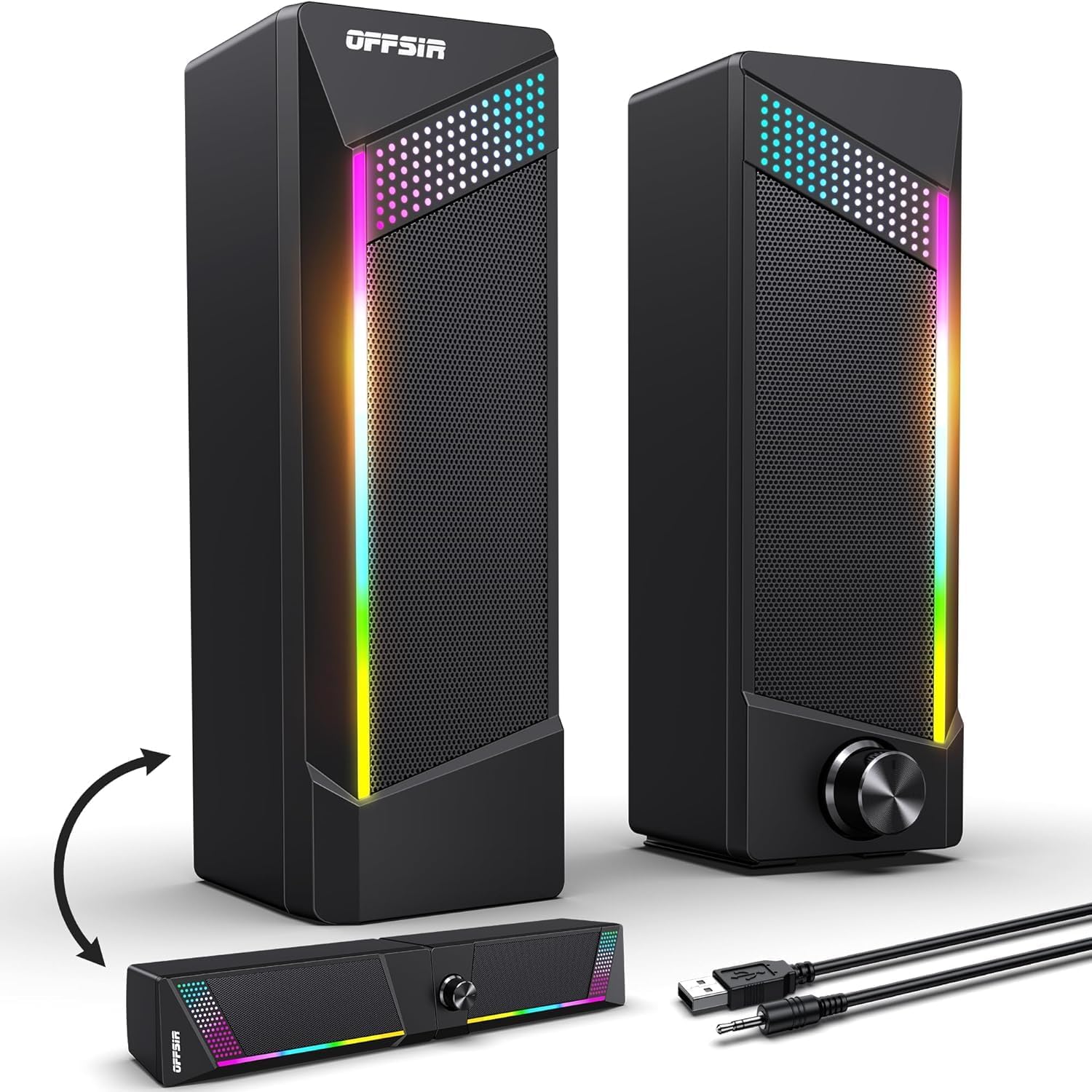
These speakers suit gamers who like to change their desk layout often. You can use them as a single soundbar or split them into two separate towers.
The touch-sensitive lighting control sits right on top of the speaker. You can tap it quickly to change the mood of your room without pressing hard buttons.
Buyers who switched to this say it completely fixed their messy desk problems. People love having the choice to use it as a soundbar or as separate speakers. On the negative side, users hate that the audio cuts out entirely if they unplug the USB cable that powers the lights.
These fit perfectly under dual monitors. You can lay them flat as a bar to save space or stand them up for better stereo sound.
I really like how easy it is to slide these together. I recommend them to anyone who struggles to fit speakers under a low monitor. However, I would look for something else if you are short on USB ports, since the audio dies completely if the light cable gets unplugged.
✅ Pros
- Slides easily under dual monitor setups
- Lets you choose between a soundbar or two separate speakers
- Touch controls change the lights fast
❌ Cons
- You cannot pick custom colors outside the basic presets
- Sound stops completely if you unplug the light cable
💬 What Customers Say
Buyers who switched to this say it completely fixed their messy desk problems. People love having the choice to use it as a soundbar or as separate speakers. The sound quality surprises many users, with clear highs and decent bass. On the negative side, a frequent complaint is the wiring design. Users hate that the audio cuts out entirely if they unplug the USB cable that powers the lights.
Frequently Asked Questions
Do I need a subwoofer for gaming?
Why do my speakers make a static noise?
Can I connect Bluetooth speakers to my PS5?
Does higher wattage mean better sound?
Conclusion
The Razer Leviathan V2 X stands out as the best overall choice. It keeps your desk perfectly clean with its single-cable design while delivering crisp, powerful sound for all your games.
If you want big sound for a living room setup, the ULTIMEA Poseidon M60 is a fantastic alternative. The dedicated subwoofer and surround speakers put you right in the middle of the action. Whichever you choose, upgrading from built-in monitor speakers will completely change how you experience your games.