
Setting up a home recording space is harder than it should be. Every brand promises professional sound. You have to choose between USB and XLR connections, dynamic and condenser types, and endless accessory bundles. Most people end up buying the wrong type of microphone for their room and get frustrated when their voice sounds hollow.
We looked at the top options and read thousands of real buyer reviews to find out which microphones actually work in normal rooms. We checked which boom arms hold up, which shields block out echoes, and which models capture clear vocals without needing a sound engineer to set them up.
In this guide, you will learn what makes a good home studio microphone. We will help you understand the difference between simple plug-and-play models and true studio gear, so you can pick the exact tool you need.
Quick Comparison
| # | Product | Rating | Reviews | Best For | Action |
|---|---|---|---|---|---|
| #1 | Dejasound USB Mic | 3.7 | 236 | Beginners | View on Amazon |
| #2 | FIFINE T669 Kit | 4.6 | 24809 | PC Streaming | View on Amazon |
| #3 | ZOPPLM Wireless Mic | 4.4 | 843 | Mobile Video | View on Amazon |
| #4 | Audio-Technica AT2020 | 4.7 | 14773 | Home Studios | View on Amazon |
| #5 | MAONO PM320S XLR | 4.4 | 1936 | Podcasting | View on Amazon |
| #6 | SwaykTech Shield Kit | 4.0 | 593 | Vocal Recording | View on Amazon |
#1 Best for Beginners — Dejasound USB Mic

This condenser microphone comes as a complete starter kit. It suits beginners who want to record vocals or podcasts without buying extra gear.
The included folding isolation shield makes the biggest difference here. The thick foam panels wrap around the microphone to block room echoes. This helps your voice sound clear even if you record in an empty bedroom.
Buyers say the microphone sounds much better than a laptop microphone. They love how quickly it sets up. However, many users complain about the included tripod. They say it feels flimsy and tips over easily if you bump the desk.
This kit works best sitting on a flat, stable desk for casual voiceovers or online meetings.
Honestly, this is a decent starting point for kids or casual users. The microphone sounds fine and the shield does its job. But I would not pick this for serious music production. The weak stand and occasional background static hold it back from true studio quality.
Compared to the FIFINE kit, this one includes a sound shield but has a much weaker stand.
✅ Pros
- Plugs directly into your computer
- Includes a folding foam sound shield
- Features easy volume and mute buttons
- Sets up in just a few minutes
❌ Cons
- Tripod stand tips over easily
- Picks up some background static
- Build quality feels cheap
💬 What Customers Say
Most buyers agree that this microphone offers a big step up from built-in computer audio. People who use it for Zoom calls and casual YouTube videos say their voice comes through clearly. However, a common complaint involves the accessories. Many reviewers note the tripod stand feels weak and struggles to hold the weight of the microphone and shield. A few users also mention picking up unwanted background static during quiet moments.
#2 Best for Streaming — FIFINE T669 Kit

This USB microphone kit gives you everything you need to start streaming or gaming. It fits PC users who want clear voice chat without a complicated setup.
The included boom arm clamps right to your desk. This keeps the microphone near your mouth and away from your loud keyboard. It also frees up your desk space for your mouse and monitor.
Gamers and streamers who use this daily report that the audio sounds warm and full. They love the simple plug-and-play design. On the downside, several buyers mention the boom arm feels weak and loses its grip over time.
This setup shines when you stream on Twitch or chat on Discord from your gaming desk.
I think the microphone itself sounds fantastic for a simple USB model. It easily beats gaming headsets. The accessories are just okay, but they get you started. If you use it every day, you will probably want to buy a better boom arm later.
Unlike the Audio-Technica AT2020, this microphone plugs straight into your computer with no extra power boxes needed.
✅ Pros
- Captures warm and clear voice audio
- Includes a full boom arm and shock mount
- Requires no special software to run
- Volume knob sits right on the microphone
❌ Cons
- Boom arm feels weak and wobbly
- Desk clamp slips on round table edges
- USB connection sometimes drops out
💬 What Customers Say
Across thousands of reviews, the thing people mention most is the surprising sound quality. Buyers say their voice sounds rich and professional on streams and calls. They love how easy it is to plug in and start talking. However, many users complain about the boom arm. They report that the metal bends easily and the desk clamp struggles to stay tight. Despite the cheap arm, most agree the microphone itself is excellent.
#3 Best for Mobile — ZOPPLM Wireless Mic
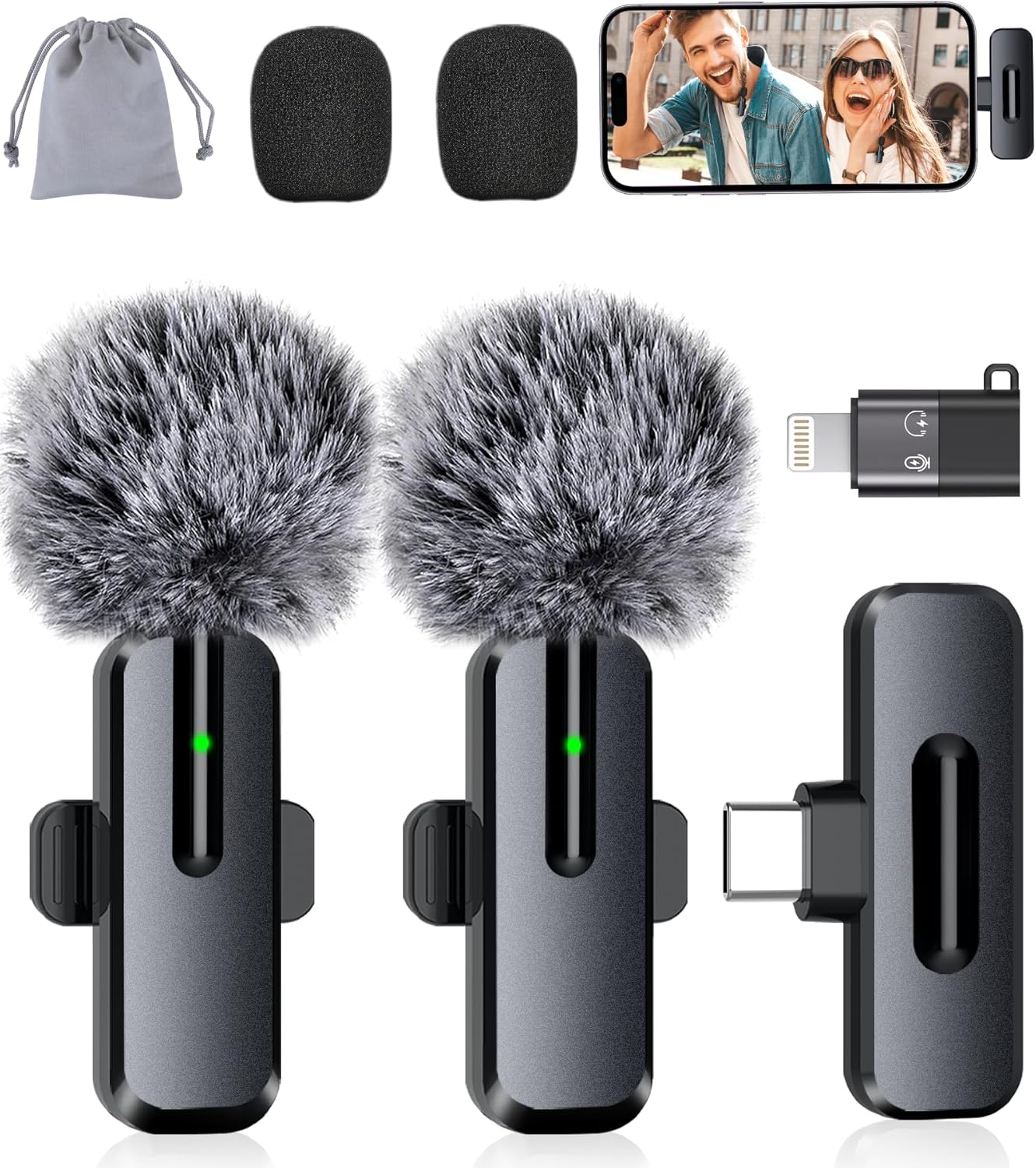
This tiny wireless microphone set connects straight to smartphones and tablets. It suits content creators who film videos on their phones and need to move around.
The wireless clip-on design gives you total freedom. You just clip the small microphone to your shirt and plug the receiver into your phone. You can walk around a room or record outside without dealing with long cables.
Content creators say this microphone makes their TikToks and vlogs sound much better. They praise the long battery life. However, some users note that the noise reduction struggles to block loud wind or heavy street traffic.
It works perfectly for recording casual interviews or talking-head videos in a quiet park or living room.
I really like how simple this system is. You do not need to download any apps or pair anything through Bluetooth. It just works. I would not use it for a professional short film, but for social media videos, it does exactly what you need.
This is the only microphone on our list designed purely for phones and mobile video.
✅ Pros
- Connects to phones without any apps
- Battery lasts up to 16 hours of recording
- Clips easily to shirts and collars
- Allows two people to record at once
❌ Cons
- Struggles to block heavy wind noise
- Plays back in only one ear on headsets
- Not meant for computer studio setups
💬 What Customers Say
Parents and vloggers who switched to this say it completely changes their phone videos. They love how small the microphones are and how quickly they connect. Many buyers mention the battery lasts through a full day of filming. The most common complaint is about the noise cancellation. While it handles basic room noise well, buyers say it does not completely block out loud public spaces or strong wind.
#4 Best Overall — Audio-Technica AT2020

The AT2020 is a true studio condenser microphone. It suits home music producers, voice actors, and serious podcasters who want professional audio.
This microphone uses an XLR connection and a custom low-mass diaphragm. This means it captures incredible detail in your voice, from deep lows to crisp highs. It handles loud singing without distorting the sound.
Reviewers rave about the clean, flat sound profile. They say it feels built like a tank. The main complaint is that beginners often buy it without realizing they need a separate audio interface to make it work.
This microphone shines in a quiet, treated room where you record vocals for music or professional voiceovers.
Honestly, this is the standard for home studios for a reason. It sounds amazing. But it is very sensitive. It will pick up your computer fan and the dog barking next door. You need a quiet room to get the most out of it.
Compared to the MAONO PM320S, the AT2020 feels much heavier and captures a slightly cleaner high-end sound.
✅ Pros
- Captures very clear and detailed audio
- Metal body handles heavy daily use
- Rejects side and rear noises well
- Handles loud vocals without distortion
❌ Cons
- Requires a separate audio interface to work
- Does not come with an XLR cable
- Picks up room echoes easily
💬 What Customers Say
Gamers and musicians who use this daily report that the sound quality is unmatched in this category. Buyers love how clear and natural their voice sounds on recordings. They also praise the heavy, durable metal body. The main issue that comes up is from buyers who do not understand the setup. Many people leave frustrated reviews because they did not know they needed to buy an XLR cable and a 48V phantom power interface separately.
#5 Best for Podcasting — MAONO PM320S XLR

This bundle gives you a real XLR microphone and all the desk mounting gear in one package. It suits people starting a serious podcast who want to use an audio mixer.
The included metal shock mount is the star feature here. It holds the microphone securely and absorbs vibrations from your desk. If you bump the table or type on your keyboard, the shock mount stops that thumping sound from ruining your recording.
Buyers like the rich vocal tone this microphone produces. They appreciate getting a full kit at once. However, a few users mention that the boom arm joints are very stiff and hard to adjust smoothly.
It works best for sitting at a desk recording long podcast episodes or hosting online radio shows.
I think this is a very smart bundle. Buying an XLR microphone, an arm, and a shock mount separately takes time and research. This puts it all together. Just remember you still need to buy an audio interface to plug it into your computer.
This sits right between the simple FIFINE USB kit and the bare-bones Audio-Technica studio microphone.
✅ Pros
- Includes a metal shock mount and boom arm
- Metal body protects the internal parts
- Captures rich and full podcasting tones
- Shock mount stops desk thumping noises
❌ Cons
- Boom arm joints feel very stiff
- Requires extra gear to power it on
- Takes up quite a bit of desk space
💬 What Customers Say
Buyers who upgraded to this kit say their podcasts sound much more professional. They love the heavy, premium feel of the microphone and the metal shock mount. Many reviewers note that it captures the deep tones in their voice very well. A complaint that comes up often is the stiffness of the boom arm. Some users say they have to use a lot of force to move the microphone into the right position.
#6 Best for Room Echo — SwaykTech Shield Kit

This kit combines a USB microphone with a desktop isolation shield. It suits singers and voice actors who have to record in rooms with hard floors and bare walls.
The three-panel foam shield stops your voice from bouncing off the walls and coming back into the microphone. This removes that hollow, bathroom-like echo that ruins many home recordings. The shield folds up so you can store it away easily.
Customers say the shield works wonders for their audio clarity. They like that it connects easily to laptops and phones. On the downside, several buyers report that the included tripod stand is weak and sometimes ships with the wrong screws.
This setup works best sitting on a table in an untreated bedroom to record singing or voiceovers.
You are really buying this for the isolation shield. The shield itself is great and does exactly what it claims. The included microphone is just average. I would use this kit to get started, and later swap the microphone for a better one while keeping the shield.
Compared to the Dejasound kit, this shield feels a bit thicker, though both suffer from weak tripod stands.
✅ Pros
- Thick foam shield blocks room echoes
- Folds up small for easy storage
- Works with phones and computers
- Includes an adjustable pop filter
❌ Cons
- Included tripod stand feels weak
- Sometimes ships with the wrong screws
- Microphone quality is just average
💬 What Customers Say
Most buyers agree that the isolation shield makes a massive difference in their recording quality. Singers say it removes the room echo and makes their vocals sound much more direct. They also like that they can plug it straight into an iPad or laptop. However, the tripod stand receives a lot of criticism. Buyers say it is hard to balance, and a few mention receiving the wrong size screws to attach the pieces together.
Frequently Asked Questions
Do I need an XLR microphone to sound professional?
What is phantom power?
Why does my microphone pick up so much background noise?
Do I really need a pop filter?
Conclusion
Finding the right microphone makes all the difference in your recording projects. The Audio-Technica AT2020 stands out as the best overall choice. It delivers true studio-quality audio that handles singing and voice acting beautifully, as long as you have the right XLR gear to run it.
If you want a simpler setup without buying extra audio interfaces, the FIFINE T669 Kit is a fantastic alternative. It gives you great sound, a boom arm, and a pop filter that all plug straight into your computer. Pick the one that fits your space, and start recording with confidence.