
Working on a single small laptop screen slows you down. When you travel or work from a coffee shop, you lose the comfort of your home office setup. Most people try to fix this by buying the first travel monitor they see. But many of these screens break easily, drain your laptop battery fast, or have washed-out colors that hurt your eyes.
The real differences between these portable screens show up when you actually pack them in a bag and use them daily. Some have flimsy stands that fall over while you type. Others require three different cables just to turn on. You need something that sets up fast and stays out of your way.
We looked at the top options and read thousands of real buyer reviews to find out which monitors actually help you work better. We checked which ones survive daily travel, which ones play nice with gaming consoles, and which ones give you the clearest picture without a messy desk.
Quick Comparison
| # | Product | Rating | Reviews | Best For | Action |
|---|---|---|---|---|---|
| #1 | MNN 15.6" Portable Monitor | 4.3 | 10914 | Best Overall | View on Amazon |
| #2 | WGK 15.6" FHD Monitor | 4.4 | 1321 | Built-In Stand | View on Amazon |
| #3 | KYY 15.6" Portable Display | 4.4 | 12512 | Heavy Travel | View on Amazon |
| #4 | LG StanbyME 2 | 4.4 | 136 | Home Use | View on Amazon |
| #5 | ASUS ZenScreen 16" | 4.4 | 1388 | Anti-Glare Use | View on Amazon |
| #6 | ASUS MB169CK | 4.4 | 2731 | Eye Comfort | View on Amazon |
| #7 | Yxk 15.6" Travel Monitor | 4.3 | 1869 | Ultra-Light Carry | View on Amazon |
| #8 | Lenovo L15 Monitor | 4.5 | 254 | Neck Comfort | View on Amazon |
| #9 | ForHelp 15.6" Monitor | 4.4 | 5903 | Budget Pick | View on Amazon |
#1 Best Overall — MNN 15.6" Portable Monitor

This screen fits best for remote workers and gamers who need a simple, fast setup. It gives you a full 15.6-inch display that connects to almost any laptop or game console.
The single-cable connection makes the biggest difference here. You only need one USB-C cord to send both power and video from your laptop to the screen. This keeps your desk clean and lets you start working in seconds.
Buyers frequently mention how well it works for both office tasks and gaming on the go. Many people use it with their PS5 or Steam Deck in hotel rooms. A few users note that the built-in speakers sound a bit weak, and the HDR mode can make colors look slightly washed out.
It shines the most when you work from small hotel desks or coffee shop tables. The included cover folds into a stand, so you do not need to carry extra parts.
Honestly, the pass-through charging stands out to me. You can plug the monitor into the wall, and it will keep your laptop or game console running. I would recommend this to anyone who travels often. I would skip it if you need professional color accuracy for photo editing.
Compared to the WGK monitor, this one feels slightly lighter in a backpack and has a more reliable cover.
✅ Pros
- Sets up fast with just one cable
- Passes power through to your laptop
- Fits easily in a standard backpack
- Includes all the cords you need
❌ Cons
- Built-in speakers sound weak
- HDR mode washes out colors slightly
💬 What Customers Say
Most buyers agree that this monitor delivers a sharp picture and sets up very fast. People who travel often love how light it feels in a backpack. Gamers report that it works perfectly with consoles like the Switch and Steam Deck. A common complaint is that the built-in speakers lack volume, so most people prefer using headphones. Overall, buyers feel it offers excellent value for daily use.
#2 Best Built-In Stand — WGK 15.6" FHD Monitor

This monitor works well for anyone who hates messing with folding covers and wants a screen that stands up on its own. It features a solid built-in kickstand.
The built-in stand makes setting up much less frustrating. You can adjust the angle exactly how you want it, and you never have to worry about a magnetic cover slipping off during a meeting.
Customers love how bright and clear the screen looks for daily office work. Many people use it for outdoor events and praise how light it feels. However, several buyers complain that the kickstand does not lock firmly, and the screen can tip over if you bump the table.
This display works perfectly for setting up a quick workstation at a kitchen table or taking on business trips where you need to share your screen with clients.
I really like the simple plug-and-play design. You do not need to install any software to make it work. I would recommend this to people who want a fast, easy setup. I would look elsewhere if you want to use your screen vertically, as it struggles to stand up that way.
✅ Pros
- Built-in kickstand makes setup fast
- Screen stays bright outdoors
- Connects easily to phones and laptops
❌ Cons
- Kickstand does not lock firmly in place
- Fails to stand up safely in portrait mode
💬 What Customers Say
Buyers frequently praise how quickly they can set this up for remote work. Many users appreciate the bright screen and the ability to connect their phone directly to the display. The most common issue people mention is the flimsy kickstand that falls over if bumped. Despite the stand issue, most customers feel it makes working away from home much easier.
#3 Best for Durability — KYY 15.6" Portable Display

This metal-framed monitor suits people who work in tough environments or just want a screen that will not break easily in a bag. It offers a strong build and a clear picture.
The premium metal body gives this screen a massive advantage over cheap plastic monitors. It flexes less in your bag, which protects the glass from cracking when you travel.
Buyers constantly mention how well this monitor holds up to daily abuse. People who work on construction sites say it survives heavy use perfectly. Some users note that the initial setup instructions confuse them, and the speaker volume stays very low.
It performs best when you need a reliable screen for a temporary office. You can use it to view large spreadsheets while keeping your email open on your main laptop.
I am very impressed by the metal design. Most travel screens feel like toys, but this one feels like a real tool. I would recommend it to anyone who treats their gear roughly. The low speaker volume might bother you if you watch movies without headphones.
Compared to the ForHelp monitor, this KYY model feels much stronger and bends less under pressure.
✅ Pros
- Metal body resists bending in your bag
- Screen shows bright and clear colors
- Customer support responds quickly to issues
- Includes a protective magnetic cover
❌ Cons
- Built-in speakers play audio too quietly
- Setup instructions confuse some new users
💬 What Customers Say
People who bought this screen love how sturdy the metal frame feels compared to plastic models. Many buyers share stories of using it daily on job sites without any issues. A few users mention that figuring out the cable connections took them a few tries. Across thousands of reviews, buyers agree that it handles travel abuse better than most options.
#4 Best Premium Screen — LG StanbyME 2

This large, battery-powered screen fits best for people who want a portable display for their home. It works as a massive tablet you can carry from room to room.
The built-in battery completely changes how you use a screen. You get up to four hours of power without plugging into a wall, letting you watch shows on the patio or follow recipes in the kitchen.
Customers love the freedom of rolling or carrying this screen around the house. Many parents use it to keep kids entertained in different rooms. A few buyers complain that the screen resolution looks a bit low when connected to high-end laptops.
This display shines when you want entertainment away from your main living room. You can detach the screen, grab it by the cover, and take it outside for a movie night.
Honestly, the touch screen controls make this incredibly fun to use. It feels like a giant, heavy iPad. I would recommend this for home entertainment and casual browsing. I would not buy this if you plan to carry it on an airplane, as it is far too heavy for travel.
✅ Pros
- Runs for hours without a power cord
- Touch screen responds quickly to taps
- Lets you easily move it between rooms
- Works great for streaming movies
❌ Cons
- Weighs much more than standard travel monitors
- Screen resolution falls short for detailed laptop work
💬 What Customers Say
Buyers rave about how fun and useful this screen is around the house. Families love moving it to the kitchen or patio for quick entertainment. The touch screen gets high marks for being smooth and easy to use. Some users note that using it as a serious work monitor disappoints them because the picture lacks the sharpness of a high-end desktop display.
#5 Best for Office Work — ASUS ZenScreen 16"

This sleek monitor is built for business travelers and remote workers who want a trusted brand name. It features a sharp anti-glare screen and a handy kickstand.
The anti-glare coating makes a huge difference when you work. It stops bright office lights or cafe windows from reflecting on your screen, so you can read text clearly without squinting.
Buyers praise how light and thin the monitor feels in a laptop bag. They love how easily the kickstand props the screen up. However, a major complaint is that the single-cable setup only works if your laptop has a very specific type of display-enabled USB-C port.
It works perfectly for setting up a dual-screen office at a hotel desk. You can mount it on a standard camera tripod to raise it to eye level.
I really like the tripod mount feature. It fixes the biggest problem with travel screens, which is looking down and hurting your neck. I would recommend this to professionals who type all day. I would skip it if you use an older laptop without modern USB-C ports.
Compared to the Lenovo L15, this ASUS model gives you the option to mount it on a tripod for better height.
✅ Pros
- Anti-glare coating stops annoying reflections
- Mounts easily to a standard camera tripod
- Fits perfectly in tight laptop bags
❌ Cons
- Requires a specific display-enabled USB-C port for one-cable use
- Requires driver installation for some setups
💬 What Customers Say
Most customers enjoy how crisp and clear the text looks on this screen. They frequently mention that it makes working from coffee shops much easier due to the anti-glare finish. A common frustration is the cable compatibility. Many buyers found out the hard way that their laptop USB-C port only handles power, not video, forcing them to buy extra adapters.
#6 Best for Eye Comfort — ASUS MB169CK

This monitor suits people who stare at screens for long hours and suffer from eye fatigue. It includes special technology to reduce blue light and screen flicker.
The eye-care features actually matter during a long workday. By cutting down on invisible screen flickering, this monitor stops your eyes from feeling dry and tired after eight hours of work.
Customers love the 360-degree kickstand that lets them angle the screen exactly right. Many users say it matches the quality of their expensive laptop screens. A few buyers mention that the monitor feels a bit delicate and requires careful handling.
This display works best when you need to read long documents or write code. You can easily spin it into portrait mode to see more lines of text at once.
I appreciate how the software automatically rotates the image when you turn the screen. Not having to dig into computer settings saves a lot of time. I would recommend this to writers and programmers. I would be careful packing it in a very tight bag, as the frame feels thin.
✅ Pros
- Reduces eye strain during long work days
- Kickstand allows for many different viewing angles
- Screen rotates automatically when you turn it
❌ Cons
- Frame feels slightly fragile in your hands
- Protective cover comes as a separate piece
💬 What Customers Say
Buyers consistently praise the picture quality and the versatile kickstand. Many people who work long hours say their eyes feel much better using this screen. The automatic rotation feature gets a lot of positive feedback. The only negative pattern is that some users worry about breaking it because the physical build feels very thin and light.
#7 Best Ultra-Thin — Yxk 15.6" Travel Monitor

This monitor is for travelers who count every ounce in their backpack. It offers a very thin profile while still giving you a full 15.6-inch screen.
The ultra-light weight is the biggest benefit here. At just 1.43 pounds, you barely feel it in your bag, making long walks through airports much less painful.
Buyers love how well this pairs with gaming consoles like the Nintendo Switch. They say the colors look great and the setup takes seconds. A common complaint is that the kickstand feels flimsy and only works properly when opened to its widest angle.
It shines when you need to game or work on small airplane tray tables. The thin design takes up almost no space.
I like how bright the screen gets, which helps in sunny rooms. However, the port placement annoys me. Because the plugs sit on the side, resting the monitor vertically bends your cables. I recommend this for horizontal use only.
✅ Pros
- Weighs almost nothing in your backpack
- Screen gets bright enough for sunny rooms
- Connects to gaming consoles easily
❌ Cons
- Side ports make vertical use awkward
- Kickstand only works at its widest angle
💬 What Customers Say
Customers mostly talk about how easy this screen is to carry around. Gamers specifically love using it with their Switch on trips. Many buyers mention the picture looks sharper than they expected. The main issue people bring up is the kickstand, which they say feels cheap and limits how you can angle the screen.
#8 Best Ergonomic Stand — Lenovo L15
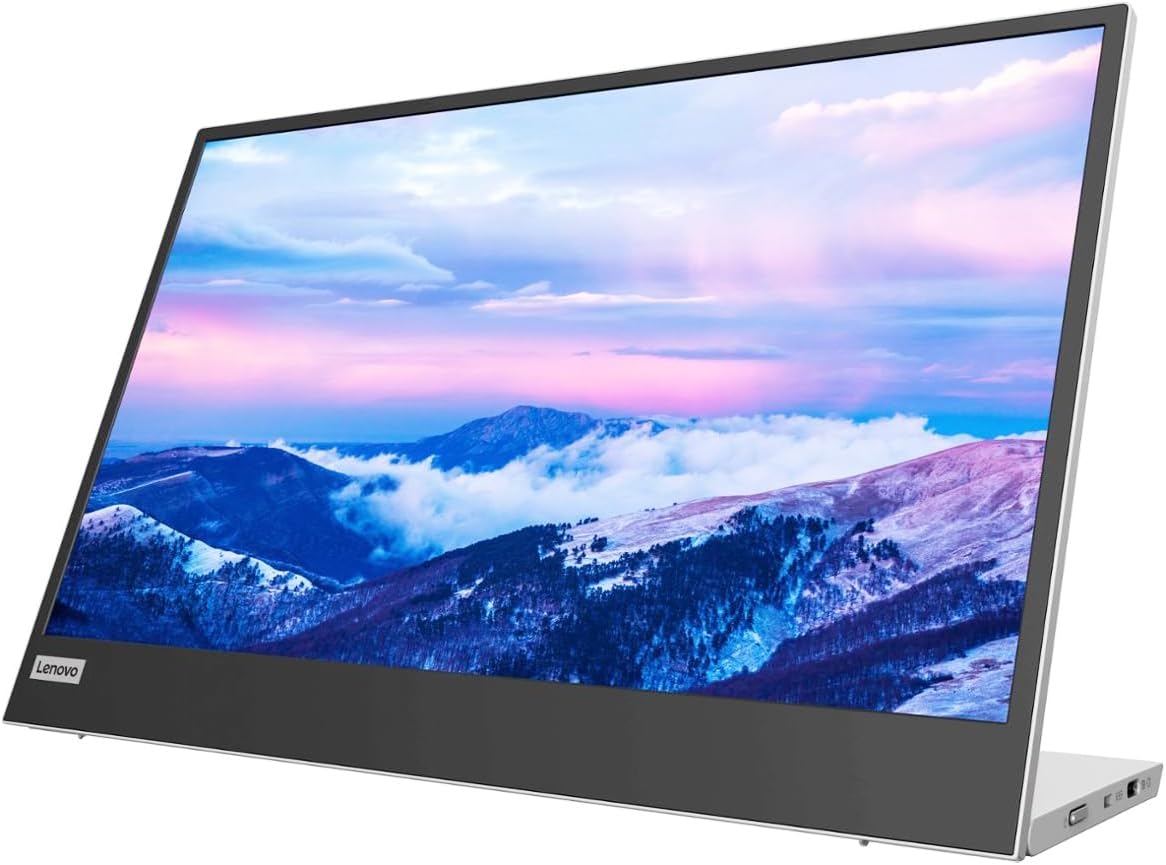
This monitor fits best for remote workers who care about good posture. It features a unique base that lets you adjust the screen height.
The height-adjustable stand solves a massive problem. Instead of looking down at a screen resting on the table, you can lift this monitor up to match your laptop height, saving your neck from pain.
Buyers praise the premium feel and the included protective sleeve. Many users say it makes their mobile office feel like a real desk. Some customers point out that the screen only reaches 250 nits of brightness, making it hard to read outdoors.
This display works perfectly for long days working from a hotel room desk. You can align it perfectly with your main laptop screen so your mouse moves smoothly between them.
Honestly, every travel monitor should have a stand like this. Lifting the screen off the desk makes a huge difference in comfort. I would recommend this to anyone who works full eight-hour shifts on the road. I would skip it if you like working outside in the sun.
Compared to the ASUS ZenScreen, this Lenovo model offers better built-in height adjustment without needing a tripod.
✅ Pros
- Stand raises the screen to match your laptop height
- Includes a thick protective sleeve
- Passes power through to charge your laptop
❌ Cons
- Screen brightness maxes out at 250 nits
- Only accepts USB-C connections
💬 What Customers Say
Users rave about the height-adjustable stand, saying it completely changes how they work on the road. Many buyers appreciate the high-quality feel of the materials. The protective sleeve gets a lot of praise for keeping the screen safe. A few people note that the screen looks a bit dim if they sit near a bright window.
#9 Best Budget Pick — ForHelp 15.6" Monitor

This screen is for people who need a second display but do not want to spend a lot of money. It provides a simple, clear picture and basic connections.
The aluminum alloy body gives you surprisingly good protection for a lower-cost item. It feels sturdy enough to toss in a bag without worrying too much about it bending.
Customers love the value they get from this screen. Many buyers say it looks exactly like monitors that cost twice as much. However, several users complain that the magnetic cover falls off easily, and the built-in speakers sound very tinny.
It works best for college students or casual workers who just need extra space for reading PDFs or watching videos while they type.
I think the screen quality beats expectations for this category. The colors look fine for basic office tasks. I would recommend this to anyone on a strict budget. I would buy a different stand for it, as the included magnetic cover frustrates me.
✅ Pros
- Aluminum body feels stronger than plastic
- Sets up quickly without extra software
- Delivers a sharp picture for daily tasks
❌ Cons
- Magnetic case fails to stay attached firmly
- Built-in speakers lack volume and bass
💬 What Customers Say
Buyers frequently express surprise at how nice the screen looks for the money. Many people bought it just for travel but ended up using it every day at home. The main complaints focus on the accessories. Users say the magnetic cover slips off easily when trying to stand the monitor up, and the speakers are too quiet to use.
Frequently Asked Questions
Do portable monitors drain my laptop battery?
Can I connect my iPhone to a portable monitor?
Why does my portable monitor say no signal?
Do I need to install drivers to use a travel screen?
Conclusion
The MNN 15.6″ Portable Monitor stands out as the best overall choice. It gives you a sharp picture, connects easily to almost anything, and packs light enough that you will actually want to take it with you.
If you care deeply about your posture while working, the Lenovo L15 is a fantastic alternative. The height-adjustable stand lifts the screen to match your laptop, which keeps your neck happy during long days on the road. Whichever you choose, having a second screen will make working away from home much easier.